
From Whiteboard Chaos to One Version of Reality: A Field Service Transformation
A representative case study showing how a 12-technician plumbing and general contracting firm transformed daily chaos into operational clarity by achieving one version of reality across dispatch, field, and office.
To protect client confidentiality, this case study represents a composite of typical engagements rather than a specific project. The business scenario, analytical approach, and outcomes reflect real patterns from field service software implementation work with small Northern California contractors.
Explore the free Field Service Software Buyer’s Guide:
Read the blog post about outgrowing spreadsheets:
Executive Summary
A 12-technician plumbing and light general contracting business in Northern California was growing steadily — but its internal systems hadn’t kept pace. Dispatch relied on a whiteboard, technicians worked from paper tickets, and the office re-entered the same information multiple times to generate invoices and track permits. The result wasn’t poor service, but invisible friction: missed opportunities, delayed billing, and constant uncertainty about what was happening in the field.
This case study examines how the business transitioned from manual dispatch and fragmented workflows to a modern field service management (FSM) platform designed around one shared version of reality. Rather than replacing existing accounting tools or forcing an all-in-one system, the solution focused on aligning dispatch, field activity, and office operations without duplicating data or disrupting established roles.
The implementation reduced dispatch coordination time by approximately 40%, increased jobs completed per technician by 25%, and cut administrative reconciliation hours significantly — accelerating billing cycles and improving cash flow. Just as importantly, it restored visibility and trust across the organization by separating who could change data from who needed to see it, reducing frustration associated with role-based controls.
This guide is intended as decision-support, not a product endorsement. It highlights where manual systems commonly break down, what criteria matter most when evaluating FSM software, and how small field service businesses can modernize without over-engineering their operations. Readers are encouraged to use the framework to assess their own workflows, risks, and readiness — whether pursuing a do-it-yourself approach or seeking outside guidance.
Key Outcomes
Operations
40% less dispatch time
Coordination time dropped from 10+ minutes to under 3 minutes per assignment
Revenue Capacity
25% more jobs per technician
Smarter routing eliminated downtime waiting for assignments
Financial Stability
Faster billing → improved cash flow
Same-day invoicing reduced unbilled work from $47K to near-zero
Additional Impact
Administrative Savings
Operational Visibility
Customer Experience
The Situation
When Growth Feels Like Chaos
It was 9:47 AM on a Tuesday when Morgan Cooper received the call that would change everything. They were standing at the whiteboard in a family-run plumbing office in Solano County, phone pressed to their ear, juggling three conversations simultaneously.
Customer on the line: “Your technician was supposed to be here at 9:30—where is he?”
Technician calling from his truck: “That job in Vacaville just took three hours instead of one. Where am I going next?”
Office phone ringing again: “Emergency water heater failure in Fairfield—who’s closest?”
Morgan glanced at the whiteboard calendar—a maze of color-coded sticky notes, crossed-out entries, and margin notes layered over one another. They had no idea where any of their 12 technicians actually were at that moment. The version of reality on their whiteboard didn’t match the version in the trucks, which didn’t match what customers had been told.
ABC Plumbing & Construction had outgrown their systems—and it was costing them.
The business had grown steadily over 15 years, expanding from one plumber with a truck into a 12-technician operation handling residential emergencies and small commercial projects. Customers loved them—but behind the scenes, the systems hadn’t kept up.
The Challenge
Three Different Versions of Reality
ABC’s real problem wasn’t the whiteboard. It was that dispatcher, technicians, and office each had different versions of the same jobs—and keeping them synchronized required constant phone calls, re-entry, and hope.
The Dispatcher’s Reality: Whiteboard & Phone Tag
Morgan’s scheduling system was a 4-foot whiteboard divided into columns for each technician, with rows for time slots. Sticky notes represented jobs. When a customer called, they’d write the info on a note and place it in an empty slot. When schedules changed (which was constantly), they’d move notes around, cross things out, add margin notes.
But the moment a technician left the office, that note was just… a note. Once a technician left the office, there was no reliable visibility into arrival time, job duration, or availability. Every update required a phone call. On busy days, Morgan spent roughly 70% of the day trying to determine where everyone was and what they were working on.
The Technicians’ Reality: Paper Tickets & Guesswork
Each morning, technicians would photograph the whiteboard with their phones (their “schedule”) and head out. They’d fill out 2-ply carbon-copy work order forms for each job—one copy for the customer, one to bring back to the office eventually.
When jobs ran long or emergencies came up, Morgan would call to redirect them. But technicians were often elbow-deep in repairs and couldn’t answer. Technicians would finish a job and call in: “What’s next?” They’d scramble to find something nearby, but without GPS or real-time location data, it was pure guesswork.
One technician described it as “playing telephone with myself”—a constant loop of partial information and corrections.
The Office’s Reality: Paper Pile & Billing Lag
At day’s end, technicians would drop off their paper work orders—if they came back to the office. Often they’d go straight home, meaning Morgan wouldn’t get paperwork for days. They’d manually type up invoices from illegible handwriting, re-entering customer names, addresses, work descriptions, parts used, and labor hours into QuickBooks.
In construction, where cash flow determines survival, ABC was effectively functioning as an interest-free bank for customers. One month they realized they had $47,000 in unbilled work sitting in a pile of paper tickets.
The permit tracking was even worse. For jobs requiring city permits (water heater replacements, gas line work, commercial remodels), they’d scribble permit numbers on sticky notes attached to job files. On multiple occasions, final inspections were missed or delayed—only discovered months later when the city issued notices. In California’s strict regulatory environment, this was a liability time bomb.
The Breaking Point
The moment that forced change came during their busiest week in July. A commercial client had a three-phase remodel project requiring coordination between plumbing, electrical subs, and their own general contracting crew. The project manager (one of their senior technicians) was supposed to handle scheduling.
On day two, the electrical sub showed up—but ABC’s crew wasn’t there. The crew thought they were starting day three. The electrical sub had based his schedule on a text message that referenced an outdated version of the calendar. The client was furious. The project manager discovered that three different people had three different schedules, all of which had been “updated” but never synchronized.
They lost the next phase of the project. The client specifically cited “communication breakdowns” and “lack of coordination” in their decision.
That night, ABC’s owner sat down with Morgan and said: “We need software. I don’t care what it costs—we can’t keep working like this.”
The Approach
Finding Software That Respects How Contractors Actually Work
ABC knew they needed field service management software. What they didn’t know was which one—or how to choose without getting trapped in vendor lock-in or buying bloated features they’d never use.
What They Needed (The Real Requirements)
Through conversations with their team, ABC identified what actually mattered:
One version of reality — When a job is scheduled, worked, invoiced, and paid, everyone should see the same information without anyone retyping it. No re-entry hell while still maintaining a single version of reality.
Real-time visibility — Morgan needs to see where every technician is, what they’re working on, and how long until they’re available for the next job
Mobile-first for technicians — Paper work orders had to go. Technicians needed job details, customer history, and the ability to update status from their phones
QuickBooks integration — They weren’t replacing their accounting system. Software had to talk to QuickBooks, not replace it
Emergency dispatch prioritization — Plumbing emergencies can’t wait. System needed to instantly show who’s closest and available
What They Feared (The Real Concerns)
ABC had heard horror stories from other contractors:
- Getting locked into expensive platforms with multi-year contracts they couldn’t escape
- Paying for “implementation” that cost more than the software itself
- Software so complex it required hiring a consultant to configure
- Vendors who trapped customer data so you couldn’t export it if you left
- Hidden fees for API access, extra users, or features that should be standard
Morgan had gotten one quote from an enterprise-level platform: $427 per month, required annual contract, $2,500 implementation fee, and a 45-minute sales pitch about features ABC would never use. The salesperson couldn’t answer basic questions about data export or contract cancellation terms.
The Selection Process (Values-Driven)
Having administered construction platforms where maintaining a single source of truth was critical, it became clear that ABC’s challenge wasn’t about finding the platform with the most features—it was about fit.
We established selection criteria focused on long-term autonomy:
Data Portability & Ownership: Can we export everything—customer lists, service history, invoices—at any time in standard formats? This prevents being held hostage by a platform.
Transparent, No-Lock-In Pricing: Month-to-month contracts only. No multi-year commitments. Pricing published upfront, not “call for quote.” If the vendor has to earn ABC’s business every month through good service, they’ll stay customer-focused.
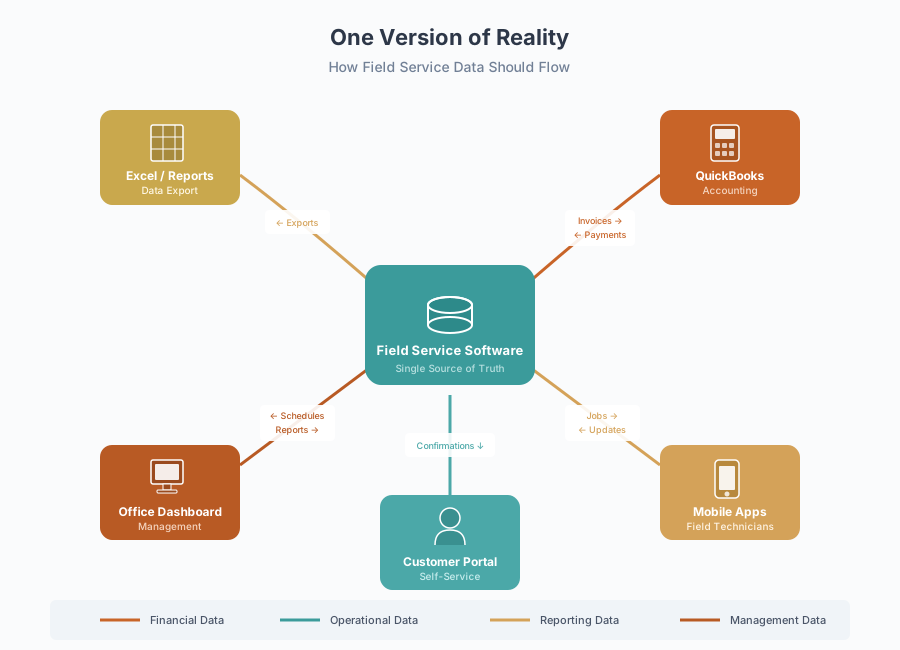
One Version of Reality Architecture: Does job data flow from schedule → work order → invoice → payment without re-entry? Can dispatcher, technician in field, and office manager all see and update the same job in real-time?
Specialized Excellence: ABC didn’t need the software to replace QuickBooks. They needed it to master field service dispatch and mobile workflow, then integrate seamlessly with tools that handle accounting and customer management. Specialized, well-integrated tools outperform “all-in-one” platforms that try to do everything and excel at nothing.
Support for Real Humans: As a small business without an IT department, ABC needed responsive support during onboarding and beyond—not a labyrinth of help articles and 48-hour ticket response times.
After demoing five platforms, ABC chose a cloud-based field service system tailored to small trades businesses. It offered month-to-month billing under $100/month (vs. $400+ competitors), full-featured mobile app, direct QuickBooks sync, and critically—one-click data export and open API access. The vendor assigned them an onboarding specialist for setup and training.
Implementation: From Sticky Notes to Single Source of Truth
Month 1: Data Migration & Setup
Rather than trying to migrate years of paper records, ABC started fresh: they exported their current customer list from QuickBooks (about 3,200 customers) and imported it into the new system. They built a digital pricebook with their common services and parts, and created job templates for frequent tasks (water heater replacement, drain cleaning, fixture installation, etc.).
The onboarding specialist walked Morgan through setting up technician profiles, service zones, and notification preferences. They configured the QuickBooks integration so completed jobs would automatically create invoices in their accounting system.
Total setup time: about 12 hours spread across two weeks, mostly Morgan with one technician helping test the mobile app.
Month 2: Pilot With Two Technicians
Rather than force everyone onto the new system simultaneously, ABC ran a two-month pilot with their two most tech-savvy plumbers. Morgan would schedule their jobs in the new software while still using the whiteboard for everyone else.
Early friction included mobile performance on older devices and increased battery drain, both resolved through hardware upgrades and charging standards. The job completion workflow had too many required fields (vendor adjusted it based on their feedback).
By month two, those two technicians were completing jobs 40% faster—not because they worked faster, but because there was zero time wasted on paperwork, calling the office for customer info, or waiting for “what’s next?” directions.
Month 3-4: Full Rollout
The other technicians saw their colleagues finishing earlier each day and wanted in. ABC retired the whiteboard, gave everyone tablets with the mobile app, and went fully digital.
The transition wasn’t seamless—two veteran technicians struggled with the technology at first. But seeing their job lists populate automatically each morning, being able to capture photos and customer signatures on-site, and never filling out another carbon-copy form won them over within weeks.
Morgan’s dispatch process transformed: instead of phone tag and guesswork, they had a live map showing all 12 technicians, their current job status, and estimated completion times. When an emergency call came in, the system could instantly show them who was closest and available. Dispatch time dropped from 10+ minutes per assignment to under 3 minutes.
Month 5-6: Optimization & Integration
With the basics working, ABC tackled the integration layer. They enabled the QuickBooks sync so that when a technician marked a job complete, the system automatically generated an invoice and pushed it to QuickBooks—no manual re-entry. Likewise, they set up automated text notifications, so customers received appointment reminders and arrival ETAs.
They created a simple customer portal (included with their software) where commercial clients could log in to see all past and scheduled work—a transparency that helped ABC win a lucrative maintenance contract over a competitor.
For permit tracking, they added custom fields to job records (permit number, issue date, inspection status) and set up automated reminders. No more sticky notes or forgotten final inspections.
The Outcome
Six Months Later: One Version of Reality
The transformation in ABC’s operations wasn’t subtle—it was dramatic and measurable.
Dispatch Speed & Efficiency
What used to take Morgan 10 minutes of phone calls and calendar-Tetris now takes 2-3 minutes. They click “assign,” the system suggests the nearest available technician, and they instantly see the job details on their mobile app. The customer automatically receives a text with the technician’s name, photo, and estimated arrival time.
40% reduction in dispatch time—but the real win is that she now spends her time on higher-value work (customer follow-ups, scheduling maintenance contracts).
Jobs Completed Per Technician
Because routing is optimized and technicians always know “what’s next” without calling in, ABC’s crew is completing approximately 25% more jobs per week than before. For example, a plumber who averaged 4 service calls per day is now regularly completing 5, simply because drive time is smarter and there’s no downtime waiting for assignment.
Administrative Time Savings
Morgan used to spend 12-15 hours per week on manual data entry: typing up work orders, creating invoices, updating QuickBooks, filing paper. The integrated workflow has reduced this to perhaps 3-4 hours—mostly reviewing exceptions and approving batched invoices.
That’s $15,000-$20,000 annually in labor time reclaimed for productive work. ABC has reinvested that capacity into customer experience improvements (follow-up calls, satisfaction surveys, maintenance contract sales).
Cash Flow Improvement
Invoices now go out the same day jobs are completed—sometimes within hours. The software even allows customers to pay by credit card directly from the invoice email. ABC’s average time-to-payment improved by roughly a week, tightening their cash flow cycle and reducing the “unbilled work” sitting in limbo from $47,000 to near-zero.
They estimate this cash flow acceleration is worth $3,000-$5,000 annually in opportunity cost and financial stress reduction.
Customer Satisfaction
Since implementing automated appointment reminders and arrival notifications, ABC’s no-show rate dropped by approximately 30%.
The customer portal has been particularly valuable for commercial accounts. One property management client specifically cited “the transparency and real-time updates” as reasons they expanded ABC’s contract to cover additional properties.
Compliance & Record-Keeping
The software’s permit tracking features have achieved 100% permit closure on projects this year—a dramatic improvement from the sticky-note era. Technicians capture photos of completed work (before-and-after shots, serial numbers, installations) that are permanently attached to job records.
This digital paper trail proved invaluable when a customer disputed a water heater installation timeline. ABC had timestamped photos showing the work in progress, which resolved the issue immediately. The same photo documentation simplifies insurance audits and contractor license board inquiries.
Team Morale
Perhaps most surprising: the technicians love it. After initial resistance from a few veterans, the entire crew has embraced the system. When asked why, one plumber said: “I used to spend 30 minutes a day calling the office, filling out forms, and driving back to drop off paperwork. Now I just do the work, tap ‘complete’ on my phone, and go home. My days are shorter, and I’m doing more jobs.”
The transformation shows up in retention: ABC hasn’t had a single technician leave since implementing the software, compared to three departures the previous year.
Why This Worked
The One Version of Reality Principle
Having administered construction platforms where maintaining a single source of truth was critical—where contracts, compliance records, and change orders all lived in one database because they had to—I recognized what ABC actually needed.
It wasn’t more tools. It wasn’t even necessarily “better” tools.
What they needed was one version of reality.
ABC’s whiteboard chaos was just a symptom. The disease was fragmentation.
The goal isn’t five apps. The goal isn’t even “one system that does everything” (which often means one system that does nothing particularly well). The goal is that everyone—dispatcher, technician, office—sees the same job information without anyone retyping it.
If a job is scheduled, worked, invoiced, and paid without anyone re-entering data, that’s the win. That’s what ABC achieved.
Specialized Excellence
Many contractors are sold on “all-in-one” platforms that promise to replace their accounting software, inventory management, CRM, and field service system. In theory, having everything in one place sounds ideal. In practice, it often means a bloated system that’s mediocre at everything.
ABC didn’t need their field service software to “do accounting.” They needed it to master dispatch and routing, then feed clean data to QuickBooks—which excels at accounting. Specialized tools that integrate seamlessly beat generalist platforms that try to do everything.
This is especially true for real-time field operations. Routing algorithms, GPS tracking, and mobile workflows generate enormous data volume. Trying to jam that into the same database handling your financial reports and contract documents creates performance problems. The best systems are purpose-built for field service, then integrate with your existing business tools.
Values-Driven Selection Protects Autonomy
ABC’s vendor selection process prioritized long-term autonomy: data portability, transparent pricing, no lock-in contracts. This wasn’t just philosophical—it was practical risk management.
When you can export your customer list, service history, and invoicing data at any time, you’re never trapped. If a vendor raises prices unreasonably or the platform stops meeting your needs, you can walk away. That optionality keeps vendors honest.
Month-to-month contracts force vendors to earn your business continuously. Annual contracts with early termination penalties only protect the vendor, not you.
ABC’s choice—a vendor offering month-to-month terms, published pricing, and full data export—meant they could implement confidently, knowing they’d retained their business autonomy.
Is This Right for You?
Common Scenarios Where One Version of Reality Matters
This approach works particularly well for:
Growing Service Contractors — When you outgrow whiteboards and spreadsheets but don’t need enterprise-level complexity. ABC’s 12-technician size is typical, but the same principles apply from 5 technicians to 50.
Multi-Trade Operations — General contractors coordinating plumbing, electrical, and framing crews. When different trades need to see the same schedule and communicate about sequencing, fragmented systems fail.
Emergency Service Businesses — Plumbing, HVAC, electrical—any trade where rapid dispatch and real-time updates matter. When seconds count, you can’t afford phone tag.
Businesses Outgrowing QuickBooks for Operations — QuickBooks is excellent at accounting. It’s terrible at dispatch, routing, and field workflow. The solution isn’t replacing QuickBooks—it’s integrating specialized field service software that feeds it clean data.
Operations Where Compliance Matters — California contractors face strict permitting and documentation requirements. Digital permit tracking, timestamped photos, and searchable records transform compliance from a liability into an asset.
Typical Investment
What Projects Like This Cost
Software Costs: $50-150 per month for small-business-focused field service platforms (under 20 technicians). Enterprise platforms run $300-500+ monthly but often include features small contractors don’t need.
Implementation: ABC handled setup themselves with vendor support (~12 hours labor). If you prefer outside help, consultants typically charge $1,500-3,000 for small business implementation.
Hardware: Tablets or smartphones for technicians if they don’t already have them ($200-400 per device). ABC used mid-range Android tablets.
Consulting: My role in cases like ABC’s typically involves 8-15 hours across vendor selection, workflow design, and implementation oversight. Projects generally range from $2,000-$5,000 depending on complexity and integration requirements.
Timeline: Plan 2-3 months from vendor selection to full rollout, including 4-6 weeks for pilot testing.
Ready to Achieve One Version of Reality?
If your dispatch board doesn’t match what’s happening in the field, your office doesn’t know what technicians are doing, and everyone is constantly retyping the same information—you’re experiencing the fragmentation that ABC overcame.
The solution isn’t necessarily more software. It’s the right software that creates one shared view of reality, integrates with tools you already trust, and respects your business autonomy.
How I Can Help
Evaluating field service or construction software? I create custom buyer’s guides grounded in your real workflows, risk tolerance, and decision horizon—so you can choose confidently without vendor pressure. If you want structured decision support or a second set of experienced eyes, let’s talk.
Sponsored & Community-Supported Engagements
For businesses navigating difficult transitions, I reserve a limited number of low-cost or sponsored engagements each year. These are structured, time-bound decision-support projects, often documented as anonymized case studies to help other organizations learn from real-world challenges.
Availability is limited and based on fit, scope, and timing. If you’re a small Northern California contractor considering this transition and willing to share your experience (anonymously), reach out—there may be room for a collaborative engagement.
Additional Resources
Field Service Software Buyer’s Guide
A comprehensive, vendor-neutral guide with comparison frameworks, integration strategies, and implementation roadmaps written specifically for Northern California contractors.
5 Signs Your Service Business Has Outgrown Spreadsheets
Not sure if you’re ready for field service software? This blog post helps you identify when it’s time to upgrade—and what to fix first.