
Field Service Software Buyer's Guide
Achieving one version of reality for field service operations - so dispatcher, techs, and office all see the same job data without re-entry.
Foundation: Is Now the Right Time?
Assess whether your business is ready for field service software—before you waste time and money.
The $40,000 Mistake
Three in five software buyers regret a recent purchase [1] — and small businesses are hit hardest. Among companies with fewer than 250 employees, 59% report significant financial impact from a regretted purchase, compared to 51% of larger businesses [2].
The top reasons aren’t usually feature gaps. Buyers most often cite higher-than-expected total cost and difficult implementation as primary drivers of regret [3]. In other words, many businesses buy software to fix problems that are actually broken workflows.
I’ve seen it happen: A Bay Area HVAC contractor spends $18,000 on field service software (first-year subscription + implementation), only to discover six months later that their techs still can’t find job details, the office still re-enters data manually, and dispatch is somehow more chaotic than before.
What went wrong?
They digitized their dysfunction.
The software worked. Their processes didn’t.
What this guide provides — the kind of structured decision framework enterprise advisory firms often charge tens of thousands per engagement for [4]:
This isn’t a feature comparison spreadsheet. It’s a decision framework designed for small Northern California contractors and service businesses (5–50 technicians) to evaluate software based on what actually matters:
Achieving one version of reality — where everyone sees the same job data without re-entry.
No vendor payments.
No affiliate links.
No “top 10” lists based on placement fees.
Just honest guidance grounded in real field service operations — from plumbing and HVAC to cleaning services and property maintenance — including what goes wrong and how to avoid it.
Is Now the Right Time to Buy?
Before evaluating platforms, assess whether your business is genuinely ready. Software can’t fix broken operations — and poor timing amplifies the damage.
Self-Assessment: 8 Signals You’ve Outgrown Manual Processes
Work through this honestly.
If four or more apply, you’re likely ready. If two or fewer apply, you may benefit from process improvements first.
Self-Assessment: 8 Signals
Progress reflects how many signals resonate — not a score or recommendation.
The Dispatcher Bottleneck: One person (often the owner or their spouse) is the only one who knows where everyone is, what they’re working on, and what’s scheduled next. If that person is sick or on vacation, operations stall.
Example: A Vacaville plumbing contractor’s wife handled scheduling. During her recovery from surgery, the owner spent six hours daily managing a whiteboard — forcing him to stop doing the skilled work that generated revenue. A 15-person cleaning company in Fairfield routed every schedule change through the owner’s personal phone. When move-out season spiked call volume, they lost three property management accounts in one month.
The Phone Tag Spiral: Techs call asking, “What’s next?” Customers call asking, “Where’s my tech?” You spend more time synchronizing information than coordinating work.
One 8-tech operation calculated they spent 47 hours per week on phone coordination — nearly one full-time employee just relaying information.
The Billing Black Hole: Jobs are completed, but invoices go out two to three weeks later — if at all — because paperwork is lost, illegible, or stuck in a truck.
One contractor had $47,000 in unbilled work sitting in paper ticket piles — effectively acting as an interest-free bank for customers.
The Multi-Version Reality Problem: The schedule in the office, what the tech believes is happening, and what the customer was told are three different things.
A general contractor lost a three-phase project when electrical subs, plumbing crews, and the office worked from different schedules. The client cited “lack of coordination.”
The Emergency Response Lag: When a burst pipe or outage call comes in, you don’t instantly know who’s closest. You start calling and hoping someone answers.
The Compliance Anxiety: Permits tracked on sticky notes. Inspection paperwork misplaced. Discovering open permits months later. In California’s regulatory environment, this isn’t just annoying — it’s liability.
The Growth Ceiling: You want to hire more techs, but you know your current systems can’t support more complexity.
In interviews with Northern California contractors, many report hitting a wall around 8–10 techs where manual systems simply break.
The Data Desert: Years of customer history locked in filing cabinets or QuickBooks notes. Repeat customers call — and you’re starting from scratch.
Progress reflects how many signals resonate — not a score or recommendation."
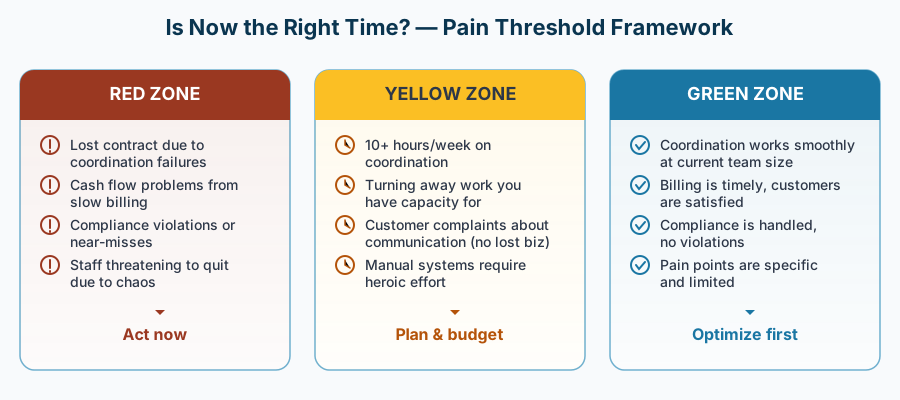
The Pain Threshold Framework
Not all pain is equal. Some signals indicate inconvenience. Others indicate structural risk.
Red flags (act soon):
- Lost contracts due to coordination failures
- Cash flow stress from delayed billing
- Compliance violations or near-misses
- Staff threatening to quit due to operational chaos
Yellow flags (plan intentionally):
- Spending 10+ hours per week on coordination
- Turning away work due to system limitations
- Customer complaints about communication
- Manual systems requiring heroic effort
Green flags (optimize first):
- Current coordination works at your scale
- Billing is timely and predictable
- Compliance is managed
- Pain points are limited and specific
Timing Considerations
Even if you need software, when you implement matters.
Seasonality & Business Cycles
Avoid implementation during:
- Your busiest season (HVAC: not July; plumbers: not freeze season; cleaning services: not peak move-out months; landscapers: not spring surge)
- Major project deadlines
- Periods when workflow disruption would create financial risk
Ideal implementation windows:
- Shoulder seasons
- After completing major projects
- When you have 8–12 weeks to pilot and stabilize
Cash Flow & Budget Readiness
Can you comfortably absorb:
- Year-one costs (subscription + setup + hardware if needed)?
- Time spent on configuration and training?
- A buffer for slower-than-expected adoption?
For a 12-tech operation, budgeting $4,000–6,000 in year one for a solid mid-tier platform is realistic. Enterprise platforms may run $8,000–15,000+ annually — often overkill for smaller teams.
Team Readiness
Ask yourself:
- Is there a clear internal champion?
- Are techs open to adopting mobile tools?
- Can you provide training time without crushing productivity?
Red flags:
- Team burnout
- Recent failed tech rollout
- High turnover
- No one accountable for the transition
Green flags:
- Team frustration with current systems
- At least one tech-comfortable employee
- Stable staff
- Shared recognition that “we can’t keep doing this”
The Cost of Waiting — and the Cost of Moving Too Fast
Every delay has a cost. Every rushed decision does too.
Costs of waiting:
- Lost revenue from coordination inefficiency
- Damaged customer relationships
- Team turnover
- Preventable compliance exposure
Costs of moving too fast:
- Selecting the wrong-fit platform
- Implementing during chaos
- Team rejection and tool abandonment
The sweet spot exists when:
- Pain points are measurable
- You have moderate workload capacity
- Budget and leadership commitment are in place
Next Steps
If four or more signals resonated, you’re likely ready to explore options.
Next, review Platform Landscape to understand the decision frameworks that matter more than feature lists.
Then visit Your Trade — the hub page connecting you to trade-specific guidance built around how your industry actually operates.
If fewer than four signals applied, consider workflow improvements first:
- Map your current process
- Identify the single biggest bottleneck
- Test lightweight automation
- Revisit this guide in 3–6 months
References
Ready to learn what actually matters in platform selection? Continue to Platform Landscape to understand the frameworks that matter more than feature lists.
Platform Landscape: What Actually Matters
Understand the modern FSM ecosystem and what creates one shared operational reality.
Beyond the Feature List
Most buyer’s guides give you a spreadsheet: Platform A has 47 features, Platform B has 52, Platform C has “AI-powered dispatch” (whatever that means). You’re supposed to pick the one with the most checkmarks.
This is backwards.
Features don’t matter if they don’t create the operational outcome you need. And the outcome you actually need—whether you realize it yet or not—is a single, shared operational reality.
When dispatcher, techs, and office see the same job information in real time — without retyping — coordination becomes simple. When they don’t, you get phone tag, miscommunication, and administrative friction.
This section covers the decision frameworks that actually matter — starting with what “one version of reality” looks like in practice.
The One Version of Reality Principle
What It Means
Here’s the scenario every small contractor faces:
Monday, 10:15 AM: Dispatcher schedules a water heater replacement in Napa for 2:00 PM.
In a fragmented system:
- Dispatcher writes it on a whiteboard
- Tech gets a phone call with the address
- Tech scribbles notes on paper
- Customer receives a confirmation call
- Tech completes job and fills out paper work order
- Office types invoice from paper ticket (days later)
- QuickBooks gets manually updated (eventually)
Customer name, address, and job details were entered five separate times.
Every handoff created risk.
In a unified system:
- Dispatcher creates job in software
- Tech’s phone updates automatically
- Customer receives text notification with ETA
- Tech completes job, captures signature on phone
- Office sees completed job instantly
- Invoice generates automatically
- QuickBooks syncs via integration
Information is entered once.
The system handles the rest.
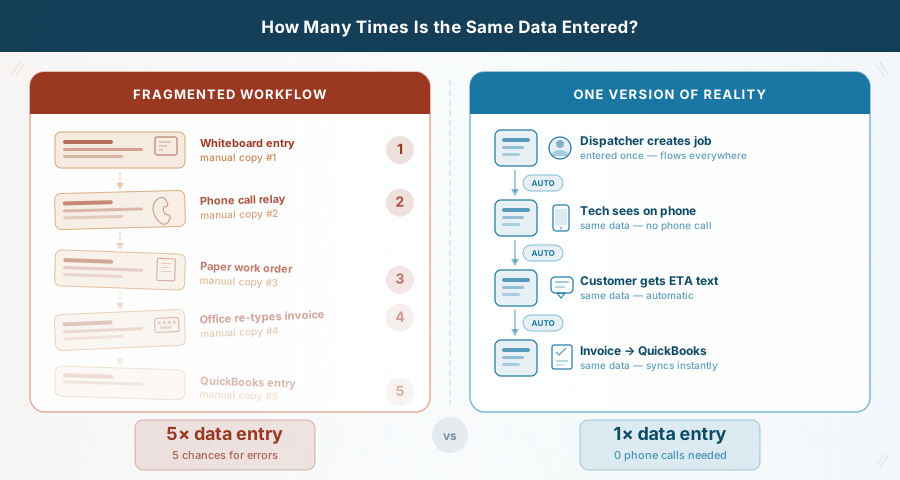
That is the transformation that matters — not whether Platform A has a better dashboard than Platform B.
Why This Is Hard to Achieve
Most small contractors piece together tools:
- QuickBooks for accounting
- Excel or whiteboards for scheduling
- Email for communication
- Paper for field documentation
Each tool holds part of the truth. None hold the whole picture.
Field service software attempts to create a single source of truth — but only if it’s designed and implemented correctly.
Common failure modes:
The Swiss Army Knife Trap
Platform claims to do everything (accounting, CRM, inventory, dispatch, reporting) but masters nothing.The Silo Problem
Modules exist for dispatch, mobile, invoicing — but don’t update each other in real time.The Reporting-Only Platform
Great dashboards. Poor operational coordination.Mobile-Last Design
Built for office users. Techs hate it. Adoption fails.
What success looks like:
A job enters once — usually at scheduling. Every subsequent action updates the same record:
- Assignment
- Travel
- Arrival
- Work performed
- Parts used
- Completion
- Signature
- Photos
- Invoice
No re-entry.
No version conflicts.
No structured duplication disguised as automation.
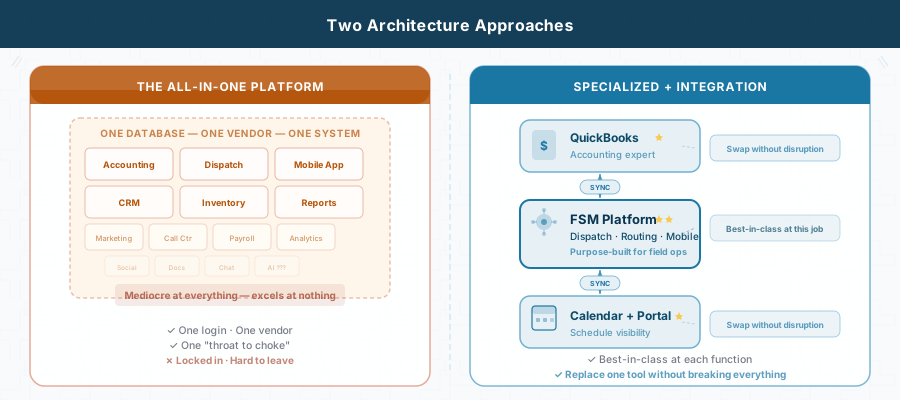
Decision Framework #1: Specialized Excellence vs. Swiss Army Knife
One of the most important architectural decisions you’ll make:
Do you want a platform that tries to do everything — or specialized tools that integrate well?
The All-In-One Appeal
One login. One vendor. One support contract.
Sometimes that’s appropriate.
When all-in-one makes sense:
- You’re starting from scratch
- You don’t already rely on accounting or CRM systems
- You’re a larger operation (30+ techs) with internal support capacity
- You prefer vendor centralization over flexibility
When it often fails:
- You already use QuickBooks (Online or Desktop) successfully
- You want best-in-class accounting
- Mobile speed and usability matter deeply
- You lack internal IT resources
The Specialized + Integration Approach
Alternative: Use purpose-built tools that connect cleanly.
Example stack:
- QuickBooks — Accounting
- Field Service Platform — Dispatch, routing, mobile workflows
- Google Calendar — Visibility for non-dispatch staff
- Customer Portal — Commercial client transparency
Each tool performs its primary function well. Data flows between them.
When this approach excels:
- You already use QuickBooks or similar SMB accounting software
- You value flexibility
- You want to replace tools independently if needed
- You’re under 20 techs without complex enterprise structure
What you need:
- Strong native integrations or well-documented APIs
- Willingness to configure connections properly
- Clear understanding of data flow
Quick Check: What’s Your Architecture Fit?
Architecture Fit Assessment
- I already use QuickBooks (or similar accounting software) and don’t want to replace it
- I prefer best-in-class tools over “does everything” platforms
- Being able to switch one system without disrupting everything matters
- I don’t have internal IT staff
- I’ve been disappointed by past all-in-one systems
- 4–5 checked → Prioritize specialized platforms with strong integrations.
- 2–3 checked → Evaluate both models carefully.
- 0–1 checked → All-in-one may suit your context.
Decision Framework #2: Table Stakes vs. Differentiators
Not all features are equal.
Table Stakes (Must-Have Basics)
Any modern FSM platform should include:
Core Scheduling & Dispatch
- Calendar view
- Assignment/reassignment capability
- Conflict detection
- Customer record linkage
Mobile Capability
- Job visibility
- Status updates
- Photo capture
- Signature capture
Basic Integration
- CSV export
- Accounting connection (at minimum export/import; ideally native sync)
Customer Communication
- Appointment confirmation
- Status notification
If a platform lacks these in 2026, it likely isn’t built for modern field service operations.
Differentiators (Context-Specific Value)
Advanced Routing
- Route optimization
- GPS tracking
- Dynamic reoptimization
Pricebook & Flat-Rate
- Digital service catalog
- Preset pricing
Inventory Tracking
- Truck stock
- Warehouse tracking
- Reorder alerts
Permit & Compliance
- Permit numbers
- Inspection tracking
- Document storage
Multi-Trade Scheduling
- Dependencies
- Crew coordination
Customer Portal
- Self-service access
- History visibility
Pay only for what matches your workflow.
Feature Bloat (Low ROI for SMB)
- AI marketing automation
- Built-in social media tools
- Enterprise analytics
- Franchise management modules
- Call center systems (unless you actually have one)
More features often mean more complexity — and lower adoption.
Decision Framework #3: Business Stage Matching
Platforms are optimized for business size.
Startup (1–5 Techs)
- Simple setup
- Low cost
- Fast adoption
Red flags:
- Required onboarding consultant
- Annual contract only
- Complex configuration requirements
Growth (6–20 Techs)
- Scalable performance
- Strong mobile usability
- Reliable QuickBooks sync
Most Northern California contractors fall here.
Established (20+ Techs)
- Advanced routing
- Dedicated support
- Multi-location management
Quick Check: Business Stage
Business Stage Assessment
- 6+ field techs
- 30+ jobs/week
- Dedicated dispatch staff
- 3+ years operating
- $500K+ revenue
- Planning to add techs
- 0–1 → Startup
- 2–4 → Growth
- 5–6 → Growth approaching Established
Decision Framework #4: Integration Philosophy
Once you’ve chosen an architectural direction, integration determines whether your system works.
Native Integration (Best)
- Official connectors
- Two-way sync
- Vendor-maintained
Middleware (Moderate)
- Zapier, Make, etc.
- Flexible
- Requires technical comfort
Manual Export/Import (Weak)
Exporting CSV files is not integration.
It’s structured re-entry.
Acceptable for:
- Reporting
- Migration
Not acceptable for: - Daily operations
Platform Comparison Matrix
| Criterion | What to Ask | Why It Matters |
|---|---|---|
| One Version of Reality | Can one job record handle full lifecycle? | Eliminates duplication |
| Business Stage Fit | How many customers my size? | Ensures alignment |
| QuickBooks Sync | Native and automatic? | Critical for SMB |
| Mobile Experience | Can we trial it? | Adoption risk |
| Data Ownership | Full export available? | Prevents lock-in |
| Contract Terms | Cancellation policy? | Flexibility |
| Pricing Transparency | Total monthly cost? | Avoid surprise add-ons |
| Integration Depth | Show real sync demo | Validates claims |
| Emergency Dispatch | Walk through urgent job | Real-world test |
| Permit Tracking | Can it track CA permits? | Compliance |
| Performance | Regional references? | Reliability |
Industry Cost Baselines (2026)
Pricing varies by:
- Per-user vs flat pricing
- Required add-ons
- Annual vs month-to-month terms
- Implementation fees
Small Business Tier: $50–150/month
Growth Tier: $150–400/month
Enterprise Tier: $400–1,000+/month
Next Steps
These frameworks apply universally — but how they matter depends on your trade.
Emergency dispatch means something different for a plumber than for a landscaper. Permit tracking matters more for electrical than for cleaning services. Parts inventory is critical for HVAC but irrelevant for many service businesses.
Continue to Your Trade to apply these principles to your specific industry, including:
- Trade-specific workflow challenges
- Make-or-break feature requirements
- Integration complexity realities
- Platform fit analysis
- Quick-reference checklists
Your Trade: Requirements That Actually Matter
Understand what’s essential for your specific workflow—plumbing, HVAC, general contracting, and beyond.
Why Trade-Specific Requirements Matter
A plumber’s daily reality—emergency burst pipes, parts inventory on trucks, same-day dispatch—looks nothing like a general contractor’s workflow of multi-week projects, subcontractor coordination, and phase-based job costing. Software that excels at HVAC seasonal maintenance contracts will likely fail for landscape route optimization or electrical crew scheduling.
Most field service software buyer’s guides ignore this distinction. They provide a generic feature checklist and expect you to determine what matters. That approach wastes your time on irrelevant capabilities while missing the make-or-break requirements specific to your workflow.
This hub helps you identify which features are essential for your trade—and which are expensive distractions. Find your trade below, understand what genuinely matters for how you operate, and skip the features that sound impressive but will not move the needle for your business.
Find Your Trade
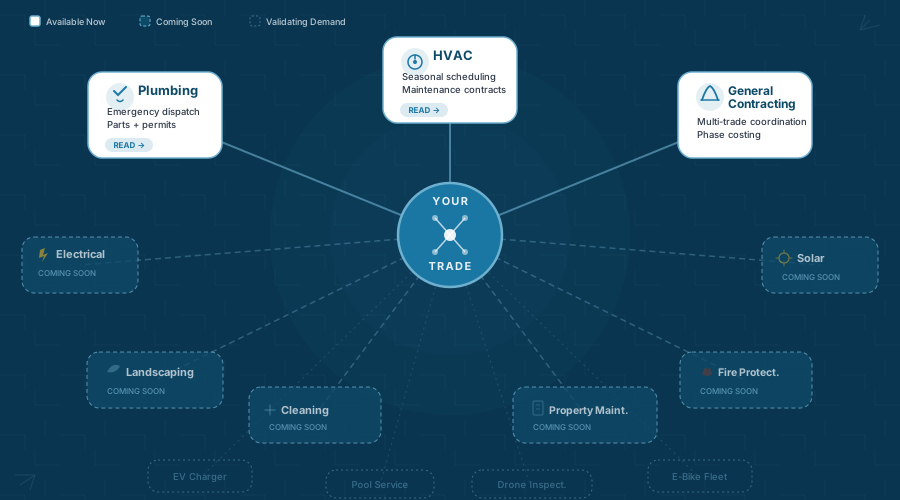
Select your trade to see specific requirements, common pitfalls, integration complexity, and honest platform guidance tailored to your workflow.
Core Trades (Available Now)
These comprehensive guides are available immediately:
| Trade | Must-Have Features | Common Pitfall | Status |
|---|---|---|---|
| Plumbing | Emergency dispatch priority, parts inventory tracking, permit workflows, flexible pricing (flat-rate + T&M) | Choosing platforms built primarily for scheduled maintenance when a significant portion of your revenue comes from emergency response | Read guide → |
| General Contracting | Multi-phase project scheduling, subcontractor coordination, job costing per phase, material procurement tracking | Selecting service-call platforms when you need project management—or project tools when you need lightweight dispatch | Read guide → |
| HVAC | Seasonal maintenance scheduling, equipment history tracking, preventive maintenance contracts, refrigerant compliance | Ignoring California Title 24 documentation requirements until inspection or commissioning exposes gaps | Read guide → |
Expanding Coverage (Coming Soon)
These guides are in development. Get notified when your section launches:
| Trade | Must-Have Features | Common Pitfall | Status |
|---|---|---|---|
| Electrical Contractors | Permit and inspection workflows, code compliance checklists, multi-crew scheduling, safety procedure tracking | Underestimating California NEC amendments and Cal/OSHA documentation requirements | Get notified → |
| Landscaping Services | Route optimization for daily maintenance, recurring service automation, crew-based scheduling, seasonal adjustments | Choosing platforms designed for individual dispatch when you schedule 3-person crews across 20+ daily stops | Get notified → |
| Cleaning Services | Recurring client management, quality assurance checklists, team scheduling, supply inventory tracking | Selecting construction-focused platforms when you need hospitality-level communication and consistency tracking | Get notified → |
| Property Maintenance | Multi-property portfolio management, multi-trade coordination, client portals, preventive maintenance automation | Trying to adapt single-property service platforms to commercial portfolio complexity | Get notified → |
| Fire Protection & Life Safety | Multi-system compliance tracking (sprinkler, alarm, suppression), NFPA inspection cycles, certification management | Assuming basic service-call platforms can handle NFPA 25/72/20 inspection complexity and documentation standards | Get notified → |
| Solar Installation & Maintenance | Project-to-maintenance transition workflows, system monitoring integration, rebate/incentive tracking, Title 24 documentation | Separating installation project management from ongoing monitoring—requiring unified platforms or clean integrations | Get notified → |
Emerging Sectors (Validating Demand)
We are developing guidance for specialized field service sectors traditional buyer’s guides ignore. Interested in coverage for your sector? Let us know →
| Sector | Must-Have Features | Common Pitfall | Status |
|---|---|---|---|
| EV Charger Installation | Electrical permit workflows + rebate program tracking (NEVI, LCFS), site assessment documentation, utility coordination | Treating this as standard electrical work when incentive compliance and utility coordination add complexity | Express interest → |
| Pool Service & Water Treatment | Route optimization, chemical inventory tracking, equipment service history, water chemistry logging | Using generic service platforms when chemical compliance and route efficiency drive profitability | Express interest → |
| Drone Inspection Services | Recurring inspection scheduling, FAA compliance tracking, deliverable management (photos/video/reports), client portals | Assuming standard service software handles specialized regulatory documentation and digital deliverables | Express interest → |
| E-Bike / Micromobility Fleet Maintenance | Fleet asset tracking, preventive maintenance cycles, high-volume parts inventory, turnaround time metrics | Applying automotive workflows when consumer-speed turnaround requires different operational design | Express interest → |
Cross-Trade Patterns: What’s Universal
Regardless of trade, several operational patterns apply across nearly every Northern California field service business evaluating software.
One Version of Reality Applies Everywhere
Whether you run emergency plumbing calls or scheduled landscape routes, the core challenge is the same: dispatchers, field teams, and office staff must see the same job information in real time without re-entering data.
The implementation varies by workflow. The principle does not.
QuickBooks Integration Is Near-Universal
Most small Northern California contractors (under 50 technicians) already use QuickBooks for accounting and are not replacing it. Your field service platform should integrate with QuickBooks—not attempt to replace it. Prioritize native, automatic synchronization over manual exports or CSV uploads.
Mobile Adoption Determines Success or Failure
If field teams resist the mobile app or find it inefficient, they will revert to calling the office or writing on paper. The entire investment collapses.
Test the mobile experience extensively before committing—ideally with real technicians during a short pilot, not just management in a demo environment.
Compliance Documentation Is Table Stakes in California
California’s regulatory environment adds complexity:
- Title 24 energy code documentation
- Cal/OSHA safety standards
- Prevailing wage tracking on public works
- Multi-county permit systems
Your platform must support permit tracking, photo documentation, and structured compliance record-keeping—or you will recreate documentation manually later.
Emergency Dispatch vs. Scheduled Service Shapes Platform Fit
Trades dominated by emergency response (plumbing, HVAC service, electrical emergency work) require:
- Real-time GPS visibility
- Rapid dispatch controls
- Flexible scheduling
Trades with primarily scheduled work (landscaping, recurring maintenance, planned projects) need:
- Route optimization
- Recurring schedule automation
- Crew-based capacity planning
Many platforms excel at one model but struggle with the other.
Integration Complexity Differs by Trade
Standalone field service platforms work for some trades. Others require connections to:
- Accounting systems
- CRM platforms
- Inventory databases
- IoT monitoring systems
- Legacy estimating software
Understanding your integration landscape determines whether implementation can be handled internally—or requires structured support.
Northern California Regional Considerations
Beyond workflow differences, operating geography also matters.
Wide Service Areas and Traffic Variability
Serving Vacaville to San Francisco—or navigating corridors like 280, 680, and 880—means routing must account for real-time traffic, not just distance. Platforms built for compact service areas may struggle in the Bay Area’s geographic sprawl and congestion variability.
Competitive Market Expectations
Bay Area customers increasingly expect:
- Text confirmations
- Arrival ETAs
- Digital invoices
- Online payment options
- Client portals
These are no longer differentiators—they are baseline expectations in competitive markets.
Multi-County Permit Complexity
Operating across Solano, Napa, Contra Costa, Alameda, or other counties requires navigating different permit systems and inspection processes. Even if your software cannot integrate directly with every municipal portal, it should track permit status internally in a structured way.
California-Specific Regulatory Layer
Title 24 compliance, prevailing wage tracking, and Cal/OSHA documentation requirements are not optional considerations. Your platform must support structured documentation for these areas—or you are introducing liability exposure.
Where Selection Ends — and Implementation Actually Begins
If you have explored this guide to this point—assessing readiness, understanding platform architecture, and reviewing trade-specific requirements—you may have reached a conclusion:
Choosing field service software is manageable. Implementing it successfully is where most projects fail.
Most buyer’s guides stop at the manageable part.
Feature comparisons and demos are straightforward. What is not straightforward:
- Integration complexity when connecting accounting, CRM, inventory, or monitoring systems
- Change management when teams resist new workflows
- Data migration from paper, spreadsheets, or legacy systems
- Process redesign to align real operations with platform constraints
- Vendor lock-in risks buried in contracts, data export policies, or API limitations
These realities determine whether your investment creates operational alignment—or becomes expensive shelfware.
The remaining sections of this guide address what happens after selection:
- Vendor Transparency (Tab 04) — Structured evaluation to protect business autonomy
- Integration Reality (Tab 05) — Where projects succeed or fail based on architecture decisions
- Implementation Guide (Tab 06) — Moving from selection to achieving one version of reality across your operation
Ready to continue? Click the Vendor Transparency tab above to access the Vendor Transparency Scorecard and structured selection framework, then continue to Integration Reality for practical implementation guidance.
These sections require free email registration—one quick form unlocks all gated content. No sales pitches. No drip campaigns.
Get Notified When Your Trade Guide Launches
Comprehensive guidance for additional trades and specialized sectors is under development. If your trade is not covered yet, sign up to receive a single notification when your guide becomes available.
Expanding Coverage (Traditional Trades)
Single notification when your guide launches. No spam, no marketing emails.
Emerging Sectors (Validating Demand)
Your input helps prioritize which emerging sectors to cover first.
Ready to dive into trade-specific requirements? Select your trade from the navigation table above to explore make-or-break features, integration complexity, and honest platform guidance.
Ready to move beyond vendor selection? Continue to the implementation sections to learn how to protect your business during transition and avoid the pitfalls where most software projects fail.
Plumbing: Speed, Parts, and Emergencies
Your competitor answers in 60 seconds. Your dispatcher is still checking the whiteboard. The right software closes that gap — here's exactly what to look for.
1. The Core Workflow Challenge
A Tuesday Morning in Solano County
It’s 9:47 AM. Your dispatcher has three calls stacked on the board, a technician calling from the truck asking, “What’s next?”, and a homeowner in Fairfield dealing with a flooded garage.
Your whiteboard says one thing. Your techs believe another. The customer was told something else entirely.
Nobody is lying. Everyone is operating from whatever version of reality they saw last — and every version is already outdated.
Plumbing is not landscaping. It’s not general contracting. Residential service plumbers juggle scheduled work, same-day service, and true emergencies — burst pipes, sewer backups, gas leaks — that can disrupt routes in minutes.
As teams grow past five or six technicians, paper tickets and phone coordination stop scaling.
The rapid growth of the field service management (FSM) market is driven by increasing demand for real-time visibility, mobile coordination, and operational efficiency [1]. Contractors are adopting digital dispatch and mobile job tracking not as a luxury — but as infrastructure.
McKinsey research on field operations found that companies using real-time data and telematics to track technician schedules can add 20 to 30 percent to the productive working day [2]. The pattern is consistent: fragmented dispatch creates operational leakage that compounds across every technician, every day.
The right platform doesn’t digitize your whiteboard. It replaces it with a unified job record visible to dispatcher, technician, and office — updating in real time from scheduling through invoice.
That structural alignment is what allows a plumbing business to scale without burning out its people.
2. Make-or-Break Requirements
These are not optional features. They are structural capabilities that determine whether your software investment produces leverage — or frustration.
Emergency Dispatch Prioritization
Emergency plumbing calls are high-margin and time-sensitive. That urgency is a major reason the FSM market is growing as fast as it is[1].
McKinsey’s analysis of field operations found that digitizing dispatch and automating scheduling can yield 10 to 30 percent gains in technician productivity [2]. For plumbing, where emergency calls command premium pricing, even modest improvements in dispatch speed translate directly to revenue.
What to Look For:
Emergency Dispatch Checklist
- Real-time GPS tracking
- Technician availability updates
- Priority job flagging
- Skill-based assignment filtering
- Automatic ETA notifications
- After-hours dispatch workflow
- Offline capability for poor-signal environments (basements, crawlspaces)
Demo Script — Emergency Dispatch
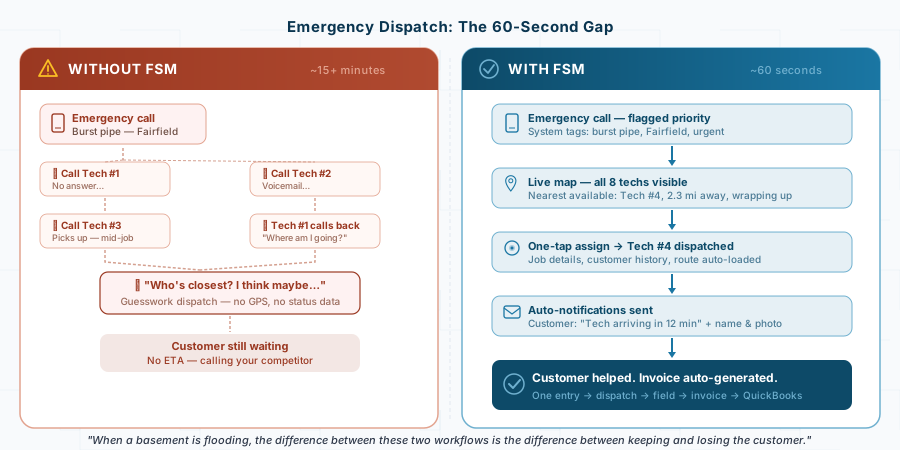
“It’s Saturday at 2 PM. A main line break in Vacaville. I have 8 plumbers in the field. Show me how I identify the nearest available tech and dispatch them in under 60 seconds — with automatic customer notification.”
Watch for excessive clicks or module switching. Complexity during emergencies creates failure.
Parts Inventory Integration
A missing flex connector can cost an hour of drive time. Multiply that weekly across multiple trucks and margins erode quickly.
Vendor case examples describe measurable fuel savings and improved technician utilization when routing and parts tracking are aligned [3]. The underlying principle is straightforward: when a plumber can confirm they have the right part on the truck before driving to the job, return trips disappear.
What to Look For:
Parts Inventory Checklist
- Truck-level inventory tracking
- Warehouse visibility
- Low-stock alerts
- Barcode/QR logging
- Automatic invoice integration
- Restock workflow
Flexible Pricing: Flat-Rate + Time & Materials
Flat-rate pricing is increasingly common in residential plumbing — customers prefer predictable, transparent pricing structures [4].
At the same time, investigative or commercial jobs require time-and-materials flexibility.
What to Look For:
Flexible Pricing Checklist
- Editable digital pricebook
- Good-better-best presentation
- Hybrid billing support
- On-site digital signature capture
- Automatic tax configuration (CA rules)
Flat-rate pricing also accelerates the path from completed work to paid invoice — the customer sees the price, approves it on-site, and the invoice generates immediately. That speed matters. QuickBooks’ 2025 research found that over half of small businesses are owed money from unpaid invoices, averaging $17,500 per business, with 47% reporting invoices overdue by more than 30 days [5]. In construction and trades specifically, average collection periods now reach 67 days. Systems that generate invoices immediately upon job completion compress that cycle significantly.
Permit Tracking and Compliance
California plumbing frequently requires permits and inspections — water heater replacements, gas line work, sewer repairs, and major fixture changes all typically trigger permit requirements.
The CSLB treats permit compliance seriously. Performing work without required permits can trigger disciplinary action, including civil penalties, correction orders, and possible license suspension. [6]
Permit & Compliance Checklist
- Permit prompts by job type
- Status lifecycle tracking (Applied → Issued → Rough Inspection → Final → Closed)
- Inspection reminders
- Document storage (permit PDFs, inspection reports, photos)
- Open-permit reporting
3. When It Works: Composite Case Illustration
(Composite example based on typical engagement patterns with small Northern California plumbing operations. Details are representative, not attributable to a specific business.)
Business Profile: 12 technicians serving Solano and Napa counties. Mix of residential service calls (70%) and light commercial maintenance contracts (30%). Using QuickBooks for accounting.
Before FSM
The operation ran on a whiteboard calendar, carbon-copy work orders, and a dispatcher who spent most of each day on the phone. Technicians would photograph the whiteboard each morning for their schedule, then call in after each job asking “What’s next?” Paper work orders came back to the office in batches — sometimes days later — where someone would manually type up invoices and enter them into QuickBooks.
The pain was measurable:
- Dispatch coordination: 10+ minutes per job assignment, mostly phone tag
- Unbilled work: $47,000 in paper tickets sitting in trucks and on desks
- Administrative re-entry: 12–15 hours per week typing handwritten work orders into QuickBooks
- Permit tracking: Sticky notes on file folders; two forgotten final inspections discovered only when the city sent notices
The Transition
The business selected a mid-tier FSM platform ($80–120/month range) with native QuickBooks integration, month-to-month billing, and full data export capability. Implementation followed a phased approach:
Month 1: Data migration — exported 3,200 customers from QuickBooks, built a digital pricebook for common services, configured job templates for frequent tasks (water heater replacement, drain cleaning, fixture installation).
Month 2: Pilot with two tech-savvy plumbers. The dispatcher scheduled their jobs in the new software while maintaining the whiteboard for everyone else. Early friction included mobile performance on older devices and a job completion workflow with too many required fields (vendor adjusted based on feedback).
Months 3–4: Full rollout. The remaining technicians saw their colleagues finishing earlier each day and wanted in. The whiteboard was retired. Two veteran technicians struggled initially but adapted within weeks once they experienced automatic job lists populating each morning and never filling out another carbon-copy form.
Months 5–6: Optimization — enabled QuickBooks auto-sync, automated customer text notifications, configured permit tracking with custom fields and inspection reminders.
After FSM
Independent industry research consistently links FSM adoption to improved technician productivity and operational efficiency [1]. This operation’s experience aligned with those patterns:
- Dispatch time: Dropped from 10+ minutes to 2–3 minutes per assignment. The dispatcher shifted from “air traffic controller” to proactive customer relationship management.
- Jobs per technician: Approximately 25% increase in weekly completions — not from working faster, but from eliminating downtime between jobs and smarter routing.
- Unbilled work: From $47,000 in limbo to near-zero. Invoices now generate the same day jobs are completed, often within hours.
- Administrative time: Manual data entry dropped from 12–15 hours/week to 3–4 hours, reclaiming an estimated $15,000–$20,000 annually in labor time.
- Permit compliance: 100% permit closure rate in the first full year. Digital photo documentation resolved a customer dispute over a water heater installation timeline with timestamped evidence.
- No-show reduction: Approximately 30% fewer missed appointments through automated reminders and arrival notifications.
The gains were structural: one system of record replacing fragmented communication. When a job entered the system once at scheduling, every subsequent step — assignment, travel, arrival, work performed, parts used, completion, signature, photos, invoicing — updated that single record.
4. When It Fails
The Enterprise Trap
Not every implementation succeeds. The failures are instructive — and they almost always trace back to the same root causes.
(Composite cautionary example.)
Business Profile: 6-technician residential plumbing shop, growing steadily, ready to “go digital.”
The owner attended a trade show and was impressed by a demo from an enterprise-tier platform. The salesperson emphasized AI-powered dispatch optimization, advanced analytics dashboards, and a customer marketing suite. The price: $350/month plus a $2,500 implementation fee, locked into an annual contract.
What went wrong:
The platform was designed for 30+ technician operations. Configuration required decisions about organizational hierarchies, approval workflows, and permission structures that a 6-person shop didn’t need. The implementation consultant spent 8 hours on setup — and the owner still couldn’t figure out how to schedule a simple service call without navigating three menus.
The technicians were worse off. The mobile app was feature-rich but slow on their mid-range phones. Job completion required filling in 14 fields before they could mark a job done. Within six weeks, three of the six plumbers had reverted to calling the office and scribbling notes on paper. The “AI-powered dispatch” required historical data the company didn’t have, so it made poor suggestions that the dispatcher overrode constantly.
By month four, the owner wanted out. The annual contract had an early termination fee of $1,200. The data export was technically available but required a support ticket and arrived as a CSV dump that didn’t cleanly import into any alternative platform.
Total cost of the failed implementation: roughly $6,000-$8,000 in direct costs (subscription, implementation, hardware, termination fee) plus months of productivity loss and team frustration.
The Pattern
Strategic analysis of FSM architecture decisions emphasizes evaluating data portability, contract flexibility, and business-stage fit before committing to a platform [7]. The common failure patterns are consistent:
- Buying enterprise software for a small operation. Features designed for scale become overhead at small scale.
- Digitizing undefined workflows. If your process is chaotic on paper, software makes it chaotic faster.
- Skipping pilot testing. Full-team rollouts without a 2–4 week pilot amplify every friction point.
- Signing restrictive contracts. Annual commitments with early termination penalties protect the vendor, not you.
Software amplifies structure. If structure is weak, software magnifies the weakness.
5. Integration Complexity
This is where software selection transitions from “which features do I need?” to “how does this actually connect to the rest of my business?” — and it’s where many plumbing operations underestimate the work involved.
The QuickBooks Question
QuickBooks integration remains the primary integration concern for small plumbing firms. But “QuickBooks integration” means different things depending on the platform:
Native two-way sync (best): Job completion in the FSM platform automatically creates an invoice in QuickBooks. Payment recorded in QuickBooks automatically updates the job status in the FSM platform. Customer records stay synchronized. This is what you want.
One-way push (acceptable): Completed jobs push invoices to QuickBooks, but payment status doesn’t flow back. You’ll check QuickBooks separately for payment tracking. Workable, but creates a visibility gap.
CSV export/import (not integration): You export a file from the FSM platform and manually import it to QuickBooks. This is slightly better than retyping — but it’s not integration, regardless of what the vendor’s marketing page claims.
Platforms emphasizing API-first architecture reduce long-term data silos and integration fragility [8].
Plumbing-Specific Integration Pain Points
Beyond QuickBooks, plumbing operations encounter integration complexity in areas that generic buyer’s guides don’t address:
- Pricebook synchronization: If you maintain a flat-rate pricebook in the FSM platform and also price items in QuickBooks, which is the source of truth? Mismatched prices between systems create invoicing errors.
- Parts catalog sync: Truck inventory tracked in the FSM platform needs to reconcile with purchase orders and supplier invoices in QuickBooks. Without clean integration, you end up tracking parts in two systems.
- California tax complexity: Sales tax rates vary by jurisdiction across Northern California. Your FSM platform needs to apply the correct rate based on job location, and that rate needs to match what QuickBooks expects.
- Permit documentation: If your FSM platform stores permit records and inspection photos, but your customer disputes a timeline or your insurance auditor needs documentation, can you retrieve it easily? Integration with document storage matters.
When to Ask for Help
If your operation uses QuickBooks and a single FSM platform with native sync, integration is manageable as a DIY project. Most vendors provide onboarding support for this configuration.
Integration complexity escalates when you’re connecting three or more systems (FSM + QuickBooks + CRM, or FSM + QuickBooks + a separate permit management tool), migrating data from an existing platform, or dealing with custom workflows that don’t fit the vendor’s default configuration. That’s when outside guidance — whether from the vendor’s professional services team or an independent consultant — pays for itself in avoided rework.
The gated sections of this guide cover integration planning in depth, including evaluation frameworks for assessing integration complexity before you commit to a platform.
6. Trade-Specific Platform Fit
The goal isn’t to find the “best” platform — it’s to find the one that fits your operation’s current size, workflow, and growth trajectory. Month-to-month contracts and full data export options preserve your autonomy to switch if fit changes over time [7].
The following assessment reflects publicly available information, aggregated user reviews, and general market positioning as of early 2026. Pricing and features change frequently — always verify current terms directly with the vendor.
Solo to Small Operations (1–5 Technicians)
Team Size
Revenue Range
Service Mix
Platform Needs:
- Fast setup (can’t afford weeks of configuration)
- Low monthly cost (budget-conscious)
- Core scheduling, dispatch, and invoicing without overwhelming complexity
- Mobile app that’s intuitive on day one
- QuickBooks integration
- Month-to-month billing
Good Fit Platforms:
- Entry-level and mid-market FSM platforms designed for small trade teams
- Platforms with fast onboarding and strong QuickBooks sync
- Simple, well-reviewed mobile apps that techs adopt quickly
Poor Fit:
- Enterprise platforms designed for 30+ tech operations (you’re paying for complexity you don’t need)
- Platforms requiring implementation consultants for basic setup
- Systems with annual contracts and per-user pricing that scales poorly at small size
Biggest Risk at This Stage: Buying more platform than you need. A simple system your team actually uses beats a powerful system that sits half-adopted.
Growth-Stage Operations (6–15 Technicians)
Team Size
Revenue Range
Service Mix
Platform Needs:
- Emergency dispatch with real-time GPS and availability tracking
- Truck-level parts inventory management
- Flat-rate pricebook with good-better-best presentation
- Permit tracking with inspection lifecycle and reminders
- Native two-way QuickBooks sync (not CSV export)
- Automated customer notifications (appointment reminders, arrival ETAs)
- Reporting on technician productivity and job profitability
Good Fit Platforms:
- Mid-market FSM platforms with strong plumbing/trades focus
- Platforms offering robust mobile apps (your technicians live in the app — if they reject it, the investment fails)
- Systems with native QuickBooks integration and built-in pricebook tools
- Platforms with month-to-month options and full data export
Poor Fit:
- Entry-level tools designed for 1–3 person operations (you’ll hit limits on dispatch, inventory, and reporting)
- Enterprise platforms with steep learning curves and implementation investments disproportionate to your team size
- Platforms with weak mobile experiences or limited offline capability
Biggest Risk at This Stage: This is where emergency dispatch, parts tracking, and QuickBooks integration become make-or-break. Demo the mobile app specifically with a realistic plumbing scenario — not the vendor’s canned presentation.
Established Operations (15+ Technicians)
Team Size
Revenue Range
Service Mix
Platform Needs:
- Advanced dispatch algorithms and route optimization
- Deep pricebook management with margin controls
- Multi-zone territory management
- Customer portal for commercial accounts
- Advanced reporting (technician performance, job profitability, marketing ROI)
- Robust integration ecosystem (QuickBooks, CRM, inventory, fleet)
- Role-based permissions (dispatchers, techs, managers, owners see different views)
Good Fit Platforms:
- Upper-tier FSM platforms purpose-built for plumbing, HVAC, and electrical at scale
- Systems with dedicated implementation support and training resources
- Platforms with advanced dispatch, deep pricebook, and strong reporting
- Vendors with proven track records at your operation size
Poor Fit:
- Mid-market platforms groaning under your data volume and user count
- Platforms without dedicated account management or professional services
- Systems designed primarily for project work rather than high-volume service dispatch
Biggest Risk at This Stage: Operations at this scale often need deeper capabilities, but be honest about your readiness for the implementation investment. If you don’t have a dedicated champion to own the transition, you may get more leverage from a simpler platform well-adopted than a powerful platform half-used.
Choosing Across Stages
Regardless of size, prioritize:
- Operational fit over feature volume. The platform that matches how your team actually works today — with room to grow — beats the one with the longest feature list.
- Mobile adoption above all. If your technicians won’t use the mobile app, nothing else matters.
- Data portability as non-negotiable. Full export capability and month-to-month contracts preserve your ability to switch if your needs change.
7. Quick-Reference Demo Checklist
Bring this to every vendor demo:
Plumbing Demo Checklist
!!Emergency dispatch workflow: Starting from a new urgent call, can I identify the nearest qualified available technician and assign the job — with customer notification — in under 60 seconds?
!!Live GPS visibility: Do I have a real-time technician map with current status (available, en route, on job), not just last check-in or scheduled assignment?
!!Truck-level inventory integration: When a technician uses a part, does it automatically deduct from that specific truck’s stock and populate the invoice without a separate manual step?
Hybrid pricing flexibility: Can I present flat-rate options, then switch to time-and-materials on the same job without reopening or duplicating the work order?
!!Permit lifecycle tracking: Where do I enter permit information? Can I track status (applied, issued, finaled, closed)? Can I generate a report of all open permits?
!!Native QuickBooks integration: Is the integration native and two-way? Show me a completed job syncing automatically to QuickBooks with customer, invoice, tax, and payment data intact.
!!Full data export capability: Can I export customers, job history, notes, invoices, and attachments in standard formats (CSV, Excel, PDF) without special approval or fees?
!!Contract flexibility and cancellation terms: Is month-to-month available? What is the cancellation notice period? Is there any data access restriction after cancellation?
Offline mobile functionality: What happens if a technician loses cellular service mid-job? Can they access job details and generate an invoice offline, and does it sync automatically once reconnected?
Plumbing is structurally more complex to evaluate than other trades because it combines emergency dispatch, truck-level inventory, permit tracking, and hybrid billing in a high-frequency service environment. That creates more individual failure points.
If the vendor cannot clearly demonstrate real-time emergency dispatch, native accounting integration, permit lifecycle tracking, and full data export — continue evaluating. These are structural capabilities, not optional features.
A platform that performs well at generic scheduling but struggles with integration, compliance visibility, or truck-level parts control is built for a different trade model.
What’s Next
You now understand:
- Where plumbing workflows break and why manual systems create invisible costs
- What features matter structurally — and which are bloat
- What success and failure look like in real implementations
- Where integration complexity creates risk (and opportunity for expert support)
- Which platforms fit which business stages
The next sections of the guide cover Vendor Transparency — including a scorecard for evaluating vendor contracts, data portability, and pricing honesty — and Integration Reality for translating platform selection into operational reality. These sections are available free of charge with email sign up.
References
General Contracting: Coordination, Costing, and Complexity
When three trades run on three different schedules, the client doesn’t blame the sub—they blame you. One shared system aligns every crew, phase, and inspection into a single source of truth.
1. The Core Workflow Challenge
The Three-Schedule Disaster
July. Peak construction season in Solano County. That’s when one general contractor learned what “three versions of reality” costs.
A commercial client had a three-phase remodel: plumbing rough-in, electrical rough-in, then drywall. The project manager coordinated schedules by text message and whiteboard. On day two, the electrical sub showed up ready to work. The GC’s own framing crew wasn’t there—they thought they were starting on day three. The electrical sub had based his schedule on a text that referenced an outdated version of the calendar.
Three people. Three schedules. All “updated.” None synchronized.
The client was furious. They pulled the next phase of the project and gave it to a competitor. The reason, stated in writing: “communication breakdowns and lack of coordination.”
This is the general contracting workflow problem: you’re not managing individual service calls—you’re managing sequenced dependencies across trades, timelines, and crews, where one delay cascades into every phase that follows.
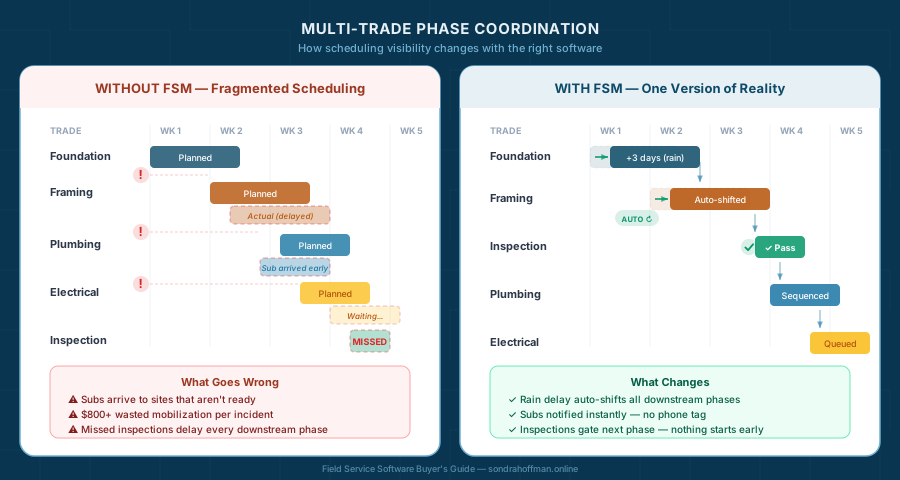
When a scheduling conflict disrupts a project’s sequence, mobilization costs escalate—crews arrive to sites that aren’t ready, paid labor sits idle, and subs charge for wasted trips [1]. A framing crew may be scheduled for Monday with the understanding that plumbing rough-in will finish by Wednesday and inspection will occur Thursday. If any of those milestones slip, the drywall crew booked for the following Monday arrives to a site that isn’t ready—and paid labor sits idle.
The tools that work for single-trade service businesses—basic dispatch boards, simple job-by-job scheduling—fundamentally cannot handle this. They show you “what’s scheduled today” when you need to see what’s planned for the next 8 weeks and how every change affects your entire project timeline.
For a general contractor, coordination is not linear—it is layered. California permitting workflows and prevailing wage compliance on public projects create regulatory pressure. Layer in staggered supplier deliveries and inconsistent subcontractor communication, and you’re managing a web of interdependent constraints. Each one introduces timing dependencies and documentation requirements that manual systems cannot reliably manage once projects run in parallel.
The right software gives you project-level visibility: every phase, every trade, every inspection, every material delivery—visible to everyone who needs it, updated in real time, with changes automatically flowing through downstream dependencies. That’s “one version of reality” for general contracting. Without it, you’re coordinating by phone tag and hoping nothing slips through.
Industry research confirms what general contractors know intuitively: planning and scheduling issues represent the highest-impact factor driving cost overruns across construction projects [2]. Contractors using integrated job costing tools can identify budget variances during the project instead of after completion [3]. Intelligent scheduling that accounts for phase dependencies and inspection timelines can reduce the domino-effect delays that erode margins on fixed-price contracts.
Labor productivity constraints and coordination inefficiencies are persistent contributors to project cost pressure [4] [5].
2. Make-or-Break Requirements
These five capabilities separate software that actually works for general contractors from platforms designed for single-trade service dispatch that have been stretched to handle projects. Each one includes what to look for, what to avoid, and the exact demo questions to hold vendors accountable.
Multi-Trade Scheduling and Phase Coordination
Why it’s make-or-break: This is the capability that defines whether a platform is built for general contractors or merely tolerates them. A residential addition in Napa isn’t a series of service calls—it’s a sequenced project where each phase must pass inspection before the next can begin. When one phase runs late, every downstream phase needs to shift—and every crew and sub assigned to those phases needs to know.
Manual coordination of this complexity—phone calls, text chains, updated spreadsheets emailed around—fails reliably at the 2–3 concurrent project mark. By the time you’re juggling 4+ active projects with different trades at different phases, something will get missed. It’s not a matter of discipline or effort. It’s a capacity problem that only shared, real-time project visibility solves.
What to Look For:
Multi-Trade Scheduling Checklist
Project-level view Not just “today’s jobs” but a complete timeline for the entire project: phases, milestones, inspections, and material deliveries laid out across weeks or months. You need to see the whole picture at a glance.
Phase dependencies The system understands that Phase 3 can’t start until Phase 2 passes inspection. When Phase 2 slips, Phase 3 (and everything after it) automatically adjusts. No manual rescheduling of 15 downstream tasks.
Visual timeline (Gantt or calendar) A graphical representation showing trade sequencing, overlap, and gaps. When you’re in a client meeting explaining a delay, you should be able to pull up the timeline on your phone and show what shifted and why.
Multi-crew assignment Assign your own crews AND subcontractors to specific phases. See at a glance who’s working on which project, which phase, and when.
Inspection milestone tracking Inspections aren’t optional steps—they’re hard gates between phases. Your system must track inspection scheduling, results, and re-inspection requirements as first-class workflow elements, not afterthought notes.
Change propagation notifications When a phase moves, everyone affected gets notified automatically: your crew lead, the relevant subs, the office, and optionally the client. No one should learn about a schedule change by showing up to an empty jobsite.
What to Avoid:
- Platforms that offer a flat calendar view with no concept of dependencies—that’s a scheduling tool, not a project management tool
- “Project management” that’s grouping individual jobs under a folder name with no timeline or sequencing logic
- Systems where rescheduling one phase requires manually updating every downstream task individually
Demo Script—Multi-Trade Scheduling:
“I’m managing a residential addition in Fairfield. Foundation, framing, plumbing rough-in, electrical rough-in, inspection, insulation, drywall, finishes. Show me this project laid out as a timeline. Now delay the foundation by three days because of rain. I want to see every downstream phase automatically shift, and I want to see how the plumbing sub and electrical sub get notified of their new dates—without me calling anyone.”
What to watch for: Does the system actually cascade schedule changes, or does it move one task and leave you to fix the rest? Can you see the full timeline on a phone screen (critical for jobsite conversations with clients)? Do sub notifications happen automatically or require a manual step?
Subcontractor Management and Communication
Why it’s make-or-break: Most small GCs don’t have 30 employees—they have 4–8 crew members and a network of 5–15 regular subcontractors (electrician, plumber, HVAC, concrete, painting, flooring, roofing). These subs are the backbone of your projects, but they’re independent businesses with their own schedules, tools, and communication preferences.
The coordination challenge isn’t technical—it’s human. Some subs check email religiously. Others respond to texts. Some are comfortable with mobile apps. Most want to know the basics: where to be, when to be there, and what tools to bring—delivered in a way that fits how they actually work.
The wrong approach is forcing all subs onto a mobile app they’ll resist or ignore. The right approach is a platform flexible enough to meet each sub where they are: push notifications for the app users, text messages for the old-school crew, and email summaries for detail-oriented project managers.
When sub coordination works, schedules stay synchronized. When it fails, you get the three-schedule disaster from the opening scenario.
What to Look For:
Subcontractor Management Checklist
Subcontractor user types Can you assign subs like you assign your own crew? Do they get limited-access accounts, so they see their jobs and not your entire customer list?
Notification flexibility Can subs receive updates via text, email, OR mobile app based on their preference? Forcing everyone into one channel guarantees some will miss updates.
Two-way status updates Can subs mark their work complete, upload photos, and note issues? Or is it one-way broadcast?
Payment tracking Can you log sub invoices against specific projects and phases for cost tracking? This feeds into job costing (covered next).
Permission controls Can you control what subs see? Some should view their assigned phases. Others (your regular electrical sub) might need visibility into the full project schedule to plan ahead.
Insurance certificate tracking Can you upload and track insurance certificates for each sub with expiration date alerts? Does the system warn you 30 days before a certificate expires and prevent sub assignment if coverage has lapsed?
Contract execution and authorization to work Can you track which subs have executed contracts on file and whether Notice to Proceed has been issued?
What to Avoid:
- Platforms that treat subs as second-class users with clunky interfaces
- Systems requiring subs to create vendor accounts with complex logins (adoption will fail)
- No offline capability for subs working in areas with poor cell coverage
Demo Script—Subcontractor Communication:
“Add my regular plumbing sub to this project. He’s not tech-savvy—he prefers texts to apps. Show me how he receives his schedule updates. Now have him mark Phase 2 complete and upload a photo of the rough-in. Can I see that update in real time? What happens if he tries to mark Phase 3 complete before Phase 2 passes inspection?”
What to watch for: Can you actually configure text-only updates for specific subs? Does the system prevent subs from completing work out of sequence? Can subs add notes like “inspector asked for additional support bracket on line 3” that you see immediately?
Job Costing Across Phases
The Reality: For general contractors working on fixed-price contracts, profitability hinges on tracking actual costs against estimated costs in real time—ideally catching variances early enough to adjust before blowing the budget.
Small GCs often discover at project end that foundation went 30% over estimate, erasing all their margin. By then, it’s too late.
The challenge isn’t tracking total project costs by itself—any accounting system can do that. The challenge is tracking costs at the phase level, so you know which specific stages are over or under budget while the project is still underway.
Vendors report that phase-level job costing provides sharper visibility into project performance at each stage, enabling contractors to identify cost overruns during execution rather than in retrospect [6]. For general contractors, the ability to track costs at a phase level rather than aggregating everything into a single project total often represents the difference between profitable and unprofitable projects [7].
What to Look For:
Phase-Based Job Costing Checklist
Budget vs. Actual tracking per phase Set phase budgets (foundation, framing, plumbing rough-in, etc.), then compare to actual costs as they accrue. You should see “Foundation: $8,200 spent of $7,500 budgeted” not just “Project: $45,000 spent.”
Labor cost capture with phase assignment Time tracking that converts to dollar costs and assigns to the correct phase. If your lead carpenter works 12 hours on framing, those labor costs hit the framing phase budget automatically.
Material cost logging per phase Purchase orders and material receipts that link to specific phases. When you order concrete for foundation, that cost hits foundation budget, not generic “materials.”
Sub costs per phase Sub invoices assigned to the phases they worked on. Plumbing sub’s rough-in invoice hits Phase 3, not lumped into “total project subcontractor costs.”
Variance alerts System warns when a phase exceeds budget threshold (e.g., 10% over). You want to know when framing is running 20% over estimate while you can still course-correct on downstream phases.
Cost-to-complete forecasting Based on phase performance so far, what’s the projected final cost? If foundation and framing both ran 15% over, the system should flag that the full project is trending toward a 15% overrun.
What to Avoid:
- Systems that only track project-level costs (you need phase-level granularity)
- Job costing that requires manual allocation of costs to phases (too time-consuming to maintain)
- Platforms where you can’t see real-time cost data—requiring month-end close to know where you stand
Demo Script—Job Costing:
“Show me a project budget broken down by phase. Foundation budget is $12,000. I’m going to log 8 hours of excavator rental ($800), 40 labor hours at $35/hour ($1,400), and a concrete delivery invoice for $6,500. Where do I see my foundation phase costs? Now show me the variance. If framing labor is running 20% over estimate, and we’re 40% through the framing phase, what does the system tell me about projected final framing costs?”
What to watch for: Can you track costs to specific phases? Does the system calculate variance automatically? Can you see cost trends (e.g., “framing labor is consistently 15% over estimate across your last 3 projects”) to improve future bidding?
Material Procurement Tracking
The Coordination Problem: GC projects involve ordering materials from suppliers, often with delivery coordination: lumber, concrete, drywall, fixtures, appliances. A missing delivery can halt work for days.
Tracking this mentally or on spreadsheets works until you’re juggling multiple projects. Then critical deliveries get missed, crews show up to jobsites without the materials they need, and project timelines slip.
What to Look For:
Material Procurement Checklist
Purchase order management Create POs within the system and link them to projects and phases. You should see “Foundation concrete PO #1847 for Fairfield addition project, due Tuesday.”
Delivery tracking Expected delivery dates with reminders and alerts. The system should notify you: “Drywall delivery for Napa project scheduled for tomorrow—crew prepared?”
Job-material linkage Know which project needs what material and when. Filter your open POs by project to see everything outstanding for the Vacaville remodel.
Supplier integration (nice-to-have)—Some platforms connect to major suppliers (Home Depot, Lowes, Friedman’s Home Improvement) for automated delivery updates. Not essential, but valuable if your suppliers support it.
Cost capture Material POs automatically hit the correct phase budget. Concrete PO for $6,500 appears in foundation phase costs without manual allocation.
What to Avoid:
- Systems where material tracking is an afterthought add-on rather than core functionality
- Platforms requiring manual re-entry of PO data from supplier systems
- No mobile access to PO status (you need this information when standing on the jobsite)
“I’m managing a Fairfield residential addition. Create a PO for foundation concrete: $6,500, delivery Tuesday 8 AM. Now show me all open POs for this project. The supplier calls Monday night—concrete delivery is delayed until Thursday. How do I update this and notify my crew? Does this delay trigger any alerts about the inspection scheduled for Friday?”
What to watch for: Can you manage the full PO lifecycle in the system? Does delivery delay notification reach the right people automatically? Can you see the cost and schedule impact of material delays?
Permit and Inspection Workflow
The Compliance Mandate: California permit tracking isn’t optional—it’s a regulatory requirement and liability issue. Even “small” GC work often requires multiple permits:
- Building permits for structural changes
- Electrical permits for panel upgrades
- Plumbing permits for fixture replacement or new lines
- Mechanical permits for HVAC installation
Each permit typically requires multiple inspections (rough, final, sometimes specialty). Miss a final inspection or fail to close a permit, and the city can flag your contractor license, hold up project completion, or even issue stop-work orders.
Paper tracking with sticky notes and filing cabinets doesn’t scale. One misfiled permit or forgotten inspection can create liability that costs far more than software.
What to Look For:
Permit and Inspection Checklist
Multiple permits per project A single project might need building, electrical, plumbing, and mechanical permits. The system must handle all simultaneously.
Permit status workflow Applied → Issued → Rough Inspection → Final Inspection → Closed. You should see where each permit stands.
Inspection scheduling and results Log inspection dates, inspector names, pass/fail results, and notes. “Rough plumbing inspection 3/15, Inspector Garcia, FAILED—needs additional support bracket on line 3.”
Inspection gating System prevents moving to next phase until required inspections pass. You shouldn’t be able to schedule drywall installation until rough plumbing and electrical inspections have passed.
Document storage Upload permit PDFs, inspection reports, approval letters. When the city calls asking about a permit from 8 months ago, you can pull it up in 30 seconds.
Compliance reminders Automated alerts when permits are approaching expiration or final inspections are overdue.
What to Avoid:
- Systems where permits are text fields in a notes section
- No reminder functionality for inspection deadlines
- Can’t upload supporting documents (permit applications, inspection reports, corrections lists)
Title 24 Energy Compliance: When compliance documentation is required, your project system should allow compliance status to be linked to the relevant phase or inspection milestone. Even if full document management lives in a separate system, field operations must be able to confirm that required documentation has been submitted and approved before proceeding.
Prevailing Wage Documentation: Public works projects require detailed certified payroll reports. If you do any public work, ensure your system can generate DIR-compliant labor reports.
Demo Script—Permit Workflow:
“Show me a project with building, electrical, and plumbing permits. Log the building permit: #2024-RES-8847, issued 2/1, rough inspection 3/1, final inspection TBD. Mark rough inspection as passed. Now try to schedule the electrical rough inspection before the building rough inspection passes—can the system prevent this out-of-sequence work? Upload a PDF of the building permit approval letter. Six months from now, can I search for this permit number and pull up all associated documents?”
What to watch for: Can the system enforce inspection sequencing? Does document storage have good search capability? Can you generate a “permit status report” showing all open permits across all projects?
Change Order Management and Budget Control
The Profitability Killer: Small GCs often discover at project end that scope creep ate their entire margin. The foundation ran 30% over, the client added “just a few small changes,” and the electrical sub submitted extra work—but none of it was formally documented, priced, and approved in real time.
By the time you realize you have $15,000 in unbilled work, the client disputes it (“I thought that was included”), and you’re stuck eating the cost or damaging the relationship.
Poor change management is consistently identified as one of the leading financial risks in commercial construction. The problem isn’t that changes happen—they’re inevitable. The problem is tracking them in real time so every scope change, client request, and field-directed work gets documented, priced, approved, and invoiced before it’s forgotten.
What to Look For:
Change Order Management & Budget Control Checklist
Field-initiated change orders—Can crew leads or PMs create a change order from the jobsite with photos, description, and estimated cost? Waiting until you’re back in the office means details get lost.
Approval workflows—Does the system route change orders for client approval with clear pricing and scope impact? Can clients approve digitally from a portal or email?
Automatic budget updates—When a change order is approved, does it automatically update the project budget and cost tracking? Or do you manually re-enter it?
Change order log—Can you see all changes (pending, approved, rejected) in one live dashboard across all projects? This prevents “surprise” costs at closeout.
Integration to invoicing—Do approved change orders automatically flow to progress billing? If you’re manually creating invoices from change order notes, you’ll miss billable work.
3. When It Works: Napa Valley Success
Meadowbrook Construction (composite scenario gc1), a 15-person general contracting firm in Napa Valley, had grown steadily over 12 years—from residential remodels to small commercial projects and vineyard infrastructure. By 2023, they were juggling 8–12 concurrent projects ranging from $50K bathroom remodels to $300K winery tasting room build-outs.
Their coordination system: A combination of whiteboards in the office, Excel spreadsheets emailed between the owner and project manager, and an ever-growing group text thread with subs. It worked until the scale of work overwhelmed the process.
The Breaking Point
A commercial expansion project for a vineyard exposed the cracks. The job required coordinating foundation work, structural framing, HVAC installation, electrical systems, plumbing, and finishes across a 6-month timeline. Six different subs, three of their own crews, and a dozen permit inspections.
Three weeks into the project, the HVAC sub showed up on Tuesday expecting to install ductwork. The framing crew was still finishing roof framing—scheduled to complete Wednesday. The HVAC sub had based their schedule on a text from two weeks ago that hadn’t been updated when foundation work ran three days late due to rain.
The HVAC sub charged $800 for the wasted mobilization trip. The client was frustrated. The project manager spent 4 hours on phone calls resynchronizing everyone’s schedules.
The owner made a decision: “We can’t keep growing like this. We need systems that keep everyone on the same page.”
The Implementation
Meadowbrook evaluated five platforms over six weeks. Their decision criteria:
- Month-to-month terms (no multi-year lock-in)
- Phase-based project scheduling with automatic cascade when dates shift
- Flexible sub communication (not everyone wants a mobile app)
- Real-time job costing broken down by phase
- QuickBooks integration (not replacing their accounting system)
- Under $300/month for their 15-person team
They chose a construction project management platform designed for small-to-mid-sized general contractors. Cost: $250/month for 15 users.
Month 1: Setup and Data Migration
Rather than trying to migrate years of project history, they started fresh with active projects only. They:
- Created project templates for common job types (residential remodel, light commercial, vineyard infrastructure)
- Built phase libraries (foundation, framing, rough trades, inspections, finishes)
- Imported their sub contact list and set communication preferences (8 subs preferred text notifications, 4 were comfortable with the mobile app)
- Configured QuickBooks integration so phase completion automatically created progress bills
Total setup time: About 15 hours over two weeks, primarily the project manager with the owner reviewing.
Month 2–3: Pilot with Two Projects
Rather than forcing the entire company onto the new system simultaneously, they piloted with their two most complex active projects: the vineyard expansion (6 months remaining) and a residential addition (3 months remaining).
Early friction:
- One sub (old-school framer) refused to check texts or the app—they accommodated him with weekly email summaries
- Phase durations weren’t estimating accurately at first (they adjusted based on actual performance)
- A few inspections got scheduled too optimistically (they learned to add buffer days)
By month three, the pilot projects were running smoother than their other jobs still on whiteboards. Schedule changes automatically rippled through downstream phases. Subs were showing up on the right days. Permit inspections were getting scheduled with appropriate lead time.
Month 4–6: Full Rollout
Seeing the pilot success, they migrated all active projects to the platform. The team embraced it quickly because they’d seen it prevent the coordination disasters they’d been fighting manually.
The Results (6 Months Post-Implementation)
Scheduling Coordination
What used to take the project manager 8–10 hours per week (calling subs, updating spreadsheets, texting crews, resynchronizing schedules) now takes 2–3 hours. Schedule changes cascade automatically. Subs receive notifications based on their preferences. Inspection dates appear on everyone’s calendar.
Time savings: Approximately 6 hours per week for the project manager = $15,600 annually in reclaimed capacity (assuming $50/hour billing rate).
Real-Time Job Costing Visibility
Previously, they didn’t know if a project was profitable until weeks after completion, when all sub invoices were collected and manually entered into QuickBooks. Now, they see phase-level costs as they accrue.
Example: On a $180K residential addition, they discovered framing was running 18% over budget when they were 50% through the framing phase. They adjusted their estimates for remaining phases (drywall, finishes) to compensate, ultimately delivering the project at their target 12% margin instead of the 6% they would have hit without early visibility.
Impact: Better project margins across their portfolio. They estimate $12K–$18K additional profit retained in year one from early cost variance detection.
Reduced Mobilization Waste
The wasted HVAC mobilization trip that cost $800 hasn’t happened since. Subs arrive on the correct days because everyone sees the same updated schedule. When delays occur (weather, inspector availability, material deliveries), the system automatically adjusts downstream dates and notifies affected parties.
Savings: They estimate avoiding 4–6 similar mobilization waste incidents per year = $3,200–$4,800 annually.
Permit Compliance
Zero missed final inspections in the first year (compared to 3 the previous year that resulted in delayed project close-outs). Permit status is visible across all projects. Inspection reminders ensure nothing falls through cracks.
Risk reduction: The cost of a missed final inspection isn’t just the reinspection fee—it’s project delays, client frustration, and potential license issues with the Contractors State License Board (CSLB).
Client Satisfaction
Two commercial clients specifically cited “the transparency and real-time updates” as reasons they expanded contracts with Meadowbrook. One winery client has access to a read-only project view where they can see the schedule, inspection status, and phase completion—eliminating the “where are we?” phone calls.
Why It Worked
1. Phase-Based Visibility
The shift from “total project costs” to “phase-level costs” transformed their ability to manage profitability. They now make mid-project corrections instead of discovering problems after the fact.
2. Flexible Sub Integration
By not forcing all subs onto a mobile app, they avoided adoption resistance. Subs get updates in whatever format works for them—texts, emails, or app notifications.
3. Automatic Cascade
When one phase shifts (foundation delayed 3 days), the system automatically adjusts every downstream date and notifies affected parties. This single feature eliminated their biggest coordination headache.
4. Month-to-Month Commitment
Choosing a platform with no long-term contract gave them confidence to commit. If it hadn’t worked, they could have walked away. That optionality reduced implementation risk.
4. When It Fails: The $86,000 Mistake
Redwood Builders (composite scenario gc2), a 14-person Sonoma County GC, spent eight months implementing a “comprehensive construction platform” promising estimating, project management, scheduling, and job costing integration. The platform could do all those things—but in isolation. Estimates didn’t flow into projects. Projects didn’t connect to cost tracking.
The Implementation Disaster
Cost: $15,000 first year (annual subscription + implementation consulting)
The Problem:
The platform was designed for 50+ person operations with dedicated IT staff. Redwood Builders had neither. Key failures:
Estimating Disconnect: They built estimates in the platform, but converting estimates to project budgets required exporting to Excel, reformatting, then manually re-entering into the project module. This defeated the entire purpose.
Sub Resistance: The subcontractor portal required each sub to create a vendor account with password, two-factor authentication, and email verification. Eight of their 12 regular subs refused. They reverted to phone calls and texts.
Mobile Failure: The mobile app was slow and crashed frequently on older devices. Crew leads stopped using it after two weeks, going back to paper and phone calls.
Job Costing Lag: Job costs updated nightly, not in real time. By the time they saw a phase was over budget, it was too late to course-correct.
No Integration Help: The vendor promised “full QuickBooks integration” but actual implementation required hiring a third-party consultant to map data fields. Cost: $2,500. Result: Only partial integration achieved—project invoices still required manual creation in QuickBooks.
Change Order Chaos: The platform had no structured change order workflow. When clients requested changes or unexpected conditions emerged, PMs would email quotes, get verbal approvals, then forget to formally document them. At project end, Redwood had $23,000 in unbilled extra work across three projects—clients disputed half of it because there was no paper trail showing approval. They recovered $11,000 after lengthy negotiations, writing off the rest.
Insurance Compliance Gap: The platform had document storage but no workflow controls around subcontractor insurance. Two months in, a roofing sub started work with an expired general liability certificate—nobody caught it because renewal reminders were still in someone’s inbox. When the client’s insurance auditor flagged it, the project was red-tagged pending proof of coverage. Three-day work stoppage cost $4,800 in crew downtime.
The Actual Cost
Direct Costs:
- Software subscription: $6,000 (year one)
- Implementation consulting: $4,500
- QuickBooks integration consultant: $2,500
- Hardware upgrades (tablets): $2,000
- Total direct cost: $15,000
Hidden Costs:
- Project manager time on setup and troubleshooting: ~80 hours ($4,000 value)
- Crew frustration and resistance affecting productivity: hard to quantify, but real
- Two projects ran over budget during implementation chaos as attention was diverted
- **Estimated project overruns: estimated $67,000 across two projects—primarily from coordination failures and rework during the transition period when crews abandoned the platform and reverted to manual systems
Total Impact: Approximately $86,000 in cost (direct + project overruns)
They canceled the subscription after 8 months.
What Went Wrong
Wrong Business Stage: The platform was built for enterprise-scale operations, not 14-person GCs.
Complexity Over Usability: More features looked impressive in demos but created daily friction in actual use.
Vendor Lock-In Ignored: They signed a 3-year contract with heavy early termination penalties. When they wanted out at month 8, they still owed for the full first year.
Integration Promises vs. Reality: “Integrates with QuickBooks” really meant “you can export CSVs and import them manually.” Not real integration.
No Pilot Period: They rolled it out across all projects simultaneously instead of piloting with 1–2 projects first. When problems emerged, they affected everything.
The Lessons
Lesson 1: “Comprehensive” usually means “bloated.” Specialized tools that integrate beat all-in-one platforms that try to do everything.
Lesson 2: Demo the mobile app extensively. If your crew hates it, they won’t use it—and the whole system fails.
Lesson 3: Month-to-month contracts protect your business autonomy. Annual or multi-year contracts only protect the vendor.
Lesson 4: Test integration claims. “Integrates with QuickBooks” should mean automatic, real-time sync—not manual CSV export.
Lesson 5: Pilot with 1–2 projects for 60–90 days before full rollout. Catch problems when they’re small.
5. Integration Complexity for General Contractors
If you’ve read this far, you’ve seen the requirements: multi-trade scheduling, sub coordination, phase-based job costing, material procurement, permit tracking. Each one alone is manageable. Combined, they create substantial integration complexity.
Here’s the reality most buyer’s guides won’t tell you: Software selection is relatively straightforward—you can research platforms, watch demos, compare features. Integration and change management are where general contractor implementations typically succeed or fail.
The Estimate-to-Project Handoff
For many general contractors, the most critical integration point is the estimate-to-project handoff. You build an estimate to win the bid. When you win the project, that estimate needs to become your project budget—ideally without manual re-entry or reformatting.
Platforms that handle this seamlessly are transformative. Platforms that require Excel exports and manual data massage become productivity drains.
What to verify: Can you convert an estimate to a project budget with one click? Does the phase structure carry over? Do cost codes map correctly?
QuickBooks Integration Depth
Most Northern California contractors use QuickBooks (Desktop or Online). The question isn’t “does it integrate?” but “how deeply?”
Shallow integration (avoid):
- Manual export from platform → manual import to QuickBooks
- One-way sync only (platform doesn’t receive payment status from QuickBooks)
- Summary totals only (no phase-level detail)
Deep integration (seek):
- Automatic, bidirectional sync
- Phase completion → progress invoice created in QuickBooks automatically
- Payment status flows back from QuickBooks → platform updates project status
- Cost data (POs, sub invoices) syncs to correct QuickBooks accounts and job codes
Demo verification: “Show me a completed project phase flowing to a QuickBooks invoice. How long does sync take? If the client pays the invoice in QuickBooks, when does this platform reflect payment received?”
The Subcontractor Coordination Layer
Subs are independent businesses. They have their own systems, their own communication preferences, their own tolerance for technology adoption.
Successful integration respects this:
- Subs who want the mobile app get it
- Subs who prefer texts receive schedule updates via SMS
- Subs who just want a weekly email summary get that
- No sub is forced into a workflow that doesn’t fit how they operate
Failed integration tries to force uniformity:
- “All subs must use our portal”
- Complex vendor account creation that subs abandon
- Mobile-only updates when some subs don’t have smartphones
Material Procurement Integration
If you order materials from large suppliers (Home Depot Pro, Friedman’s Home Improvement, local lumber yards), some platforms can integrate with supplier systems for automatic delivery updates and cost import.
Nice to have, not essential. Manual PO entry is manageable. The real value is linking POs to projects and phases for job costing—which doesn’t require supplier integration.
The Change Management Challenge
Software implementation isn’t primarily a technical challenge—it’s a people challenge.
Common adoption failures:
- Crew leads who refuse to use tablets (“I’m not a computer guy”)
- Subs who ignore app notifications because they never check
- Office staff who keep parallel manual systems “just in case”
Success factors:
- Get buy-in from crew leads early (involve them in platform selection)
- Start with subs who are most tech-comfortable
- Provide hands-on training, not just documentation
- Celebrate early wins (“look how much easier this made the Fairfield project”)
This is where expert support becomes valuable. Someone who’s guided other small GCs through similar transitions can anticipate resistance points and design rollout strategies that minimize disruption.
When to Seek Implementation Support
You can likely handle it yourself if:
- Your team is generally tech-comfortable
- You’re implementing a platform designed for your business size (10–20 person operations)
- The vendor provides good onboarding support
- You have 2–3 months of moderate project volume to implement gradually
Consider expert support if:
- You’re trying to integrate multiple systems (estimating, PM, accounting)
- Your team has significant tech resistance
- You need prevailing wage compliance reporting
- You’re managing the transition while juggling peak project volume
- The estimate-to-project handoff is mission-critical for your business
6. Trade-Specific Platform Fit: General Contracting
Not all general contractors have the same needs. A 6-person residential remodeler works differently from a 25-person commercial GC. Platform choice should match your operation type.
Small GC Operations (5–12 People)
Team Size
Revenue Range
Project Load
Platform Needs:
- Simple multi-project scheduling (not complex Gantt charts—just clean project timelines)
- Flexible sub communication (texts, emails, light mobile app use)
- Subcontractor compliance tracking (insurance certificates with expiration alerts, additional insured verification)
- Basic job costing (phase-level visibility, not deep cost code hierarchies)
- QuickBooks integration (absolute must—you’re not replacing accounting)
- Under $200/month total cost
Good Fit Platforms:
- Mid-market construction PM tools designed for small GCs
- Platforms offering month-to-month pricing
- Simple mobile apps (not enterprise complexity)
- Strong sub notification capabilities (email/SMS)
Poor Fit:
- Enterprise construction management suites (overkill, too expensive)
- Platforms requiring dedicated IT support
- Systems designed for large commercial or infrastructure projects
Growth-Stage GCs (12–30 People)
Team Size
Revenue Range
Project Load
Platform Needs:
- Robust multi-project dashboards (see all projects at once, spot bottlenecks)
- Subcontractor insurance management (certificate tracking, coverage verification, contract requirement matching, auto-alerts before expiration, assignment blocking for non-compliant subs)
- Advanced job costing (phase-level tracking, cost-to-complete forecasting, variance alerts)
- Sub coordination tools (portal access, mobile app, notification preferences)
- Material procurement management (PO tracking, delivery coordination)
- Permit and inspection workflow (multiple permits per project, inspection gating)
- Reporting and analytics (project profitability trends, crew productivity, sub performance)
- $200–$400/month budget range
Good Fit Platforms:
- Growth-tier construction PM platforms
- Systems with role-based permissions (PMs see their projects, owner sees everything)
- Platforms supporting multiple project managers
- Strong mobile capabilities (crew leads and PMs both need field access)
Poor Fit:
- Entry-level tools designed for 1–5 person operations (you’ll outgrow them)
- Platforms that don’t handle multi-PM workflows well
- Systems lacking robust job costing depth
Hybrid Service + Project Businesses
Business Model
Platform Challenge
Decision Threshold
Special Case: Some general contractors also run service operations—handling service calls, maintenance contracts, and emergency repairs alongside project work.
Example: A GC that does residential additions and remodels (project work) but also offers handyman services, seasonal maintenance contracts, and emergency repairs (service work).
Platform Challenge:
- Project management platforms excel at multi-phase project coordination
- Service dispatch platforms excel at same-day job scheduling and rapid dispatch
- Few platforms handle both equally well
Solution Approaches:
Option A: Separate Systems with Integration
- Use a project management platform for project work
- Use a service dispatch platform for service calls
- Integrate the two for shared customer data and unified invoicing
- Pro: Each system excels at its purpose
- Con: Integration complexity, two subscriptions, dual systems to maintain
Option B: Find a Hybrid Platform
- Some newer platforms are designed specifically for this hybrid model
- Project module for longer-term work
- Service dispatch module for same-day/next-day calls
- Shared customer database, unified job costing, single QuickBooks integration
- Pro: Simpler administration, one system to learn
- Con: May not be as specialized in either project or service features
Recommendation: If service work represents >30% of your revenue, prioritize platforms designed for hybrid operations. If service is <15% of revenue, use a project-focused platform and handle service calls through simpler tools (basic scheduling, manual dispatch).
7. Quick-Reference Evaluation Checklist
Use this when demoing platforms. Score each item as Yes / Partial / No. Platforms scoring “No” on critical items (marked with *) should be eliminated regardless of other strengths.
GC Platform Evaluation Checklist
!!Multi-Phase Project View: Can I see an entire project timeline—phases, dependencies, inspections, material deliveries—in one view? Is it a real Gantt chart or just a calendar with color-coded entries?
Subcontractor Insurance Compliance: Can I set required coverage levels for each sub? Does the system alert me 30-60 days before expiration? Can I verify additional insured endorsements and specific coverage limits match contract requirements? Most critically: can the system prevent me from assigning a sub to a project if their coverage has lapsed or doesn’t meet project-specific requirements?
Change Order Workflow: Can field staff create change orders on-site with photos and cost estimates? Does the system route them for client approval and automatically update project budgets when approved? Show me a change order flowing from field request to approved budget adjustment to invoice line item—without manual re-entry.
Subcontractor Authorization Controls: Can I see which subs have executed contracts and whether Notice to Proceed has been issued? Does the system prevent me from assigning work to a sub whose contract isn’t fully executed or who hasn’t received formal authorization?
!!Phase Dependencies: If I delay Phase 2, do all downstream phases automatically shift? Do affected subs and crew get notified without manual intervention?
Subcontractor Portal: Can my subs see their assigned tasks, upload photos, and update status—without seeing my client list, budgets, or other subs’ information?
Flexible Sub Communication: Can I configure text notifications for tech-resistant subs while giving app access to tech-savvy ones? Does the system accommodate both?
!!Phase-Level Job Costing: Can I see budget vs. actual for each phase—labor, materials, and sub costs—in real time? Does it warn me when a phase exceeds budget by 10%?
Prevailing Wage Support: Can the system track dual labor rates (standard and prevailing wage) on the same project? Does it generate certified payroll reports?
Material Procurement Tracking: Can I log POs, track delivery dates, and link materials to specific project phases? If a delivery is delayed, does it alert me and suggest schedule adjustments?
Permit & Inspection Workflow: Can I track multiple permits per project with status workflows? Are inspections gated milestones in the project timeline, or just notes?
QuickBooks Integration (verify version): Is the integration for QuickBooks Online, Desktop, or both? Is it native and automatic? Show me a completed project phase flowing to a progress bill in QuickBooks.
Estimating Handoff: If I build an estimate in your system (or import one), does it flow into the project as a starting budget? If you don’t have estimating, how does external estimate data get into the project?
Data Export: Can I export ALL my data—projects, clients, subs, job history, cost records, documents—at any time in standard formats? Show me the export function.
Contract Terms: Is month-to-month available, or am I locked into an annual contract? What’s the cancellation process? Are there early termination fees?
Mobile Jobsite Experience: Can I pull up a project timeline, check a phase budget, and view inspection status from my phone while standing on a jobsite? Have a crew lead try the mobile app for 10 minutes—not your most tech-savvy person.
Customer References: Can I talk to a general contractor your size (not a 50+ person operation) who’s been managing multi-phase projects on this platform for at least 6 months?
What’s Next
You now have the trade-specific requirements, demo scripts, cautionary tales, and evaluation checklist you need to evaluate software as a general contractor—not as a generic “field service business.”
If you haven’t already:
- Complete the Foundation self-assessment to confirm you’re ready for software (not just process fixes)
- Review the Platform Landscape section for the universal decision frameworks that apply across all trades
- Explore the Plumbing tab if you also run service-call plumbing work alongside your project-based GC operations
When you’re ready to go deeper: The gated sections of this guide cover Vendor Transparency (the scorecard that protects your business autonomy), Integration Reality (where implementations succeed or fail—particularly the estimate-to-project handoff that trips up most GCs), and Implementation (phased rollout strategies for multi-trade operations). Enter your email to continue.
References
This guide is part of the Field Service Software Buyer’s Guide—a free, vendor-neutral resource for Northern California contractors. No affiliate links. No sponsored recommendations. Just honest guidance grounded in real contractor experiences.
HVAC: Seasonal Demand, Maintenance Contracts, and Compliance
You are running emergency cooling repairs and scheduled maintenance — two separate businesses. The right software handles both. Here is what that looks like.
1. The Core Workflow Challenge
Two Businesses Under One Roof
It’s the first week of July in Fairfield. The temperature hit 107°F yesterday and the phones haven’t stopped since 6 AM. Your dispatcher has 14 no-cooling emergency calls stacked, three maintenance agreement tune-ups that were scheduled weeks ago, and a commercial rooftop unit replacement that’s halfway through day two. One tech just called — the compressor they’re diagnosing needs a TXV that isn’t on their truck. Another tech is 30 minutes behind schedule and the next customer already called twice asking where he is.
Meanwhile, your maintenance coordinator is looking at next week’s calendar. You’ve got 23 spring tune-ups that need to happen before summer billing cycles close. She has no idea which techs will be available because today’s emergency overload will cascade into tomorrow’s schedule, which will push into next week.
This is the HVAC workflow challenge in a sentence: you’re running two fundamentally different businesses — emergency service and planned maintenance — through the same team, the same trucks, and the same 10-hour days, and the tools that work for one actively sabotage the other.
No other trade lives this tension as acutely as HVAC. A plumber handles emergencies, but most residential plumbing is scheduled service. A general contractor operates on project timelines measured in weeks. HVAC contractors operate in a world where a Tuesday full of planned maintenance tune-ups can transform into an all-hands emergency scramble by 10 AM if the temperature spikes — and then swing back to maintenance-heavy work the following week when the weather stabilizes.
Layer on California’s regulatory environment — Title 24 energy compliance documentation on every installation, HERS verification testing, refrigerant tracking for environmental compliance, CF-1R forms for building departments — and your technicians aren’t just fixing equipment. They’re generating compliance paperwork that has to be accurate, attached to the right job, and retrievable months or years later when an inspector or auditor asks for it.
The data tells the story of what happens when HVAC operations try to scale on manual tools. Industry surveys show companies implementing FSM software see average productivity improvements of 24% in the first year [1], with technicians completing 15–25% more jobs — not from rushing, but from eliminating the dead time between calls [3]: the 20 minutes waiting for dispatch to call back, the 15-minute detour because nobody knew a closer tech was available, the return trip for a part that should have been on the truck. Data from the ACCA shows technicians spend nearly 25% of their time on non-technical administrative tasks, with inefficient routing adding another 15% to travel time [2]. Vendor-reported case examples show even larger gains, with some small HVAC companies reporting revenue increases of 30–50%, primarily from better capacity utilization of their existing teams rather than adding headcount [4].
2. Make-or-Break Requirements
These five capabilities define whether your software investment will survive your first peak season or become another tool your team ignores by August. Each one is built around how HVAC businesses actually operate — not generic “field service” workflows.
Seasonal Demand Management and Capacity Planning
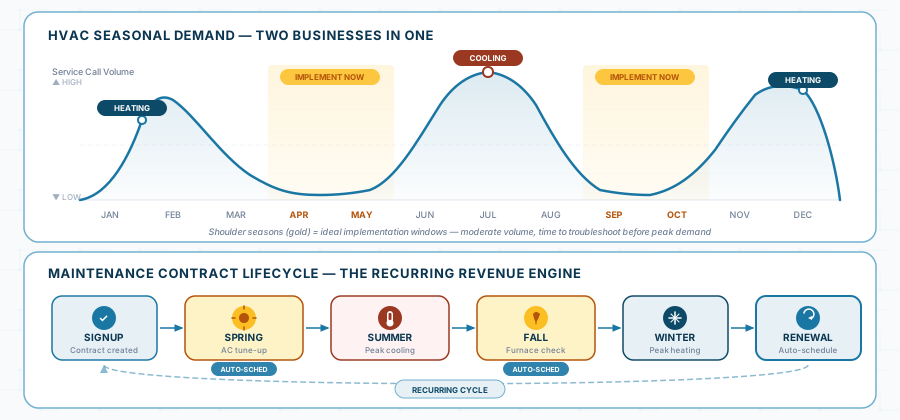
Why it’s make-or-break: HVAC demand doesn’t arrive evenly across the year. Northern California contractors experience two peak surges — summer cooling (June–September, especially in Sacramento Valley where temperatures regularly exceed 100°F) and winter heating (November–February, particularly for Tahoe and foothill service areas). Between those peaks are shoulder seasons where maintenance agreements dominate the schedule.
Your software must handle all three modes: peak-season emergency triage, shoulder-season maintenance scheduling, and the chaotic transition periods where both overlap. A platform that handles Tuesday’s five scheduled tune-ups but collapses when 12 emergency calls come in Wednesday morning isn’t built for HVAC.
What to Look For:
Seasonal Demand Management Checklist
Dynamic schedule rebalancing — When emergencies flood in during a heat wave, the system should help you identify which scheduled maintenance appointments can be rescheduled and which customers are high-priority (commercial accounts, elderly customers, maintenance agreement holders). Not all scheduled work is equally deferrable.
Maintenance agreement prioritization — Agreement customers pay for priority service. Your system must distinguish them from one-off callers during peak periods. When 14 no-cooling calls come in, agreement customers should surface at the top — they’re your recurring revenue base.
Seasonal scheduling templates — Pre-built scheduling patterns for different seasons: spring AC tune-up campaigns, fall furnace checkups, winter emergency on-call rotations. You shouldn’t rebuild your schedule structure from scratch four times a year.
Capacity visualization — A dashboard showing booked vs. available capacity by day, week, and tech. During shoulder seasons, this helps you see how many maintenance tune-ups you can stack per day. During peak season, it shows you when you’re at the breaking point and need to start triaging.
Recurring maintenance auto-scheduling — For agreement customers, the system should auto-generate spring and fall tune-up visits based on agreement terms and preferred scheduling windows. Your office shouldn’t be manually creating 200+ maintenance appointments twice a year.
Waitlist or callback management — During peak periods, you’ll turn away work. The system should capture those calls and auto-follow-up when capacity frees up, rather than losing them forever.
“It’s July 15th. I have 8 maintenance tune-ups scheduled today and it’s 106°F. By 9 AM, I’ve received 11 emergency no-cooling calls. Show me how I’d triage: which maintenance appointments get rescheduled (and how those customers are notified automatically), how emergency calls are prioritized (with maintenance agreement customers flagged), and how my dispatcher sees the real-time picture of who’s available and where.”
What to watch for: Can the system distinguish agreement customers from one-off callers? Is rescheduling a bulk action or does it require touching each appointment individually? Does the customer get automatic notification of the reschedule with rebooking options?
Equipment History and Asset Tracking
Why it’s make-or-break: HVAC is an equipment-centric trade. Every customer has specific units — a Trane XR15 heat pump installed in 2019, a Carrier 58STA furnace from 2014 with a cracked heat exchanger noted last fall, an Aprilaire 700 whole-house humidifier that needs a water panel every season. Your technician’s effectiveness depends on knowing this history before arriving at the jobsite.
Without accessible equipment records, your tech walks into every call cold. They ask the homeowner questions the homeowner can’t answer (“What model is your furnace? When was it last serviced? What refrigerant does it use?”). They diagnose problems without context on prior repairs. They miss upsell opportunities on aging equipment because they can’t see that the 16-year-old unit has had three repairs in the past two years.
This matters for customer experience: customers increasingly choose service providers offering real-time updates and transparency. For HVAC, “transparency” includes your tech pulling up the customer’s equipment history on a tablet and saying, “I see we replaced your contactor last June and noted the capacitor was weakening — let me check that first.”
What to Look For:
Equipment & Asset Tracking Checklist
Customer equipment profiles — Store make, model, serial number, installation date, warranty status, refrigerant type, and filter size for every unit at every customer location. This is your tech’s cheat sheet before they walk in the door.
Service history per unit — Not just “we serviced the Smith house” but “we replaced the TXV on the Trane XR15 (serial #TW6A04) on March 12, found low refrigerant charge, added 1.5 lbs R-410A, noted condenser coil needs cleaning.” Unit-level history, not just address-level.
Equipment age and replacement tracking — Flag units approaching end-of-life (typically 15–20 years for furnaces, 12–15 for AC). These are your replacement sales pipeline — but only if the system surfaces them proactively.
Refrigerant tracking per unit — Log type (R-22, R-410A, R-454B) and quantity added at each service. This isn’t optional — EPA Section 608 requires recordkeeping for systems with 50+ lbs of ozone-depleting refrigerant [7], and recent rulemaking under the AIM Act proposes extending similar requirements to HFC systems at 15+ lbs, which would cover most residential HVAC equipment [8]. California’s requirements layer additional state-level obligations on top of federal rules. Regardless of where the thresholds land, tracking refrigerant per unit per service event is an operational best practice your software should make effortless, not an afterthought.
Photo documentation per unit — Before-and-after photos, data plate shots, condition documentation. Techs snap a photo of the data plate on the first visit and it’s permanently attached to that unit’s record. No more asking “what model is it?” on the second visit.
Warranty tracking — Log manufacturer warranty dates and terms. When a compressor fails on a unit still under warranty, your tech should know before ordering a replacement — not after the homeowner gets a bill they shouldn’t owe.
“Mrs. Johnson calls — no cooling. Show me how my tech sees her equipment history before arriving: what units she has, when they were last serviced, what was found, and what refrigerant type she uses. Now show me — across all my customers — which units are over 15 years old. That’s my replacement sales list.”
What to watch for: Is equipment data stored at the unit level (individual serial numbers) or just the address level? Can your tech access this on their phone while standing in the customer’s garage? How easy is it to add a new unit when you encounter one you haven’t serviced before?
Maintenance Agreement Management
Why it’s make-or-break: Maintenance agreements are the financial backbone of a healthy HVAC business. They provide predictable recurring revenue through shoulder seasons, build customer loyalty, create a pipeline for replacement sales, and guarantee that when peak season hits, your best customers are already on your schedule.
But agreements are only as good as your ability to manage them: auto-scheduling tune-ups at the right intervals, tracking which customers are covered and which aren’t, billing renewals on time, and giving agreement customers priority service when emergencies surge. If you’re tracking agreements in a spreadsheet, you’re losing renewals, missing scheduled visits, and undermining the entire value proposition you sold the customer.
What to Look For:
Maintenance Agreement Checklist
Agreement database — Store agreement terms, coverage details, pricing tiers, start/renewal dates, and included services per customer. When a customer calls, the dispatcher instantly sees “Gold Plan — 2 visits/year, priority scheduling, 15% parts discount.”
Auto-scheduled visits — The system generates spring and fall tune-up appointments based on agreement terms, preferred customer time windows, and technician availability. For a 300-agreement book, this saves dozens of hours of manual scheduling each season.
Renewal tracking and reminders — Automated alerts 30/60/90 days before agreement expiration. Auto-generated renewal notices sent to customers. Lapsed agreements flagged for follow-up. This is where revenue walks out the door silently — expiring agreements nobody noticed.
Agreement-based priority dispatch — During peak periods, agreement customers are automatically flagged as higher priority than non-agreement callers. Your dispatcher shouldn’t have to remember who has an agreement — the system should surface it.
Revenue tracking per agreement — See what each agreement costs you to service vs. what it earns. Track profitability by tier. Are your Gold Plan customers profitable, or are you underpricing the coverage?
Upsell triggers — When a tech performs a tune-up on a non-agreement customer, the system should prompt an agreement pitch with pricing. When a tech services an aging unit for an agreement customer, the system should flag the replacement opportunity.
“I have 250 maintenance agreements. Show me: how many are due for spring tune-ups this month, how many are expiring in the next 60 days, and how I’d auto-schedule all April tune-ups without touching each one individually. Then show me what the dispatcher sees when an agreement customer calls with an emergency during peak season — does the system flag them as priority?”
What to watch for: Is agreement management a core feature or an add-on module with extra cost? Can tune-ups be batch-scheduled or does each require manual entry? Is agreement status visible on the dispatch screen during emergency triage?
Emergency Dispatch with On-Call Rotation
Why it’s make-or-break: HVAC emergencies don’t respect business hours. A furnace failure on a January night in the Tahoe foothills is life-threatening. A commercial cooler failure at a Napa restaurant means thousands in spoiled inventory. Your software needs to handle 24/7 dispatch — including on-call rotation management — not just 8-to-5 scheduling.
The competitive pressure is real. When a homeowner’s AC fails at 9 PM and it’s 95°F inside, they’re calling the first company that answers and can give them an ETA. If your on-call tech doesn’t get the notification for 15 minutes because your dispatch system isn’t designed for mobile dispatch after hours, you’ve lost a $300+ emergency call to whoever picked up faster.
What to Look For:
Emergency Dispatch Checklist
On-call rotation scheduling — Define who’s on-call each night/weekend with automatic rotation. The system knows who to alert without your dispatcher looking it up.
Real-time GPS tracking — Live map of all technicians during business hours, plus on-call tech location after hours. When an emergency comes in, find the closest available tech in seconds.
Emergency priority queue — Emergency calls jump to the top of the dispatch board. The system should visually distinguish emergencies from routine service.
Automated customer ETA — Assign the tech and the customer gets an immediate text: “Your technician Mike is on the way — estimated arrival 35 minutes.” This reduces anxiety and prevents “where’s my tech?” callback loops.
After-hours call capture — If calls come through an answering service or voicemail, the system should have a workflow for entering them and dispatching the on-call tech. Ideally with a mobile-friendly interface the dispatcher (or on-call tech acting as dispatcher) can use from home.
Emergency job documentation — Same completion workflow as daytime jobs: photos, notes, parts used, customer signature. Emergency work is often the most disputed — documentation protects your business.
“It’s 10 PM on a Saturday in January. Call comes in — furnace failure in a Vacaville home with a family and young kids. Show me how the on-call tech gets notified, how they see the job details and customer history on their phone, and how the customer gets an ETA — all within 2 minutes of the call coming in.”
What to watch for: Does the on-call rotation actually work in the system, or is it just a note someone has to remember? Can the entire dispatch happen from a mobile device (because nobody’s in the office at 10 PM on Saturday)? Is the workflow the same quality as daytime dispatch, or is after-hours a degraded experience?
Title 24 Compliance and Regulatory Documentation
Why it’s make-or-break: In California, HVAC installations aren’t just mechanical work — they’re regulatory events. Every system installation or major replacement requires Title 24 energy compliance documentation: CF-1R forms (Certificate of Compliance) submitted to the local building department before a permit is issued, Manual J load calculations, HERS verification testing for duct leakage, and specific equipment efficiency ratings (SEER, AFUE) that must meet or exceed current standards.
The 2025 Building Energy Efficiency Standards took effect on January 1, 2026 [5]. These updates tighten existing compliance requirements. Duct insulation minimums are now stricter. All supply and return ducts — including boots and plenums — must meet a minimum of R-6. In some climate zones, unconditioned spaces require R-8 insulation [6]. The standards also expand heat pump requirements for certain equipment replacements.New HERS verification measures also apply to refrigerant charge and airflow testing [9]. For Northern California HVAC contractors, the direction is clear: more documentation per job, not less.
Beyond Title 24, you’re tracking refrigerant usage (EPA Section 608 compliance), city-specific permit processes (Vacaville’s process differs from Napa’s differs from Sacramento County’s), and potentially PG&E or SMUD rebate documentation for customers claiming energy efficiency incentives.
If this paperwork lives in filing cabinets, truck glove boxes, and someone’s email inbox, you’re one audit away from a serious problem.
What to Look For:
Title 24 & Regulatory Compliance Checklist
Job-type compliance triggers — When a job is tagged “system installation” or “furnace replacement,” the system auto-prompts for required documentation: permit number, equipment model and efficiency ratings, duct leakage test results, HERS verification status.
Document attachment per job — Upload CF-1R forms, HERS test reports, manufacturer data sheets, permit approvals, and inspection results. Everything attached to the job record — retrievable by job, customer, or equipment serial number.
Refrigerant tracking — Log refrigerant type, quantity added or recovered, and technician EPA certification number per service event. Aggregated reporting by refrigerant type for environmental compliance.
Permit workflow — Track permits from application through final inspection with status updates and reminders, just like the plumbing contractors in this guide. HVAC permit requirements overlap heavily with plumbing and electrical.
Rebate documentation — Track PG&E, SMUD, or other utility rebate applications and status per installation job. Customers expect you to handle this; your system should support it.
Inspection scheduling and tracking — HERS testing, city inspections, and any follow-up visits required for compliance. Each should be a trackable event in the job timeline, not a note someone might forget.
“I just installed a 16 SEER2 heat pump in a Fairfield home. Walk me through the compliance trail: where does my tech enter the equipment specs and efficiency ratings? Where does the CF-1R form get attached? How do I track HERS testing scheduling and results? And if the building department asks for this documentation 18 months from now, how do I find it in under 60 seconds?”
What to watch for: Is compliance documentation built into the job completion workflow, or is it a separate process the tech has to remember? Can you search for all installations requiring HERS testing that haven’t been verified yet? Is refrigerant tracking per-service-event or just a general log?
3. When It Works: The Transformation Scenario
Sierra Comfort HVAC — From Summer Chaos to Year-Round Control
This scenario is a composite drawn from real Northern California HVAC contractor transitions. It illustrates what “one version of reality” means for a business that balances emergency service with a growing maintenance agreement book.
The Business: 10 technicians, residential and light commercial HVAC, serving Solano and Napa Counties. ~280 maintenance agreements. Mix of scheduled tune-ups, emergency calls, and system installations. Revenue heavily seasonal — 45% earned in June–September.
Before (manual + spreadsheet systems):
| Pain Point | Impact | Real Cost |
|---|---|---|
| Maintenance agreements tracked in Excel | Missed 15–20% of scheduled tune-ups each season; renewal rate slipping because nobody followed up on expirations | ~$28K/year in lapsed agreements (estimated 35 lost renewals × $800 avg. agreement value) |
| Emergency dispatch by phone during peak season | Average 8–12 minutes to assign an emergency call; lost an estimated 3–5 emergency calls/week to faster competitors during summer | ~$400–$600/week in lost emergency revenue during peak |
| No equipment history in the field | Techs arrived cold to every call; repeat diagnostics on units serviced months earlier; missed replacement sales on aging equipment | Unquantified but significant: estimated $30K–$50K/year in missed replacement opportunities |
| Paper-based compliance documentation | CF-1R forms in filing cabinets; refrigerant logs in a binder; two instances of missing HERS test documentation during audits | One audit finding required $1,800 in retroactive testing; ongoing CSLB risk |
| Seasonal scheduling built manually each spring and fall | Office manager spent 2+ weeks each season scheduling 280 tune-ups by hand; scheduling errors averaged 6–8 per campaign | ~40 hours of labor per season + customer frustration from errors |
After (9 months on HVAC-focused FSM platform):
Agreement Retention
92% renewal rate (up from ~78%)
Auto-renewal reminders at 30/60/90 days; lapsed agreements flagged for follow-up. Recovered an estimated $22K in annual recurring revenue.
Emergency Response
Under 3 minutes to dispatch
Live GPS map, on-call rotation in system, auto-customer ETA text. Estimated 2–3 additional emergency calls captured per week during peak season.
Seasonal Scheduling
280 tune-ups auto-scheduled in 4 hours (down from 2+ weeks)
Batch scheduling by agreement tier, zip code, and tech availability. Scheduling errors dropped to near-zero.
Equipment Visibility
Full unit history accessible on every call
Techs pull up make, model, service history, and refrigerant records from their tablets before ringing the doorbell. Replacement sales pipeline built automatically from aging-unit reports.
Compliance
100% documentation compliance
CF-1R forms, HERS test results, refrigerant logs, and permit status tracked per job. Passed a surprise audit with documentation retrieved in under 2 minutes.
Revenue Growth
~22% revenue increase without adding techs
Combination of better capacity utilization (less dead time), captured emergency calls previously lost, retained agreement revenue, and increased replacement sales from equipment age reporting.
The implementation approach:
| Phase | Duration | Activity | Outcome |
|---|---|---|---|
| Setup | 3 weeks | Imported customer database from QuickBooks (2,400 customers); entered equipment data for top 150 agreement customers from service records; built pricebook for common services; configured QuickBooks Online sync | Equipment entry was the most time-consuming step — assigned one admin to enter ~10 customer equipment profiles per day |
| Pilot | 6 weeks (timed for spring shoulder season — April/May) | 3 techs ran on new system for all maintenance tune-ups. Office maintained whiteboard for emergency dispatch during pilot. | Techs validated mobile workflow: equipment lookup, photo documentation, compliance form attachment. Identified issues with battery drain on older tablets — resolved with hardware upgrades. |
| Full rollout | 4 weeks (completed before June peak) | All 10 techs on system. Emergency dispatch moved to digital. Whiteboard retired. On-call rotation configured. | Critical timing: full rollout was operational 3 weeks before summer surge. Team had time to build comfort before the system was stress-tested by July heat. |
| Optimization | Ongoing through first peak season | Auto-scheduling for fall tune-ups configured; refrigerant tracking workflow built; customer portal launched for commercial accounts; equipment age reports built for replacement sales pipeline | Owner: “The first July where I wasn’t terrified. I could actually see what was happening instead of guessing.” |
What clinched adoption: Timing. Sierra Comfort deliberately implemented during the spring shoulder season (April–May) so the team had 6+ weeks to get comfortable before summer peak. By the time July’s 107°F days hit and emergency calls surged, the system was familiar — not a new source of stress on top of an already stressful season.
The maintenance agreement auto-scheduling was the single feature that won over the office manager. What previously consumed 2+ weeks of tedious manual scheduling now happened in an afternoon. They described it as “getting two weeks of my life back — twice a year.”
4. When It Fails: The Cautionary Tale
Central Valley Mechanical — Implemented in July, Abandoned by September
Not every HVAC software implementation succeeds. This composite represents the most common and most avoidable failure pattern in the HVAC trade: implementing during peak season.
The Business: 7 technicians, residential HVAC, Sacramento Valley. Heavy summer workload (90% of emergency calls June–September).
What went wrong — and why:
Mistake #1: They went live on July 1st.
Central Valley’s owner attended a trade show in May, got excited about a platform demo, signed a contract in June, and pushed for a July 1st go-live so they could “use the system during our busiest time.” The logic seemed sound: if the system works during peak, it works anytime.
The reality was catastrophic. July 1st arrived with 108°F temperatures and a fully booked emergency schedule. Technicians were simultaneously learning a new mobile app, handling back-to-back emergency calls, and trying to figure out how to log parts and complete jobs digitally — all while Sacramento homeowners with failing AC units had zero patience for delays.
The dispatcher, who had run the whiteboard flawlessly for three years, was now slower on the new system. Calls that took 3 minutes to dispatch on the whiteboard took 8–10 minutes in unfamiliar software. By the second day, the queue was backed up and two customers cancelled because response times had doubled.
Mistake #2: No equipment data was entered before go-live.
The system was technically “set up” — customer list imported, techs had logins — but nobody had entered equipment data for existing customers. Every service call was essentially a new customer from the system’s perspective. Techs had no access to prior service history, equipment specs, or refrigerant records. They were typing this information in on-site, mid-call, in 107°F attics.
By week two, techs had stopped entering equipment data entirely. “I’ll do it later” became “I’ll never do it.” The equipment tracking that was supposed to be a core benefit was dead on arrival.
Mistake #3: They tried to run agreements and emergencies in the new system simultaneously from day one.
Rather than starting with one workflow (emergencies or maintenance, not both), Central Valley attempted to run everything through the new system immediately. Maintenance agreement customers were being scheduled in the new system while emergency dispatch was half-digital, half-whiteboard. Nobody was sure which system was authoritative.
On July 14th, an agreement customer’s tune-up was accidentally scheduled on top of an emergency block. The tech showed up for a routine tune-up; the dispatcher had reassigned him to an emergency but only updated the whiteboard, not the software. The agreement customer had taken the morning off work. She cancelled her agreement.
The total damage:
| Cost Category | Amount |
|---|---|
| Software subscription (4 months before abandonment) | $1,160 |
| Lost productivity during peak season (estimated 15% efficiency drop for 6 weeks) | $8,000–$12,000 |
| 3 lost maintenance agreements from scheduling confusion | $2,400 |
| Hardware (tablets purchased, never properly utilized) | $2,100 |
| Team morale and trust damage | Unquantifiable but real — “never again” sentiment persisted for 18 months |
| Total estimated cost | ~$14,000–$18,000 |
By September, the whiteboard was back. The tablets went in a drawer. The owner told peers at a trade association meeting: “Software doesn’t work for HVAC.” He was wrong — but his experience was real, and the mistake was entirely preventable.
What Central Valley should have done differently:
| Mistake | Fix | Time Required |
|---|---|---|
| Went live July 1st (peak season) | Signed in May, spent June–August on setup and data entry, piloted in September, full rollout October, ready for winter heating season | 4–5 months |
| No equipment data entered | Assigned admin to enter equipment profiles for top 100 agreement customers before pilot; techs enter new equipment data at each visit going forward | 2–3 weeks of admin time pre-launch |
| Ran all workflows simultaneously from day one | Started with maintenance scheduling only (lower-pressure workflow), added emergency dispatch after 4–6 weeks when the team was comfortable | 6–8 week phased approach |
| No pilot period | Ran 2–3 techs on the system during shoulder season for all their calls; identified issues before full team rollout | 4–6 weeks |
| Dispatcher wasn’t trained before go-live | Gave dispatcher 1–2 weeks of dedicated training time with the vendor’s onboarding team — using real scenarios, not canned demos | 5–10 hours of training |
Central Valley eventually tried again — 14 months later, during September. The second attempt succeeded. But they’d lost a year and $14,000–$18,000, plus the harder-to-measure cost of a team that didn’t trust “going digital” and needed extra convincing to try again.
5. Integration Complexity for HVAC Contractors
Where “One Version of Reality” Gets Technically Hard
HVAC contractors have a unique integration landscape because of the blend of service dispatch, maintenance scheduling, equipment data, compliance documentation, and financial management. Here’s what the real integration picture looks like:
| System | Integration Priority | Complexity | What Can Go Wrong |
|---|---|---|---|
| QuickBooks (Online or Desktop) | Critical | Low–Medium | Maintenance agreement billing cycles not mapping cleanly; recurring revenue not categorized properly; seasonal revenue spikes create reconciliation confusion |
| Maintenance agreement billing | Critical | Medium | Agreement billing (monthly, quarterly, annual) must sync with accounting; credits and discounts per agreement tier need to flow correctly to invoices |
| Equipment / asset database | High | Medium | Equipment data lives in FSM but financial data lives in QuickBooks — keeping customer records consistent across both requires discipline during setup |
| Supplier / parts ordering | Medium | Medium–High | HVAC parts distributors (Carrier, Trane, Lennox local distributors) rarely offer API integrations; most ordering remains manual with the FSM tracking the PO and cost |
| Refrigerant compliance reporting | Medium | Low–Medium | Simple if the FSM tracks per-service-event data; complex if you need to generate aggregate EPA reports across hundreds of service events |
| Utility rebate programs (PG&E, SMUD) | Low–Medium | Manual bridge | No rebate program offers API integration; your FSM tracks the documentation, you submit manually through utility portals |
| City permit portals | Medium | Not possible (manual bridge) | Same as plumbing and GC — each NorCal city has its own portal; FSM tracks internal status only |
| HERS testing / verification | Medium | Manual bridge | HERS raters use their own systems; your FSM logs results and stores documentation but doesn’t connect to HERS software |
| Customer communication (text/email) | High | Low | Most platforms include built-in communication; verify it handles appointment reminders, arrival ETAs, and agreement renewal notices |
The Maintenance Agreement Billing Problem
This is the integration challenge most specific to HVAC contractors, and it trips up more implementations than people expect.
Here’s the scenario: You sell a customer a Gold maintenance agreement for $189/year, billed $15.75/month. The agreement includes two tune-ups, priority scheduling, and a 15% parts discount. Your FSM platform manages the agreement terms, schedules the tune-ups, and flags the customer as priority.
But who bills the $15.75/month?
If your FSM platform handles billing, does that revenue show up correctly in QuickBooks? Is it categorized as “maintenance agreement revenue” or just dumped into a generic “service revenue” category? When the customer’s spring tune-up generates a $0 invoice (included in agreement), does that confuse your accounting?
If QuickBooks handles billing, does your FSM platform know the agreement is active and paid up? When the customer calls during a heat wave, does your dispatcher see “active Gold agreement” — or does that status live only in QuickBooks where the dispatcher never looks?
What good integration looks like: FSM manages agreement terms, scheduling, and priority status. QuickBooks manages billing and revenue categorization. The two stay synchronized: when a customer pays their monthly agreement fee in QuickBooks, the FSM platform reflects an active agreement. When an agreement lapses due to non-payment, the FSM platform removes priority status.
What usually happens: One system is “authoritative” and the other lags. The office manager becomes the human integration layer, manually checking both systems to reconcile. This works until it doesn’t — usually during peak season when they are already overwhelmed.
When Integration Complexity Requires Help
Most HVAC contractors with a straightforward setup — one FSM platform, QuickBooks, built-in communication — can handle integration themselves with vendor support. But complexity escalates when you add:
- Large agreement books (200+) with multiple tiers, monthly billing, and automated renewal workflows that must reconcile with accounting
- Multi-location or multi-brand operations — separate territories, different truck inventories, consolidated reporting needs
- Commercial service divisions alongside residential — commercial accounts with different billing structures, SLAs, and multi-unit locations
- Inventory management tied to supplier accounts — automated reordering from HVAC distributors based on truck stock levels
- IoT and connected equipment — Smart thermostats, equipment monitoring sensors, or building automation systems feeding data into your service platform (emerging, but growing fast)
6. Trade-Specific Platform Fit
Not all HVAC contractors have the same needs. A 7-tech residential shop replacing whiteboards works differently from a 30-tech operation managing 500 maintenance agreements across three counties. Platform choice should match your operation type — not your aspirations.
HVAC is one of the best-served trades in the FSM software market. Several platforms were built specifically for residential HVAC or treat it as a primary use case. You have genuinely good options, but vendors will compete aggressively for your business. Focus on fit for your size and workflow, not on who gives the slickest demo.
Small HVAC Operations (5–12 Techs)
Team Size
Revenue Range
Seasonal Reality
Platform Needs:
- Simple scheduling and dispatch (drag-and-drop calendar, not complex workflow engines)
- Strong mobile app (techs complete jobs, capture photos, collect signatures — if they hate the app, adoption dies)
- QuickBooks integration (automatic sync, not CSV export — you’re not replacing your accounting system)
- Basic maintenance agreement tracking (schedule tune-ups, track renewals — doesn’t need to be sophisticated yet)
- Month-to-month pricing under $150/month total cost
Good Fit Platforms:
- Entry-to-mid-tier FSM platforms designed for residential service trades
- Platforms with fastest onboarding (your team should be functional within days, not weeks)
- Simple mobile-first design — if the vendor quotes 6–8 weeks of onboarding, it’s built for a bigger operation
- Month-to-month contracts with full data export
Poor Fit:
- Enterprise HVAC platforms (you’ll pay for complexity you can’t use and overwhelm your team)
- Platforms requiring dedicated IT support or implementation consultants
- Annual contracts for your first platform — you don’t know what you need yet
Growth-Stage HVAC (12–25 Techs)
Team Size
Revenue Range
Seasonal Reality
Platform Needs:
- Robust maintenance agreement management — agreement tiers, auto-scheduled seasonal tune-ups for 200+ customers, renewal tracking at 30/60/90 days, and agreement customers flagged as priority during emergency dispatch. If agreement management is a bolt-on or afterthought, you’ll outgrow the platform within a year.
- Equipment-level history — per-unit records (make, model, serial, refrigerant type, full service history), not just per-address. A customer with a 2019 Carrier rooftop unit and a 2008 Trane split system needs separate histories. This is what drives replacement sales and accurate diagnostics.
- Batch seasonal scheduling — groups by zip code, assigns by tech availability and certification level, sends customer confirmations automatically. This single capability can reclaim 40+ hours per season.
- Advanced dispatch with GPS — live map, nearest-available routing, on-call rotation management, real-time capacity visibility
- Refrigerant tracking per unit — log type and quantity at each service event, pull compliance reports
- $150–$350/month budget range
Good Fit Platforms:
- Mid-tier to growth-tier platforms purpose-built for HVAC (or treating HVAC as a primary use case)
- Systems where agreement management and equipment history are core features, not add-ons
- Platforms with batch scheduling and seasonal workflow tools
- Strong mobile experience that field techs use daily without resistance
Poor Fit:
- Entry-level platforms you’ve already outgrown (basic agreement features, limited equipment tracking)
- Generic field service platforms that don’t understand HVAC seasonal demand patterns
- Platforms without per-unit equipment records
Established HVAC Operations (25+ Techs)
Team Size
Revenue Range
Seasonal Reality
Platform Needs:
- Advanced dispatch intelligence — route optimization accounting for traffic, skill-based assignment (certified techs for warranty work), real-time capacity visibility across the entire operation
- Revenue analytics — revenue per tech, agreement profitability by tier, replacement conversion rates, seasonal capacity utilization. Dashboards that answer operational questions, not just count completed jobs.
- Technician performance and sales tools — good-better-best presentation on tablets, conversion tracking, commission calculation if applicable
- Integration ecosystem — robust native connections to QuickBooks, CRM/marketing platforms, fleet management, and potentially IoT monitoring. Well-documented API, not CSV workarounds.
- Multi-crew and multi-location support — if you’re running satellite offices or separate install vs. service teams
- $350–$600+/month, with year-one investment of $10,000–$20,000+ when factoring subscription, implementation, and integration setup
Good Fit Platforms:
- Enterprise-tier HVAC platforms with proven track records at your scale
- Systems with dedicated onboarding teams and account management
- Platforms where other 25+ tech HVAC operations can serve as references
- Advanced reporting and business intelligence capabilities
Poor Fit:
- Mid-market platforms straining under your volume and complexity
- Platforms where you’d be the largest customer (you’ll outpace their development roadmap)
- Systems without dedicated support — at this scale, email-only support with 48-hour response times is unacceptable
Hybrid Service + Installation Businesses
Many HVAC contractors run what’s effectively two businesses: a service operation (emergency calls, tune-ups, maintenance agreements) and an installation operation (system replacements, new construction, commercial retrofits). These workflows have fundamentally different scheduling, costing, and coordination needs.
Platform Challenge:
- Service dispatch platforms excel at same-day scheduling, rapid routing, and high-volume short-duration jobs
- Project/installation platforms excel at multi-day scheduling, crew coordination, material staging, and permit tracking
- Few platforms handle both equally well
Solution Approaches:
Option A: Service-First Platform with Installation Workarounds If service revenue dominates (70%+), choose the best service dispatch platform and manage installations through longer-duration “jobs” with notes and checklists. Imperfect for complex installs, but keeps your core workflow optimized.
Option B: Find a Platform Designed for HVAC’s Dual Nature Some HVAC-focused platforms have evolved separate modules for service dispatch and installation project management within a single system — shared customer database, unified equipment records, one QuickBooks integration. This is the ideal if the platform executes both modules well.
Recommendation: If installation work represents more than 30% of your revenue and involves multi-day jobs with permit coordination, evaluate platforms specifically on their ability to handle both workflows. During demos, run two scenarios back-to-back: a same-day emergency dispatch and a 3-day system replacement with permit scheduling. If the platform stumbles on either, it’s optimized for only half your business.
7. Quick-Reference Checklist
Bring This to Every Software Demo
Print this page or pull it up on your phone. Use it during every vendor evaluation to ensure you’re testing what actually matters for an HVAC operation — not getting sold features designed for a different trade.
HVAC Contractor's Software Demo Checklist
Seasonal Demand Triage: Can the system help me reschedule maintenance appointments in bulk when emergencies flood in? Do rescheduled customers get automatic notifications with rebooking options?
!!Maintenance Agreement Management: Can I store agreement tiers, auto-schedule seasonal tune-ups for 200+ customers, track renewals, and flag agreement customers as priority during dispatch?
!!Equipment History: Can my tech see customer equipment profiles (make, model, serial, service history, refrigerant type) on their phone before arriving? Is this data stored per-unit, not just per-address?
!!Emergency Dispatch: Can I see all techs on a live map, dispatch the nearest available tech in under 60 seconds, and send the customer an automatic ETA text?
On-Call Rotation: Does the system manage after-hours on-call scheduling and notifications? Can the entire dispatch workflow happen from a mobile device at 10 PM?
Refrigerant Tracking: Can I log refrigerant type and quantity per service event, per unit? Can I pull a compliance report showing all refrigerant usage across my business?
Title 24 / Compliance Documentation: Can I attach CF-1R forms, HERS test results, and permit documents to job records? Does the system prompt for compliance documentation on installation jobs?
QuickBooks Integration: Is the sync native and automatic? When a job completes, does an invoice appear in QuickBooks? Is it one-way or two-way? Does agreement billing reconcile correctly?
Pricebook / Flat-Rate: Can my tech present good-better-best options on a tablet, get a signature, and generate an invoice on-site?
Mobile App Quality: Have an HVAC tech (not your most tech-savvy one) try the app for 10 minutes. Can they navigate a job, log parts, take a photo of a data plate, and mark complete without help?
Data Export: Can I export ALL data — customers, equipment records, service history, agreement details — at any time in standard formats? Show me the export function.
Contract Terms: Is month-to-month available? What’s the cancellation process? Any early termination fees?
Equipment Age Reporting: Can I pull a list of all customer equipment over 15 years old? This is my replacement sales pipeline — if the system can’t generate it, I’m leaving money on the table.
Customer References: Can I talk to an HVAC contractor my size who’s been using the platform through at least one peak season?
What’s Next
You now have the trade-specific requirements, demo scripts, cautionary tales, and evaluation checklist tailored to how HVAC businesses actually operate — including the seasonal demand reality, maintenance agreement complexity, and California compliance landscape that generic buyer’s guides ignore.
If you haven’t already:
- Complete the Foundation self-assessment to confirm you’re ready for software
- Review the Platform Landscape for the universal decision frameworks that apply across all trades
- Check the Plumbing tab if your operation also handles plumbing service work
When you’re ready to go deeper: The gated sections cover Vendor Transparency (the scorecard that protects your business autonomy), Integration Reality (including the maintenance agreement billing challenge that’s unique to HVAC), and Implementation (with HVAC-specific timing guidance built around seasonal cycles). Enter your email to continue.
References
This guide is part of the Field Service Software Buyer’s Guide — a free, vendor-neutral resource for Northern California contractors. No affiliate links. No sponsored recommendations. Just honest guidance grounded in real contractor experiences.
Vendor Transparency: Selecting the right tools for the job
You've identified your trade-specific requirements. Now it's time to evaluate vendors — and this is where most small contractors get outmaneuvered. The average software salesperson has done hundreds of demos. You've done maybe two. This section levels that playing field.
Why Vendor Transparency Deserves Its Own Section
Most buyer’s guides skip straight from “here are the features” to “here are our top picks.” They assume the hard part is figuring out what you need. It’s not.
The hard part is figuring out what vendors are hiding.
Field service software is a relationship, not a transaction. You’re entrusting a vendor with your customer data, your operational workflows, and your team’s daily productivity. A bad vendor relationship doesn’t just waste money — it creates a new kind of chaos that’s harder to escape than the whiteboard you’re replacing.
Enterprise buyers have procurement teams, legal departments, and IT staff to navigate this. You have yourself, maybe an office manager, and a salesperson who’s very good at steering demos toward strengths and away from limitations.
This section gives you the structure to evaluate vendors like a $50,000 consultant would — without needing one.
The Vendor Transparency Scorecard
This is the centerpiece of your evaluation process. Use it during and after every vendor demo. Score each vendor honestly — not based on the demo’s polish, but on whether they can answer these questions directly.
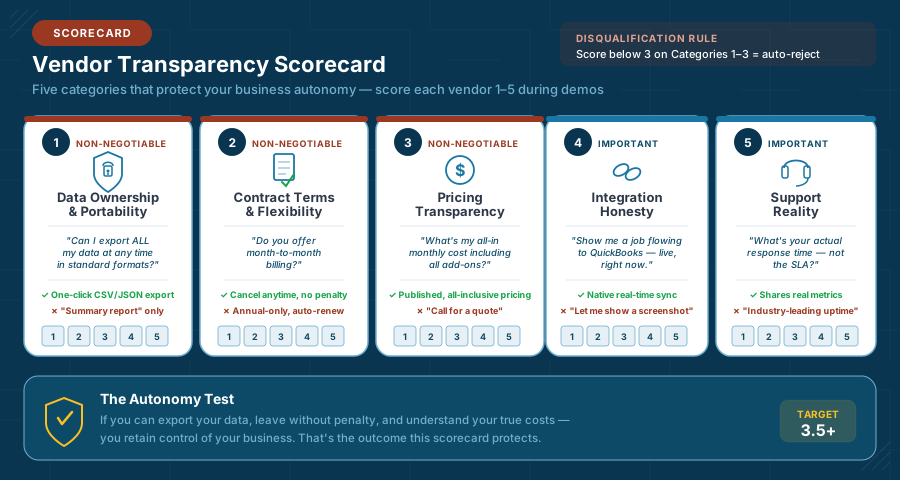
How to Use This Scorecard
Rate each criterion on a 1–5 scale:
- 5 = Fully transparent — Clear, direct answer with evidence or demonstration
- 4 = Mostly transparent — Answered clearly but missing minor details
- 3 = Partially transparent — Vague answer, required follow-up to clarify
- 2 = Evasive — Redirected to a different topic, gave marketing language instead of specifics
- 1 = Refused or couldn’t answer — “I’ll have to get back to you” or no response
Category 1: Data Ownership & Portability
This is the single most important category. If you can’t take your data with you, you don’t own your business — the vendor does.
| Question | What You’re Really Asking | Red Flag Answer | Green Flag Answer |
|---|---|---|---|
| “Can I export ALL my data — customers, jobs, service history, invoices, photos — at any time?” | Do I own my data, or do you? | “We can provide a summary report” or “That would need to go through our support team” | “Yes — one-click export to CSV/JSON from your admin panel, available anytime” |
| “What format is the export? CSV, JSON, XML, or proprietary?” | Can I actually use this data elsewhere? | Proprietary format or “our custom export” | Standard formats: CSV, JSON, XML with clear field mapping documentation |
| “If I cancel tomorrow, how long do I have to retrieve my data?” | Will you hold my data hostage? | “Per our terms of service…” (vague) or less than 30 days | 60–90 day grace period with full export access, clearly stated in contract |
| “Is there a fee for data export or retrieval after cancellation?” | Are there hidden exit costs? | Any fee beyond nominal processing | No fee for standard exports; published rates if custom extraction needed |
| “Can I access my data via API for custom integrations?” | Is the platform open or a walled garden? | “API access is available on our Enterprise plan” (upsell) | API included at all plan levels with published documentation |
| “Who owns photos, notes, and documents my technicians upload?” | Could you use my operational data? | Vague or references to “license” in TOS | Explicit: “You own all uploaded content. We claim no rights.” |
Category 2: Contract Terms & Flexibility
The contract determines your leverage. Every restriction favors the vendor, not you.
| Question | What You’re Really Asking | Red Flag Answer | Green Flag Answer |
|---|---|---|---|
| “Do you offer month-to-month billing?” | Can I leave if this doesn’t work? | “We offer annual plans with a discount” (avoiding the question) | “Yes — month-to-month available. Annual saves X% if you prefer.” |
| “What’s the cancellation process and timeline?” | How painful is the exit? | 60–90 day written notice requirement, or “contact your account manager” | Cancel anytime from your account settings; effective end of billing period |
| “Are there early termination fees on annual contracts?” | What’s my real cost to leave? | Remaining balance due or percentage penalty | No termination fee, or prorated refund for unused months |
| “Does my contract auto-renew? At what terms?” | Could my price jump without notice? | Auto-renews at “then-current pricing” (blank check) | Auto-renew at locked rate; 30-day advance notice before renewal; easy opt-out |
| “Can I downgrade my plan if my needs change?” | Am I locked into this tier? | “Downgrades take effect at next annual renewal” or not possible | Downgrade anytime; takes effect next billing cycle |
| “What happens to my pricing if you’re acquired?” | Is my deal stable long-term? | No answer or “we don’t anticipate that” | Contractual rate protection clause for existing customers post-acquisition |
Category 3: Pricing Transparency
“Starts at $49/month” is marketing. Your actual cost is what matters.
| Question | What You’re Really Asking | Red Flag Answer | Green Flag Answer |
|---|---|---|---|
| “What’s my all-in monthly cost for [X] technicians, including all required add-ons?” | What will I actually pay? | “It depends on configuration” or requires custom quote for basic plans | Clear per-user or flat pricing; total calculated in real-time during demo |
| “Are there features I’ll need that cost extra beyond the base plan?” | What’s hidden behind the base price? | Lists what’s included without mentioning add-on costs | “Here’s what’s included at your tier. The only paid add-ons are [specific list].” |
| “What’s the cost per additional user beyond my plan?” | How does scaling affect my cost? | “Contact sales for volume pricing” | Published per-user overage rate |
| “Are there transaction fees on payments processed through your platform?” | Are you taking a cut of my revenue? | Percentage-based fee on all transactions | Flat monthly fee regardless of volume, or transparent per-transaction rate |
| “Will my rate change at renewal? How much notice do I get?” | Am I buying price stability? | “Pricing is subject to change” with no cap or notice period | Rate locked for contract term; 60-day notice of any increase at renewal |
| “Is there a setup fee, implementation fee, or onboarding fee?” | What’s my total first-year cost? | Discovered during contract signing, not during demo | Transparent: “Setup is $X” or “Setup is included” — stated upfront |
Calculating True Cost: The Three-Year TCO
When comparing vendors, never compare sticker prices. Calculate your Total Cost of Ownership (TCO) for three years — the actual cost of each option including every expense you’ll incur [9][10]:
| Cost Component | Vendor A (Budget) | Vendor B (Mid-Tier) | Vendor C (Enterprise) |
|---|---|---|---|
| Monthly subscription (36 months) | $2,700 | $5,400 | $14,400 |
| Setup / implementation fee | $0 | $500 | $2,500 |
| Hardware (tablets for techs) | $2,400 | $2,400 | $2,400 |
| Training time (staff hours × rate) | $600 | $900 | $2,000 |
| Integration setup (QuickBooks, etc.) | $0 (DIY) | $300 | $1,500 |
| Year-one troubleshooting (estimated) | $800 | $400 | $600 |
| 3-Year TCO | $6,500 | $9,900 | $23,400 |
The budget vendor costs 72% less — but if your techs abandon it due to poor mobile experience, you’ve spent $6,500 on nothing and burned team trust in the process. Vendor B might deliver the best ROI if adoption is high. Vendor C only makes sense if you actually use enterprise features daily.
The real question isn’t “which is cheapest?” — it’s “which delivers the highest return per dollar when my team actually uses it?”
Category 4: Integration Honesty
Integration claims are where vendors stretch the truth most aggressively. “Integrates with QuickBooks” can mean anything from seamless real-time sync to “you can export a CSV and import it yourself.”
| Question | What You’re Really Asking | Red Flag Answer | Green Flag Answer |
|---|---|---|---|
| “Show me a completed job flowing to a QuickBooks invoice — live, right now.” | Does the integration actually work? | “I can show you a screenshot” or “Let me schedule a technical demo” | Demos it live; you watch the data flow in real-time |
| “Is the QuickBooks integration native or through middleware (Zapier, Make)?” | Who’s responsible when it breaks? | “We use a best-in-class integration partner” (middleware) | “Native integration maintained by our engineering team” |
| “How often does the sync run? Real-time, hourly, daily?” | Will my data be current when I need it? | Nightly batch sync or manual trigger | Real-time or near-real-time (within minutes) |
| “What happens when the integration fails? How am I notified?” | Will I know before it causes problems? | “Our team monitors integrations” (reactive) | Automatic error alerts to admin; failed sync retry with notification; audit log accessible |
| “If I use [specific tool], does it integrate? Show me.” | Is this a real integration or a marketing checkbox? | “We’re working on that” or “It’s on our roadmap” | Either demos it live or honestly says “No, but here’s the workaround” |
| “Has a platform update ever broken customer integrations?” | Are integrations stable over time? | “Not that I’m aware of” (evasive) | “Yes — [specific incident]. Here’s how we handled it and what we changed to prevent recurrence.” |
Category 5: Support Reality
Support quality is invisible during the sales process and critical after you’ve committed.
| Question | What You’re Really Asking | Red Flag Answer | Green Flag Answer |
|---|---|---|---|
| “What’s your average response time — not the SLA, the actual measured average?” | Do you track and share real performance? | Quotes SLA only: “We guarantee 24-hour response” | Shares actual metrics: “Average first response is 2.4 hours phone, 6 hours email” |
| “Can I talk to a human by phone when something is broken?” | Is phone support real or an upsell? | “Phone support is available on our Premium plan” | Phone support included; direct number, not a callback queue |
| “What support do I get in the first 90 days vs. after?” | Will you disappear after I sign? | No distinction — same level before and after | Enhanced onboarding support: dedicated specialist, priority queue for first 90 days |
| “Do you have customers my size in my trade? Can I talk to one?” | Are references real or cherry-picked? | “We have thousands of happy customers” (no specifics) | Provides 2–3 references in your trade and size range; encourages direct contact |
| “What’s your actual uptime over the past 12 months?” | Is the platform reliable? | “We have industry-leading uptime” (no data) | Published status page; shares specific uptime figure with incident history |
| “What happens when your system is down and my techs are in the field?” | Is there a fallback for real-world conditions? | “Our downtime is minimal” (avoids the question) | Offline mode for mobile app; data syncs when connection restores; documented contingency |
The Structured Selection Process
Knowing what to ask is half the battle. Knowing how to run the process is the other half. Here’s the sequence that protects your time and prevents vendor manipulation.
Phase 1: Shortlist (Week 1–2)
Goal: Narrow from the full market to 3–4 serious candidates.
Before you watch a single demo, eliminate vendors who don’t meet your non-negotiables. Use your trade-specific requirements (from your trade tab) as the primary filter.
Shortlist Criteria
- Month-to-month option exists — Vendors requiring annual-only contracts are disqualified unless they offer a substantive free trial (not a “30-day money-back guarantee,” which is not the same thing)
- Pricing is published or clearly quoted — “Call for pricing” means enterprise-level costs or price discrimination based on perceived willingness to pay. If they won’t quote before a sales call, the price isn’t designed for your size
- Your trade is explicitly served — Check their customer stories and case studies. If they don’t mention your trade, you’re an afterthought in their market
- QuickBooks integration is confirmed — Not “coming soon,” not “available via Zapier at additional cost” — confirmed native integration at your pricing tier
- Mobile app has strong independent reviews — Check App Store and Google Play ratings independently, and cross-reference with aggregated platform reviews [11]. Below 4.0 stars is a concern. Read the 1- and 2-star reviews specifically — they reveal the real friction points
- Data export is documented — Search their help docs for “export data.” If it’s not documented, it probably doesn’t exist or it’s intentionally difficult
Time investment: 2–3 hours of research. This prevents wasting 10+ hours on demos with vendors who were never going to work.
Phase 2: Structured Demos (Week 2–3)
Goal: See each platform handle your actual workflow — not their canned pitch.
Critical rule: You drive the demo, not the salesperson.
Sales reps are trained to showcase strengths and skip weaknesses. If you let them control the narrative, every platform looks great. Instead, bring your scenarios.
The Universal Demo Script
Combine these with the trade-specific demo questions from your trade tab:
“I want to walk through a real scenario. I’ll describe the situation, and I’d like you to show me how your platform handles each step — actually clicking through the system, not describing it.”
Scenario 1 — Standard Job Flow: “A customer calls to schedule a [common service for your trade]. Walk me through: scheduling the job, assigning a technician, what the tech sees on their phone, completing the job on-site, generating the invoice, and that invoice appearing in QuickBooks. I want to watch the data flow from start to finish.”
Scenario 2 — Emergency Disruption: “It’s Tuesday at 2 PM. All my techs are on jobs. An emergency call comes in — [trade-specific emergency]. Show me how I find the nearest available tech, reassign them, notify the customer whose appointment is being rescheduled, and handle the emergency from dispatch through payment.”
Scenario 3 — The Exit Test: “Let’s say in six months I decide this platform isn’t right for us. Walk me through: exporting all my data, what format I get it in, what happens to photos and documents my techs uploaded, and what my cancellation process looks like.”
Phase 3: Reference Checks (Week 3–4)
Goal: Verify vendor claims with real customers who match your profile.
Request specifics: “I’d like to speak with a [your trade] contractor with [your team size] technicians in California who’s been on your platform for at least six months.”
If the vendor can’t provide this, they either don’t have customers matching your profile or their customers aren’t happy enough to serve as references. Both tell you something important.
Questions for References:
Reference Check Questions
- What was your biggest surprise — good or bad — after going live?
- How long until your team was genuinely comfortable with the system?
- Has the QuickBooks integration ever broken? How quickly was it resolved?
- What’s the one thing you wish you’d known before signing?
- If you could start over, would you choose this platform again? Why or why not?
- How responsive is support when something actually goes wrong — not a how-to question, an actual system problem?
- Have your costs increased since you originally signed up? By how much?
The independent validation step: References provided by the vendor are inherently their happiest customers. Supplement with independent research: trade forums, Google Reviews, Capterra/G2 reviews, and App Store ratings. The gap between vendor-provided references and independent reviews reveals the full picture.
Phase 4: Contract Review (Week 4–5)
Goal: Ensure the contract protects your business, not just the vendor’s revenue.
Before signing anything, verify these terms are documented in the actual contract — not just verbally promised during the sales process:
| Term | What to Verify | Why It Matters |
|---|---|---|
| Billing frequency | Month-to-month available; annual optional with specific savings amount | Flexibility to leave if adoption fails |
| Cancellation process | Self-service or simple written notice; no penalties | Your right to walk away without punishment |
| Auto-renewal terms | Advance notice period (30+ days); price at renewal specified | Prevents surprise cost increases |
| Data export rights | Available during and after contract; standard formats; no fees | You own your data, unconditionally |
| Post-cancellation data access | Minimum 60 days to retrieve data after cancellation | Prevents data loss during platform transitions |
| Price increase limits | Maximum annual increase or advance notice requirement | Budget predictability year over year |
| SLA commitments | Uptime guarantee with meaningful remedies beyond token credits | Real accountability for platform reliability |
| Integration maintenance | Vendor responsible for maintaining stated integrations | Prevents “our QuickBooks sync broke — that’s your problem” |
Common Vendor Tactics (And How to Counter Them)
You’re not being cynical — these are documented strategies used by software vendors targeting small businesses that lack procurement experience.
The Urgency Close
Tactic: “This pricing is only available through end of month” or “We have a limited implementation special running right now.”
Reality: FSM vendors don’t have seasonal inventory to clear. This creates artificial pressure to prevent you from completing due diligence.
Counter: “If the pricing changes next month, I’ll evaluate the new price then. Right now I’m focused on finding the right fit for my operation.” Any vendor who withdraws a deal because you took an extra two weeks to evaluate wasn’t offering genuine value — they were exploiting urgency.
The Feature Flood
Tactic: Demonstrating 47 features in a 45-minute demo to create the impression of overwhelming value and prevent you from asking pointed questions about the 3 features that actually determine success or failure.
Counter: Control the demo with your scenario script. “I appreciate the overview, but I’d like to focus on [my specific workflow]. Can you show me that end-to-end?” Repeat as needed. A confident vendor respects this. A vendor relying on feature dazzle resists it.
The Discount-for-Annual Squeeze
Tactic: “Month-to-month is available, but you’ll save 20% with annual billing.” The discount is real, but it’s designed to lock you in before you’ve validated the platform works for your team in the real world.
Counter: “I’ll start month-to-month for the first 90 days. If the platform is working well for my team, I’m happy to switch to annual billing at that point.” Any vendor refusing this arrangement wants the commitment more than your satisfaction. That tells you where their priorities are.
The Reference Dodge
Tactic: “We have thousands of happy customers across the country” but can’t connect you with one contractor in your trade, your size range, or your region.
Counter: “I’d specifically like to speak with a [your trade] contractor with [your team size] technicians. If you don’t have a customer matching that profile, that’s useful information for my evaluation.” No matching reference means no validation that the platform works for businesses like yours.
The Integration Overstatement
Tactic: Website says “Integrates with QuickBooks” — but the actual integration is a CSV export you manually import weekly, or a middleware connection that costs extra and breaks periodically.
Counter: “Show me the integration working live right now. I want to watch a completed job create a QuickBooks invoice in real-time during this demo.” If they can’t demonstrate it live, the integration either doesn’t exist as advertised, doesn’t work reliably, or requires middleware they haven’t disclosed.
The Final Evaluation: Vendor Comparison Worksheet
After completing demos and reference checks, score your finalists using this consolidated framework. This synthesizes the Transparency Scorecard categories with practical fit assessment.
Final Vendor Evaluation
- !!Transparency Score: Vendor scored 3.5+ average across all five Scorecard categories
- Trade Fit: Platform has demonstrable experience with my specific trade — references, case studies, and trade-specific features confirm it
- Size Fit: Platform serves businesses my size; pricing and features are calibrated for my team count, not constantly upselling toward enterprise tiers
- !!One Version of Reality: Demo proved job data flows from schedule → field → completion → invoice → QuickBooks without manual re-entry at any step
- Mobile Experience: Technician app is intuitive, performs well on standard devices, and handles offline/poor-connectivity scenarios
- !!Data Ownership Confirmed: Can export all data anytime in standard formats; no export fees; post-cancellation access period specified in contract
- !!Contract Terms Acceptable: Month-to-month available; cancellation process clear and simple; auto-renewal terms fair and transparent
- Pricing Fully Understood: Three-year TCO calculated including all subscriptions, add-ons, implementation fees, hardware, and scaling costs
- QuickBooks Integration Verified: Native sync demonstrated live during demo; sync frequency meets my needs; error handling and notifications confirmed
- Support Validated: Actual response times verified by references (not just SLA promises); phone support available at my plan tier; onboarding plan documented
- Reference Checks Complete: Spoke with at least one customer in my trade and size range; no major unresolved concerns
- Team Buy-In: My dispatcher and at least one technician saw the platform and are willing to adopt it — or at minimum, not actively opposed
When to Walk Away
Walking away now is infinitely cheaper than buying the wrong platform, failing to adopt it, and starting over in a year.
Walk away if:
- No vendor scores above 3.5 on the Transparency Scorecard — the market may not have a good fit for your specific trade, size, and needs right now. Revisit in 6–12 months as platforms evolve.
- Your team is actively resistant and no amount of demo enthusiasm shifts their stance. Two decades of analyst research show software implementation failure rates between 30% and 70%, with poor user adoption as the leading cause [6][8] — address the underlying resistance first.
- Your total first-year cost exceeds 3% of gross revenue — evaluate whether the expected ROI justifies the investment.
- You can’t identify a clear internal champion — someone who will own the day-to-day implementation, troubleshoot issues, and coach reluctant team members. Without a champion, adoption stalls within weeks.
- Your core processes aren’t documented yet — you’ll digitize dysfunction. Fix the workflows first, then automate them with software.
Walking away today saves you from joining the 58% who regret their purchase [1]. The right platform at the wrong time is still the wrong decision.
What Comes Next
You’ve assessed readiness, understood the platform landscape, explored your trade’s specific requirements, and now have a structured, repeatable process for evaluating vendors with transparency and confidence.
But here’s what most buyer’s guides never tell you — and what separates the businesses that transform from the ones that waste money:
Choosing the right platform is the easiest part of this entire journey.
The next section — Integration Reality — covers where field service software projects actually succeed or fail: the integration architecture that connects your tools into one version of reality, the change management that determines whether your team embraces or abandons the platform, and the data migration decisions that preserve or destroy years of customer history.
This is the territory where $15,000–$50,000 consulting engagements live — because it’s where the real complexity hides.
References
Continue to Integration Reality to understand where projects actually fail — and how to make sure yours doesn’t.
Integration Reality: Architecture, Change Management, Data Migration, and Successful Implementation Patterns
You've selected a platform. You've negotiated transparent terms. Now comes the part that determines whether your investment transforms your operation — or becomes an expensive source of new frustration. This is where most guides end. It's where the real work begins.
The Gap Nobody Talks About
Here’s a pattern I’ve seen across construction platforms, supply chain systems, law firm operations, and field service businesses of every size:
Selection takes weeks. Implementation takes months. And the gap between “we signed the contract” and “this actually works” is where projects live or die.
Implementation concerns are the top barrier to software adoption among small businesses — with difficulty onboarding and training users cited as a leading cause of purchase regret [1] [10]. And that only counts the businesses that tried. It doesn’t include the ones who implemented, struggled, and quietly went back to the whiteboard.
Choosing the right platform is the simplest part of the entire process. In a field service management software market projected for double-digit annual growth [3], the hard parts — the parts that enterprise firms charge $15,000–$50,000 to manage — are integration, change management, and data migration. And most buyer’s guides pretend these don’t exist.
This section covers all three. Not in theory — in practice, with the specific failure patterns I’ve seen, the decisions that determine success, and honest guidance about when you can handle this yourself versus when you need help.
Part 1: Integration Architecture — Building One Version of Reality
What “Integration” Actually Means
When your trade tab discussed integration complexity, it focused on your specific trade’s needs — plumbing’s parts inventory sync, GC’s job costing reconciliation, HVAC’s maintenance agreement billing. Those are the what.
This section covers the how — the architectural patterns that determine whether your tools genuinely talk to each other or just pretend to.
Integration isn’t a feature. It’s an architecture.
A feature is “we integrate with QuickBooks.” An architecture is understanding: What data flows between systems? In what direction? How often? What happens when it fails? Who’s responsible for maintaining it? What breaks when one system updates?
Small contractors rarely think about architecture — and that’s exactly why integration failures blindside them. With the FSM market expanding rapidly and more platforms competing for small business adoption [4] [12], understanding integration tiers prevents you from confusing marketing claims with technical reality.
The Three Integration Tiers
Not all integrations are created equal. Understanding which tier your platform operates at prevents nasty surprises.
| Tier | How It Works | Data Flow | Failure Mode | Maintenance | Best For |
|---|---|---|---|---|---|
| Tier 1: Native Sync | Vendor builds and maintains direct connection to target system (e.g., QuickBooks) | Real-time or near-real-time; bidirectional | Vendor detects and fixes; you get notification | Vendor-maintained; updates when either API changes | Primary integrations (QuickBooks, payment processing) |
| Tier 2: Middleware / iPaaS | Third-party platform (Zapier, Make, Workato) bridges your FSM and target system | Trigger-based; usually one-directional per workflow | May break silently; you discover days later | You maintain (or pay someone to); breaks when any API updates | Secondary integrations; custom workflows; connecting niche tools |
| Tier 3: Manual Export/Import | Export CSV from one system, import to another | Batch; manual trigger; one-directional | Human error (wrong file, wrong mapping, missed export) | You do it every time | Reporting; one-time migration; backup |
The critical insight: Most small contractors need Tier 1 for exactly one integration — QuickBooks. Everything else can be Tier 2 or even Tier 3 without major pain. Don’t overcomplicate your integration architecture chasing perfection. Get the QuickBooks sync working flawlessly first. Everything else is optimization.
The QuickBooks Integration Deep Dive
This is the integration that matters most for virtually every small Northern California contractor. Here’s what you need to understand beyond what was covered in your trade tab.
What Should Sync (Minimum Viable Integration):
| Data Element | Direction | Frequency | Why It Matters |
|---|---|---|---|
| Customer records | FSM <-> QuickBooks (bidirectional) | Real-time or daily | New customers created in either system appear in both; no duplicate entry |
| Completed jobs → Invoices | FSM → QuickBooks | Real-time or same-day | Tech completes job; invoice automatically generates in QuickBooks without office re-entry |
| Line items (services + parts) | FSM → QuickBooks | With invoice | Accurate breakdown of labor, materials, and fees flows to books without manual typing |
| Payment status | QuickBooks → FSM | Daily | When customer pays in QuickBooks, FSM shows the job as paid; dispatcher sees which accounts are current |
| Tax rates | QuickBooks → FSM | On change | California sales tax on parts; city-specific rates; automatic calculation on invoices |
What Frequently Goes Wrong:
The Duplicate Customer Problem. Your FSM creates “John Smith, 123 Main St, Vacaville” and your QuickBooks already has “John Smith, 123 Main Street, Vacaville CA 95687.” The sync sees these as two different customers. Now you have duplicate records in your accounting system — invoices fragment across profiles, payment history splits, and your “one version of reality” has quietly become two again.
Prevention: Before enabling sync, clean your QuickBooks customer list. Standardize address formats. Run the FSM’s duplicate detection during setup. Most platforms offer a “match and merge” step during initial configuration — don’t skip it.
The Tax Rate Mismatch. Your FSM calculates tax on a water heater replacement at 7.38% (Solano County rate). QuickBooks has a different rate configured for the same jurisdiction. The invoice syncs, but the tax line doesn’t match. Across hundreds of jobs annually, this creates reconciliation headaches and potential tax filing discrepancies.
Prevention: Configure tax rates identically in both systems before enabling sync. Test with a real invoice before going live. Verify quarterly when California rate adjustments occur.
The Partial Sync Failure. The integration syncs job completion data but doesn’t transfer photos, technician notes, or permit information. Your QuickBooks invoice shows “$847 — Water Heater Replacement” but the office can’t see before/after photos, serial numbers, or warranty documentation without logging into the FSM separately.
Reality check: This is actually normal and expected. QuickBooks isn’t designed to store operational documentation. Accept the division: QuickBooks handles financials; your FSM handles operational records. The goal is clean financial data flow — not replicating your entire FSM database inside your accounting system.
The Silent Failure. The sync breaks on Tuesday. Nobody notices until Friday when the office realizes no invoices have appeared in QuickBooks all week. Four days of completed jobs need manual reconciliation. Your “automated” system quietly reverted to manual — except nobody was doing the manual work because they assumed automation was handling it.
Prevention: Build a daily two-minute verification habit: does yesterday’s job count in the FSM match yesterday’s new invoices in QuickBooks? Most native integrations include sync status dashboards and error logs — check them. Confirm your platform sends automated alerts when sync fails.
Beyond QuickBooks: The Integration Ecosystem
Once your QuickBooks sync is solid, you may want to connect additional tools. Here’s an honest assessment of common secondary integrations:
| Integration | Complexity | Value | Recommendation |
|---|---|---|---|
| Google Calendar (schedule visibility) | Low | Medium | Worth it; 15-minute setup; low maintenance |
| Customer notifications (text/email reminders) | Low — built into most FSMs | High — significant no-show reduction reported | Should be built-in; not a separate integration |
| GPS fleet tracking (dedicated fleet tools) | Medium | Low-Medium | FSM’s built-in GPS is sufficient for most <20 vehicle operations |
| Parts supplier ordering | High | Medium | Phase 2 at earliest; manual ordering works fine under 15 techs |
| CRM (Salesforce, HubSpot) | Medium-High | Low for most small contractors | Skip unless you have a dedicated sales team |
| Payment processing (Stripe, Square) | Low-Medium | High | Use FSM’s built-in option first |
| Accounting (non-QuickBooks) | Varies | High | Verify integration tier during vendor evaluation |
Part 2: Change Management — The #1 Predictor of Success
Why This Section Exists
Here’s an uncomfortable truth drawn from years of supporting technology transitions:
The technology works. The people are the variable.
A perfectly selected, perfectly integrated field service platform will fail if your team doesn’t use it [7]. And “doesn’t use it” isn’t always dramatic refusal — it’s the technician who completes the mobile form but also keeps paper notes “just in case.” It’s the dispatcher who uses the digital schedule but maintains the whiteboard as backup. It’s the office manager who checks FSM invoices but manually re-enters everything into QuickBooks “because I don’t trust the sync.”
Each workaround means you’re paying for software while still operating manually. You haven’t achieved one version of reality — you’ve added a fourth version.
The Four Adoption Profiles
Every team member falls into one of four profiles. Understanding this in advance lets you plan proactively rather than reacting to resistance.
The Champions (10–20% of your team) — They want new technology. Already use apps to track mileage, have organized phone photo folders, and have been asking “why can’t we just do this digitally?” They adopt fast, find creative platform uses, and become natural peer trainers.
Strategy: Identify them before implementation. Include them in the pilot. Their peer endorsement carries more weight than anything management says.
The Willing (40–50% of your team) — Open to change but cautious. They’ll adopt if it’s easy, supported, and clearly better than the old way. They need proof from Champions, not from the boss.
Strategy: Ensure their first experience is positive. Pre-configure their devices, load their job lists, set up their common workflows. First impressions drive long-term adoption.
The Skeptics (20–30% of your team) — They’ve seen technology initiatives come and go. They’ll test the system with measured expectations. If it creates more work, they’ll revert fast.
Strategy: Show them the math, not the enthusiasm. “You spend 30 minutes a day on paperwork. This eliminates that.” Give them 2–3 weeks before expecting buy-in. And listen to their complaints — skeptics often identify real usability problems Champions overlook.
The Resistors (5–15% of your team) — Active resistance. Often veteran technicians who see the new system as implicit criticism of how they’ve worked for years, or who fear looking incompetent with technology in front of younger colleagues.
Strategy: Pair them with a Champion for hands-on peer training. Reframe them as evaluators: “You know this trade better than anyone — we need you to tell us if this system actually works in the field.” This preserves dignity and often converts resistance into engagement. But be realistic: some resistance is permanent. If a resistor refuses to use the system after 60 days of genuine support, that’s a management decision, not a technology problem.
The Phased Rollout: Why “All at Once” Fails
The Pattern: Sign the contract Monday. Everyone gets a tablet by Friday. Whiteboard goes in the dumpster. Entire operation runs on new software immediately.
The Result: Chaos. Confused technicians calling more than before. Dispatch overwhelmed with an unfamiliar system during peak hours. Garbled customer notifications. Office reverting to manual “temporarily.” By month two, half the team is back on paper. Recent research confirms the pattern: only one in three software buyers qualifies as a successful adopter, and 89% of those who regret their purchase experienced implementation disruptions [9].
What works instead — the three-phase rollout:
Phase 1 — Pilot (Weeks 1–4): 2–3 Champion technicians on the new system. Everyone else stays on the existing process. Dispatcher manages both systems simultaneously.
You’re testing: Does the mobile app work in real field conditions? Can techs complete the workflow independently? Does the QuickBooks sync work every time? What friction wasn’t visible during demos?
Phase 2 — Expansion (Weeks 5–8): Onboard the Willing group. Champions serve as peer mentors. Adjust workflows based on pilot learnings. Dispatcher transitions fully to digital. Retire the whiteboard.
Phase 3 — Full Adoption (Weeks 9–12): Remaining team members join a proven, debugged system with multiple colleagues who can help. Skeptics and Resistors see it working in real conditions — far more persuasive than any demo.
The Five Change Management Mistakes That Kill Adoption
Mistake #1: Training as a one-time event. A single 2-hour session doesn’t create proficiency. Research shows inadequate training is consistently among the top reasons users limit or avoid new software [8]. Training should be ongoing, bite-sized, and contextual — 15 minutes on multi-part invoicing when that scenario actually arises, not in a classroom weeks beforehand.
Mistake #2: Removing the old system before the new one is proven. Throwing away the whiteboard on day one is motivating for Champions and terrifying for everyone else [11]. Keep the old system available (but clearly secondary) until Phase 2 is complete. Then retire it with confidence.
Mistake #3: Ignoring field conditions. Demos happen in offices with fast Wi-Fi. Technicians work in basements without cell signal, in crawl spaces where screens are impractical, and in 105°F Vacaville attics where tablets overheat. Test in actual field conditions during the pilot.
Mistake #4: Making the owner the sole champion. When the boss is the only one pushing adoption, it feels like a mandate. Identify a non-owner champion — the office manager saving 10 hours/week, or the tech-savvy plumber who’s been wanting this. Peer-driven adoption outlasts top-down mandates.
Mistake #5: Expecting immediate ROI. Month one will likely be less efficient than the old system. Most businesses expect ROI from new software within nine months [10], but declaring failure at week two is the most common — and most preventable — adoption killer. By month three, you should see measurable improvement. By month six, transformation should be clear.
Part 3: Data Migration — Protecting Your History
The Decision: Start Fresh or Migrate?
| Factor | Start Fresh | Migrate Historical Data |
|---|---|---|
| Effort | Minimal — import customer list, go | Significant — cleaning, mapping, testing, validation |
| Timeline | Days | Weeks to months |
| Data quality | Clean from day one | Only as good as your source data |
| Historical context | Lost — no past service visibility | Preserved — service history, equipment records available |
| Risk | Low | Medium-High — mapping errors, duplicates, lost data |
When to start fresh: Existing data is scattered across paper, email, spreadsheets, and memory. Fewer than 500 active customers. Significant data quality issues. You’re willing to import just QuickBooks customer contacts and build history forward. (This is what ABC Plumbing did — 3,200 customers imported, fresh start on job history, old paper accessible in filing cabinets if needed.)
When to migrate: You have structured data in an existing FSM or database. Service history has direct revenue value (maintenance contracts, warranty tracking, equipment databases). Commercial clients where documented history demonstrates reliability.
The Minimum Viable Migration
For most small contractors, the pragmatic answer splits the difference:
Import from QuickBooks: Customer names, contact info, service addresses, account balances, tax settings.
Import from existing FSM (if switching): Active maintenance agreements, open jobs/quotes, equipment records with warranty dates.
Leave behind (accessible in old system): Completed job history older than 12 months, historical invoices (already in QuickBooks), old unconverted quotes, archived notes.
This delivers 80% of migration value at 20% of migration effort — and it’s what I recommend for most 5–20 technician operations.
What Migration Actually Looks Like
Even a “simple” QuickBooks customer import has more steps than most contractors expect. Here’s the actual workflow:
Migration Workflow with QuickBooks Data
Export & Scope (Define what comes over)
- Export customers from QuickBooks to CSV (often 15–30 columns).
- Keep essentials: name, phone, email, service address, account balance.
- Decide what you’re leaving behind (old internal notes, rep codes, payment terms).
- Output: a trimmed, import-ready CSV template.
Clean the Data (Fix what you already know is wrong)
- Remove duplicates (e.g., “Smith, John” vs “John Smith”).
- Standardize address formats (St vs Street, Suite formatting, etc.).
- Remove inactive customers you don’t want cluttering dispatch search.
- Output: fewer, cleaner records that won’t fragment service history.
Map Fields (Where silent data loss happens)
- Match QuickBooks columns to FSM fields (Customer → Customer Name, Ship To → Service Address).
- Identify custom fields (gate codes, equipment notes) that may not map.
- Decide whether to create FSM custom fields or store these notes elsewhere.
- Output: a mapping plan you can repeat and defend.
Test Import (Catch problems while it’s still cheap)
- Import 50 records first.
- Verify: names, addresses, phone numbers, balances.
- Watch for duplicate creation from formatting differences.
- Fix mappings and cleanup rules before you scale.
Full Import + Validation (Trust but verify)
- Import the full customer list.
- Spot-check 10–15 records against QuickBooks.
- Pay attention to customers with multiple service addresses (property managers, commercial accounts).
- Output: a customer database you can actually rely on.
Go-Live Discovery (Where messy imports become operational pain)
- Dispatch can’t find the “right” customer due to duplicates.
- Service history fragments across multiple profiles.
- Critical notes (gate codes, side door, equipment details) are missing because they didn’t map.
- Cleanup now takes longer — because you’re fixing data while running jobs.
If this felt more involved than expected, that’s normal.
QuickBooks import isn’t technically hard — it’s operationally revealing.
The real effort is data cleanup, clear ownership, and validation checkpoints.
Migration doesn’t create complexity. It reveals it.
Part 4: The Implementation Timeline
What to Realistically Expect
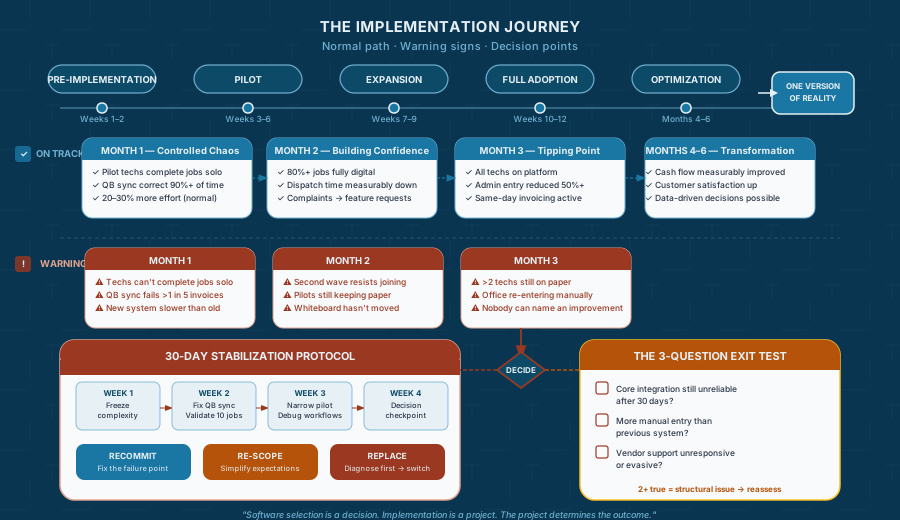
Vendor sales teams will tell you “a few days.” Here’s what actually happens for a 10–15 technician operation:
| Phase | Duration | What’s Happening |
|---|---|---|
| Pre-Implementation | 1–2 weeks | Account setup, data prep, QuickBooks configuration, pricebook creation |
| Pilot | 3–4 weeks | 2–3 techs on platform; parallel systems; friction identification; sync validation |
| Expansion | 2–3 weeks | Next wave onboarding; workflow adjustments; whiteboard retired |
| Full Adoption | 2–3 weeks | Remaining team; advanced features enabled; reporting baseline established |
| Optimization | Months 4–6 | Workflow refinement; secondary integrations; advanced features |
Total: 8–12 weeks from contract to full adoption. Not 8–12 weeks of full-time effort, but 8–12 weeks of calendar time for learning curves, testing, and natural adoption cycles.
Month-by-Month: What Success Looks Like
Month 1 — Controlled Chaos (Normal): 20–30% more total effort as people learn. Pilot techs finding their footing. Dispatcher managing dual systems. QuickBooks sync being tested. On track: Pilot techs complete standard jobs without calling the office. QuickBooks sync produces correct invoices 90%+ of the time. Warning signs: Pilot techs can’t complete a basic job without help after two weeks. QuickBooks sync fails on more than 1 in 5 invoices. Dispatcher spends more time on the new system than the old one.
Month 2 — Building Confidence (Progress): Second wave joining. Pilot techs mentoring colleagues. Whiteboard is clearly secondary. Complaints shift from “this doesn’t work” to “I wish it could do X” — a healthy sign. On track: 80%+ of jobs are fully digital. Dispatch time measurably reduced. Warning signs: Second wave resists joining. Pilot techs still maintaining paper backups. Whiteboard hasn’t moved to secondary status. Complaints are still about basic functionality, not feature requests.
Month 3 — The Tipping Point (Validation): Full team adoption. Resistors either converted or using the system under mild protest (acceptable). Same-day invoicing. Cash flow visibly improving. Someone says “I can’t believe we used to do this on paper.” On track: All techs using the platform. Admin data entry reduced 50%+. First month of reliable operational metrics available. Warning signs: More than two techs still on paper. Office still re-entering data manually “just to be safe.” Nobody can articulate what’s improved. If these persist, see Part 5 before investing further.
Months 4–6 — Optimization (Transformation): Automated reminders, customer portal, custom reporting, preventive maintenance scheduling. ROI accelerates because you’re building on a stable foundation. On track: Measurable cash flow improvement. Customer satisfaction increasing. Business questions answerable with real data.
That timeline is achievable for most small operations handling implementation internally. Whether it’s the right approach for your situation depends on your integration complexity, team dynamics, and available bandwidth — which the next section addresses directly.
What the timeline doesn’t show is complexity variance.
For one contractor, implementation means FSM + QuickBooks and a disciplined rollout.
For another, it means ERP connections, compliance workflows, multi-trade scheduling logic, and years of legacy data that can’t afford to break.
The same 8–12 week calendar window can feel smooth — or chaotic — depending on what’s underneath it.
This is also where vendor conversations get blurry. Sales demos simplify complexity. They show the “happy path.” They rarely pressure-test your real-world integration architecture, data migration scope, or change management risks.
That’s why structured vendor evaluation matters.
If you haven’t already, use the Vendor Scorecard framework in the Vendor Transparency to evaluate how clearly a platform addresses integration depth, migration support, API maturity, and real onboarding expectations. A polished demo is not the same as implementation readiness.
That’s the normal path. But what happens when implementation doesn’t follow the script?
Part 5: When Implementation Goes Wrong
The timeline in Part 4 describes the path when things go reasonably well. But every implementation hits friction — and some hit a wall. The question isn’t whether you’ll encounter problems. It’s whether those problems are normal turbulence or structural failure.
Knowing the difference prevents two equally expensive mistakes: abandoning a fixable implementation, or persisting with a fundamentally broken one.
Diagnosing the Failure Type
| Symptom | Likely Cause | Category |
|---|---|---|
| Techs reverting to paper | Adoption failure | Change management |
| Invoices not syncing | Integration architecture | Technical |
| Duplicate customers | Migration mapping error | Data |
| Everyone says “this is slower” | Workflow not redesigned | Process |
| Cash flow disrupted | Go-live too early | Timeline failure |
The 30-Day Stabilization Protocol
Freeze complexity
- Turn off non-essential integrations
- Revert to manual exports if needed
- Stop onboarding new features
Fix the one system that matters
- QuickBooks sync must work perfectly
- Validate 10 invoices end-to-end
Narrow pilot
- Reduce to 2–3 technicians again
- Debug workflows in controlled environment
Decision checkpoint
- Recommit
- Re-scope
- Replace
When Do You Cut Your Losses?
The 3-Question Exit Test
Core integration (FSM ↔ QuickBooks) cannot be made reliable after 30 days.
Workflows require more manual entry than your previous system.
Vendor support is unresponsive or evasive about limitations.
If the foundation is wrong, optimization will not save it.
When to Recommit Instead
Most failing implementations are not software failures — they’re change management failures. If the exit test came back clean (the integration works, manual entry hasn’t increased, vendor support is responsive), your problem is almost certainly in one of these categories:
Training gaps — Techs know the system exists but haven’t internalized the workflows. Solution: pair them with a Champion for contextual, on-the-job training, not another classroom session.
Configuration mismatch — The platform works, but it’s configured for a generic workflow rather than yours. Solution: revisit your pricebook, job templates, and notification settings with someone who understands your actual daily operations.
Workflow design — You digitized your old process instead of redesigning it. If dispatching in the FSM takes more steps than the whiteboard did, the system isn’t the problem — the workflow mapped into it is. Solution: simplify before adding complexity.
Cultural resistance — The system works for those who use it, but key team members won’t. Revisit the adoption profiles from Part 2, and be honest about whether resistance is a training problem or a management problem.
In these cases, the answer isn’t a new platform. It’s a targeted fix to the specific failure point — often achievable in 2–3 weeks with focused effort.
What Starting Over Actually Costs
| Category | Realistic Cost |
|---|---|
| 3 months subscription | $1,500–$4,500 |
| Staff hours (lost productivity) | 40–80 hrs |
| Damaged team trust | Harder to measure |
| Vendor switch implementation | 8–12 week reset |
What The Wrong System Can Cost
| Staying in wrong system | Hidden Cost |
|---|---|
| Continued double entry | 5–10 hrs/week |
| Delayed invoicing | Cash flow impact |
| Morale erosion | Cultural damage |
Whether you’re implementing for the first time or recovering from a failed attempt, the final question is the same: what can you handle yourself, and where does experienced support prevent expensive mistakes?
Part 6: When You Need Help
What You Can Handle Yourself
Most 5–15 technician operations can implement without outside help if:
- You have an internal champion with moderate tech comfort and 5–10 hours/week available
- Your integration needs are straightforward (FSM + QuickBooks)
- You’re doing a fresh start or minimal migration
- Your vendor provides genuine onboarding support
DIY timeline: 8–12 weeks. Cost: Subscription + 40–60 total staff hours during implementation.
What Benefits from Professional Support
Complex integrations beyond FSM + QuickBooks — ERP connections, separate CRM systems, IoT sensors, legacy systems without modern APIs. Integration architecture is a specialized skill; misconfigured integrations create problems that compound invisibly [6].
Significant data migration from an existing FSM with years of service history, equipment records, and maintenance agreements. Professional migration prevents field-mapping errors and duplicate-record cascades.
Multi-trade operations where workflow design must account for dependencies, sequencing, and multi-party visibility across plumbing, electrical, HVAC, and framing subcontractors.
Entrenched team resistance that goes beyond unfamiliarity into cultural opposition requiring structured change management frameworks.
Compliance-heavy environments with prevailing wage, multi-jurisdiction permits, or environmental documentation where someone who’s configured these workflows before can prevent regulatory missteps.
The Decision Framework
Do I Need Professional Support?
- Integration complexity: I need more than FSM + QuickBooks (ERP, CRM, IoT, legacy systems, multiple accounting platforms)
- Data migration scale: 1,000+ customer records with service history and equipment data requiring accurate transfer
- Multi-trade coordination: Scheduling and coordinating multiple trades or subcontractors through the platform
- Team resistance: Multiple team members actively opposed, or a prior technology initiative failed
- Compliance requirements: Prevailing wage tracking, multi-jurisdiction permits, or environmental compliance documentation
- Time constraints: Cannot dedicate 5–10 hours/week for 2–3 months to manage implementation internally
- Prior failure: Previous FSM attempt didn’t work and I need diagnosis and a different approach
0–1 items checked: Handle it yourself with vendor onboarding support. Use this guide’s frameworks.
2–3 items checked: Targeted professional support for specific complexity areas — a few hours of guidance on integration architecture or migration strategy.
4+ items checked: A structured engagement will almost certainly deliver better results and lower total cost than attempting a complex implementation without relevant experience.
The Bottom Line
Software selection is a decision. Implementation is a project. The project determines the outcome, not the decision.
You can choose the perfect platform and botch the implementation. You can choose a “good enough” platform and nail the implementation. The second scenario produces better results every time.
One version of reality isn’t a software feature. It’s an outcome you build — deliberately, systematically, and with the right support for the parts that exceed your experience.
Ready to Build Your Version of Reality?
You now have the complete toolkit: readiness assessment, platform evaluation frameworks, trade-specific requirements, structured vendor selection, and implementation guidance covering integration, change management, and data migration.
Moving forward on your own? Use the phased rollout plan, change management strategies, and integration architecture guidance as your implementation roadmap.
Want experienced support for the complex parts? I work with Northern California contractors on vendor selection, integration design, data migration, and implementation coaching — structured decision support so you can move forward confidently.
Planning an FSM implementation? I create custom engagement plans matched to your workflows, integration needs, team dynamics, and timeline.
Common engagements include:
- Vendor selection with structured evaluation frameworks
- Integration architecture (FSM + QuickBooks + additional systems)
- Data migration planning and oversight
- Change management strategy for teams with adoption concerns
- Phased implementation coaching
References
This concludes the Field Service Software Buyer’s Guide. For trade-specific guidance, return to Your Trade to explore requirements for plumbing, general contracting, HVAC, and expanding coverage.
Connect & Share This Guide
If you're navigating software selection, system integration, or complex operational workflows, I’d welcome a conversation. My work focuses on designing thoughtful, defensible solutions that align technology with how your organization actually operates.