
Spatial Analysis for Small Businesses
Discover how location intelligence can transform your business decisions.
Overview
A Practical Guide to Spatial Intelligence for Small Businesses

The math is getting harder for small businesses. Margins are tighter. Customers are choosier. The cost of a wrong decision—a bad location, a misdirected marketing campaign, an expansion that doesn’t pan out—hits differently when there’s no cushion to absorb it. You already know this. You feel it every time you second-guess a choice or wonder if you’re missing something your competitors see.
This guide exists because you deserve better tools for navigating uncertainty. Not enterprise software with six-figure price tags. Not academic theory. Practical methods that help you see your business more clearly—where your customers actually are, which neighborhoods respond to you, where the overlooked opportunities hide.
Spatial analysis won’t make the economy easier. But it can make your decisions sharper. And right now, that edge matters.
What This Guide Covers
This guide introduces five spatial analysis methods that help small businesses make smarter location-based decisions—without requiring a technical background or enterprise budget.
Where are my customers concentrated?
Point pattern analysis reveals whether your customers cluster in specific neighborhoods or scatter randomly—essential for targeted marketing and site selection.
Do my best customers live near each other?
Spatial autocorrelation identifies whether high-value customers or strong sales cluster geographically. When they do, you've found neighborhoods worth prioritizing.
What's happening where I don't have data?
Interpolation estimates values between known data points, helping you understand customer demand or market potential across your entire region.
What factors actually drive my sales?
Spatial regression connects location characteristics—demographics, competition, accessibility—to business outcomes. Move from "I think this matters" to "I know."
How should I group my customers or territories?
Clustering segments your market into meaningful geographic groups for tailored outreach, optimized delivery routes, or smarter resource allocation.
Finding the Right Tools
The Tools tab offers an honest breakdown of mapping and GIS software options—from free platforms like QGIS and Google My Maps to cloud-based solutions for growing businesses. You’ll learn what each tool does well, what it costs, and which fits your skill level and budget.
Why This Guide—and Why Now
Most small businesses rely on intuition. That’s not a weakness—it’s how you’ve survived. But intuition works best when it’s informed. Spatial analysis doesn’t replace your gut; it sharpens it.
When you can visualize where your strongest customers live, which neighborhoods actually respond to marketing, and where underserved demand is quietly building, you stop guessing and start seeing. Decisions that used to feel uncertain become clearer. Faster. More strategic.
It's whether you can access it without enterprise budgets, data science degrees, or weeks of learning curve. This guide exists to prove you can.
Every section balances analytical depth with plain-English explanations. You’ll find real examples from businesses like yours, honest cost breakdowns, and practical workflows you can start today. No jargon for jargon’s sake. No tools you can’t afford. No assumptions about your technical background.
Point Pattern Analysis
Discovering where your customers cluster — and why it matters
Are my customers concentrated in certain neighborhoods, or are they spread out everywhere? And what should I do about it?
What It Is (In Plain English)
Point pattern analysis answers a deceptively simple question: Are my customers clustered together, or randomly scattered across the map?
Think of it like this: imagine dropping pins on a map for every customer order you’ve received in the past year. If you step back and squint, do you see obvious “hot spots” where pins bunch together? Or does it look like someone scattered confetti randomly?
Here’s why that matters: clustered customers are easier and cheaper to reach. If your best customers live within a few neighborhoods, you can focus your marketing, plan efficient delivery routes, and even choose your next location with confidence. Random scatter means you might need a different strategy entirely.
The “analysis” part takes this beyond eyeballing. It uses statistics to tell you whether the clusters you think you see are real patterns or just coincidence. That’s the difference between confident decision-making and expensive guesswork.

Why Small Businesses Care
Focus your limited marketing budget. Instead of blanketing an entire city with ads, you can concentrate spending in neighborhoods where your customers actually live — often getting 3-4x better response rates for the same spend.
Find your next location. Clusters reveal where demand already exists. Opening near an existing customer concentration reduces risk compared to guessing based on gut instinct.
Identify underserved opportunities. Sometimes the most interesting finding is where customers aren’t. Gaps in your coverage might represent untapped markets — or areas where you’ll never compete effectively.
Optimize delivery and service routes. Dense clusters mean efficient routes. Scattered customers mean higher costs per delivery. Knowing which pattern you have shapes your entire operations strategy.
When You’d Use This
Opening your second (or third) location. You’ve got one successful spot and customer data from your POS. Before signing a lease somewhere, wouldn’t you want to know where your existing customers actually come from?
Planning a direct mail campaign. You have $2,000 for postcards. Should you mail to 10,000 random households, or 5,000 households in the three ZIP codes where 60% of your customers already live?
Evaluating a franchise territory. Someone’s offering you the rights to a 15-mile radius. Point pattern analysis of existing franchisee performance can show whether that territory has real potential or is mostly dead zones.
Choosing where to focus delivery service. You can’t deliver everywhere profitably. Cluster analysis helps you draw the delivery boundary that captures the most customers with the least driving.
Real Small Business Example
Business: Local coffee roaster with café and wholesale accounts
Size: 8 employees, $650K annual revenue
Challenge: Deciding between two potential locations for second café
The Situation:
The owners had narrowed their expansion to two neighborhoods. Both “felt right” — good foot traffic, reasonable rent, the right vibe. But with $80,000 in buildout costs on the line, feelings weren’t enough.
What They Did:
- Exported 18 months of customer data from their POS (about 4,200 unique customers with ZIP codes)
- Used QGIS (free software) to map customer locations
- Ran a simple cluster analysis to identify concentration areas
- Overlaid competitor locations to spot gaps
What They Found:
Their customers weren’t evenly distributed — 52% came from just four ZIP codes, all northeast of their current location. One of their candidate sites was in this cluster zone. The other (which had “felt” better to the owners) was in an area that generated only 8% of their current customers.
The Decision:
They chose the location within their existing customer cluster, even though rent was $400/month higher.
The Result:
The new location hit profitability in month 4 instead of their projected month 8. First-year revenue was 34% above projections. The owners estimate the analysis saved them from a $120,000 mistake.
Total cost of analysis: $0 (DIY with free tools) + ~12 hours of the owner’s time learning the basics.
How It Works (The Simple Version)
You don’t need to understand the math, but here’s the concept:
Every customer address becomes a dot on a map.
The analysis calculates the average distance between each point and its nearest neighbor.
Here's the key insight — if you scattered the same number of points *randomly* across the same area, what would the average distance be? Statistics can tell us exactly what to expect from randomness.
- If your actual distances are *shorter* than random would predict → **clustering** (customers bunch together)
- If your actual distances are *longer* than random → **dispersion** (customers spread apart, avoiding each other — rare in business contexts)
- If distances match random expectation → **no pattern** (you'll need a different strategy)
DIY Workflow: Discover Where Your Customers Concentrate
Export Your Customer Addresses
Pull a list of customer addresses from wherever you track them—your point-of-sale system, email list, CRM, or even a spreadsheet of past invoices. You need at least 100 addresses to see meaningful patterns, but 300-500 is better. Include any extra details you have, like order totals or visit frequency, which can add depth to your analysis later.
Clean Up the Data
Open your list in Excel or Google Sheets. Remove duplicate entries and fix obvious typos in street names or ZIP codes. Make sure each address is complete (street, city, state, ZIP). Delete any entries that are clearly wrong, like test orders or your own address. This step is tedious but important—messy data creates misleading maps.
Convert Addresses to Map Coordinates
Mapping tools need latitude and longitude, not street addresses. Use a free geocoding service like geocod.io (2,500 free per day) or the Google Sheets add-on "Geocode by Awesome Table". Upload your address list, and the service adds coordinates to each row. For lists over 1,000 addresses, this may take a few minutes.
Plot Your Customers on a Map
Import your geocoded data into a free mapping tool. Google My Maps is the easiest starting point—upload your spreadsheet and it drops a pin for each customer. For more options, try Kepler.gl (drag-and-drop, no account needed) or QGIS (steeper learning curve but more powerful). Don't worry about analysis yet—just get the points on the map.
Examine the Pattern
Step back and study your map. Ask yourself: Do customers bunch together in certain neighborhoods, or are they scattered evenly across the area? Turn on a heat map view if your tool offers it—this highlights dense areas with warmer colors. You're not creating zones or drawing boundaries here; you're simply observing where concentrations naturally appear.
Document What You Discovered
Write down what the pattern reveals. Which ZIP codes or neighborhoods have the highest density? Are there areas you assumed were busy that turned out sparse? What surprised you? This discovery becomes the foundation for decisions—but the pattern itself is the insight. You're not assigning customers to groups; you're seeing where they already chose to be.
Expected Time: 4-6 hours for your first map (faster once you've done it before)
Cost: Free with tools mentioned above, or up to $50 if you need paid geocoding for large lists
What Your Results Mean
If you see strong concentrations: Your customers naturally gravitate toward certain areas. This could reflect demographics, proximity to your location, word-of-mouth networks, or local marketing that worked. These hotspots deserve attention—and investigation into why they exist.
If customers appear scattered: Either your appeal is broad (good for some businesses), or you haven’t yet found your core audience. Scattered patterns might also mean your sample is too small to reveal underlying structure. Try adding more data before concluding there’s no pattern.
If you’re not sure: Ambiguous results are common. The pattern might be subtle, or you might need more data points. This is a good time to consult someone who can run statistical tests to confirm whether concentrations are meaningful or just random noise.
When to Get Help
This DIY approach works well for a first look at your customer patterns. Consider bringing in a consultant if:
- You have more than 5,000 addresses and want statistical confirmation that concentrations are real (not random chance)
- You want to layer in demographic data, competitor locations, or other factors to understand why the pattern exists
- You’re making a high-stakes decision (like signing a lease) and need confidence before committing
- Your pattern is ambiguous and you need expert interpretation
A professional point pattern analysis typically runs $1,500-3,500 and includes statistical validation plus recommendations—often worthwhile for decisions involving significant investment.
Common Mistakes to Avoid
With only 50 customers, almost any pattern could be random chance. You need at least 200+ points for reliable cluster detection, and 500+ is better.
A "cluster" of customers in a dense urban area might just reflect where people live, not actual preference for your business. Always consider: is this a cluster of customers, or a cluster of *people*?
Customer patterns shift. Your 3-year-old data might show where customers *were*, not where they are now. Use recent data (12-18 months) for expansion decisions.
Questions to Consider
Now that you understand point pattern analysis, here are questions to explore for your own business:
Do you have enough customer data to analyze? Check your POS or CRM — how many unique customer addresses could you export?
What would change if you knew your customers clustered? Would you adjust marketing spend? Consider a new location? Change your delivery zone?
How old is your customer data? Has your customer base shifted in the past year?
If you have 200+ customer addresses and a decision to make, point pattern analysis might be your next step. Start with a free visualization in Google My Maps to see what you're working with.
Spatial Autocorrelation
Discovering if your best customers live near eachother — and why it matters
Do your best customers tend to live near each other — and does that pattern matter for your decisions?
Where Tab 2 showed you where customers cluster, spatial autocorrelation measures whether similar customer values — like spending, visit frequency, or lifetime value — appear together more often than random chance.
If they do? Geography is influencing behavior. If they don’t? Location-based strategy may not be your strongest lever.
What It Means (In Plain English)
Imagine color-coding your customer map:
- Green = high-value (e.g., customers who spend $500+/year)
- Yellow = medium-value (e.g., customers who spend $200–$500/year)
- Red = low-value (e.g., customers who spend less than $200/year)
Then ask:
- Do the green dots tend to be surrounded by more green dots?
- Or are they evenly mixed with yellows and reds?
- Or do high-value customers appear unusually far apart from one another?
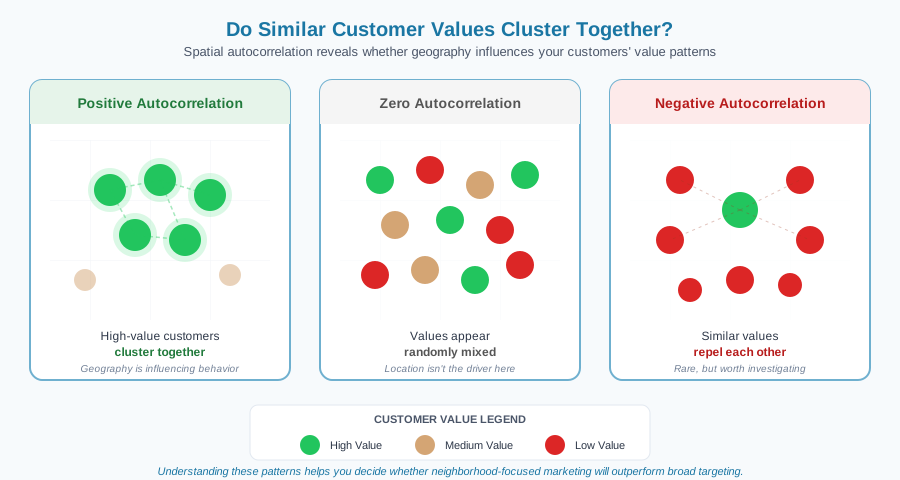
Spatial autocorrelation measures this pattern and gives you a clear signal:
This measurement helps you decide whether neighborhood-focused marketing will outperform broad targeting.
Why Small Businesses Care
1. Marketing Efficiency
If your highest-value customers cluster in a few neighborhoods, you can target fewer ZIP codes, shorten your ad radius, sponsor hyperlocal events, and stop paying to reach people who were never going to convert.
This isn’t theoretical — businesses regularly cut 20–40% in advertising costs once they stop spreading budget across an entire metro and start focusing where their best customers actually live.
2. Smarter Location Decisions
Thinking about a second location? Autocorrelation shows you:
- Which neighborhoods truly match your existing customer profile
- Where a new location would draw from a proven customer base
- Which areas to skip, even if rent is cheap or foot traffic looks promising
It’s the difference between “this feels like a good spot” and “this matches the pattern of everywhere we’ve succeeded.”
3. Product & Service Personalization
When certain neighborhoods over-index for your business, you can tailor your approach:
- Stock inventory that matches local preferences
- Create neighborhood-specific promotions or bundles
- Build localized loyalty programs that reward your best clusters
- Adjust service hours or delivery windows based on where demand concentrates
4. Competitive Intelligence
Spatial autocorrelation helps you see the competitive landscape differently:
- Where competitors have locked up customer loyalty (and where they haven’t)
- Gaps in the market where no one is serving clustered demand
- Neighborhoods where your brand resonates in ways competitors can’t replicate
Sometimes the most valuable insight is learning that a “hot” neighborhood is actually saturated — and the quieter area next door is wide open.
When You’d Use This: Quick Examples
Discovered that loyal members (3+ classes/week) clustered heavily in two walkable neighborhoods — not scattered across the city as assumed. Shrank Facebook ad radius from 10 miles to 3 miles and shifted budget to Instagram targeting those specific ZIP codes. Result: 35% lower ad spend, same number of new sign-ups, and a referral program that actually worked because members knew each other.
Assumed natural wine buyers were high-income customers. Autocorrelation revealed they actually clustered in two creative-class neighborhoods with moderate incomes but strong "lifestyle" characteristics. Moved tasting event promotion away from wealthy suburbs and into those districts. Attendance doubled; bottle sales at events increased 60%.
Mapped repeat customers (5+ orders) and found three tight clusters in the metro area. Restructured delivery routes around those clusters, reducing driver time by 20%. Launched a "neighborhood loyalty bonus" in those areas — customers got a free meal for every neighbor they referred. New customer acquisition in cluster zones jumped 45%.
Thought business was evenly distributed across service area. Autocorrelation showed premium grooming packages clustered in three specific subdivisions. Started leaving door hangers only in those neighborhoods instead of the whole ZIP code. Cut printing costs by 70% while booking rates stayed constant.
Real-World Case Studies of Small Businesses Using Autocorrelation
Spatial and temporal autocorrelation aren’t academic ideas alone — they’re practical tools that help small businesses make smarter decisions. Below are real-world examples of how small businesses used autocorrelation to improve marketing, reduce costs, or plan expansion.
Business: Multi-location laundry & dry-cleaning business
Size: 9 existing locations, ~25 employees
Challenge: Choosing the right neighborhood for store #10
The Situation:
The owners wanted to open a 10th store but were wary of picking a location based on instinct or “market vibe.” Previous expansions had mixed results, and they were ready to use data, not just gut feel.
What They Did:
- Mapped customer trade areas for all 9 stores using ArcGIS
- Identified shared traits among top-performing locations
- Overlaid demographic layers (renters, young professionals, nightlife access)
- Scored candidate neighborhoods for pattern match
- Compared pattern scores to rent costs and competitor presence
What They Found:
The most successful stores were in renter-dense, walkable neighborhoods with nightlife and no direct competition. One site on their shortlist had the exact profile; the other did not.
The Decision:
They selected the high-match site, even though its square footage was slightly smaller. It fit the proven pattern they saw in existing clusters.
The Result:
Foot traffic was 15% higher than projections in the first 90 days. Launch ROI was achieved in under 4 months. They avoided investing in a high-income district with low demographic match — a decision they estimate saved them over $80,000 in lost opportunity.
Total cost of analysis: Internal team effort using ArcGIS + free census overlays (~10 hours staff time)
How It Works: The Process
You don’t need to understand the math — but it helps to know what’s actually happening when you (or a consultant) run this analysis.
Export customer addresses along with a value metric — spending level, visit frequency, lifetime value, or whatever matters most to your business. You'll need at least 100 customers for meaningful results; 300+ is better.
Convert addresses to latitude/longitude coordinates. Free options exist (Census geocoder, Google Sheets add-ons), or your analysis tool may handle this automatically.
Run a test called Moran's I (don't worry about the name). Behind the scenes, the software builds a "neighborhood table" that defines which customers count as neighbors to each other — that's what makes the math work. You don't need to configure this yourself; most tools handle it automatically.
This gives you one number that answers: "Overall, do similar customer values cluster together across my entire service area?"
- Positive result → Yes, similar values cluster. Geography matters.
- Near zero → No pattern. Location isn't the driver.
- Negative result → Similar values repel each other (rare, but interesting).
If the global test shows clustering, run LISA analysis to see exactly where. This creates a map showing:
- Hot spots — High-value customers surrounded by high-value neighbors
- Cold spots — Low-value customers clustered together
- Outliers — High-value customers in low-value areas (or vice versa)
Now the strategy part:
- Hot spots → Focus marketing, consider expansion, build loyalty programs
- Cold spots → Investigate why. Service gaps? Wrong product mix? Or just not your market?
- No pattern → Shift strategy away from geography toward demographics, behaviors, or interests
Cost Range: Free (DIY) to $2,500 (full analysis with recommendations)
Data Needed: Customer addresses + one value metric (100+ records minimum)
Common Mistakes to Avoid
Just because high-value customers cluster in a neighborhood doesn't mean the neighborhood caused them to be high-value. They might share demographics, lifestyle, or proximity to your location. Clustering tells you where to focus — not why the pattern exists. That's a separate question worth investigating.
Autocorrelation needs enough data points to find real patterns. With 50 customers, you might see "clusters" that are actually just random noise. Aim for 100+ customers minimum, and 300+ if you want to detect subtler patterns. If you don't have enough data yet, focus on collecting it before investing in this analysis.
Finding zero autocorrelation isn't a failure — it's valuable information. It tells you that geography isn't the primary driver for your business, which means you should shift focus to other targeting strategies: demographics, behaviors, purchase history, or interests. Don't waste money on hyperlocal marketing when location doesn't matter.
Running autocorrelation on "all customers" often shows nothing interesting. The magic happens when you segment: Where do your highest-value customers cluster? Your most loyal? Your newest? Different segments may cluster in completely different places — and that's where strategy gets interesting.
Questions This Might Raise
As you think about whether spatial autocorrelation fits your situation, you might be wondering:
"My customers seem pretty spread out — does that mean this analysis won't help me?"
Not necessarily. "Spread out" is often an assumption, not a measurement. You might be surprised what patterns emerge when you actually map the data. And if analysis confirms there's no clustering? That's useful too — it tells you to focus your strategy elsewhere.
"How do I get from 'customers cluster here' to 'I should do X'?"
Great question. The analysis shows you where; the strategy comes from combining that with business judgment. Hot spots might mean "double down on marketing here" or "this is where a second location makes sense." The Tools tab covers how to move from insight to action.
"Can I do this with just ZIP codes, or do I need full addresses?"
ZIP codes can work for a rough analysis, especially if you have hundreds of customers. Full addresses give you more precision — you can see patterns within neighborhoods, not just across them. Start with what you have; upgrade your data collection if the initial results look promising.
"How often should I run this analysis?"
For most small businesses, annually is plenty — customer geography doesn't shift that quickly. Run it again if something major changes: you open a new location, expand your service area, or launch a product that attracts a different customer type.
Next Steps
Spatial Interpolation
Filling in the gaps to see the complete picture across your service area
"I have data for some locations—like customer satisfaction at 10 stores, or delivery times in certain neighborhoods—but what about everywhere else? How do I estimate what's happening in the areas I haven't measured yet?"
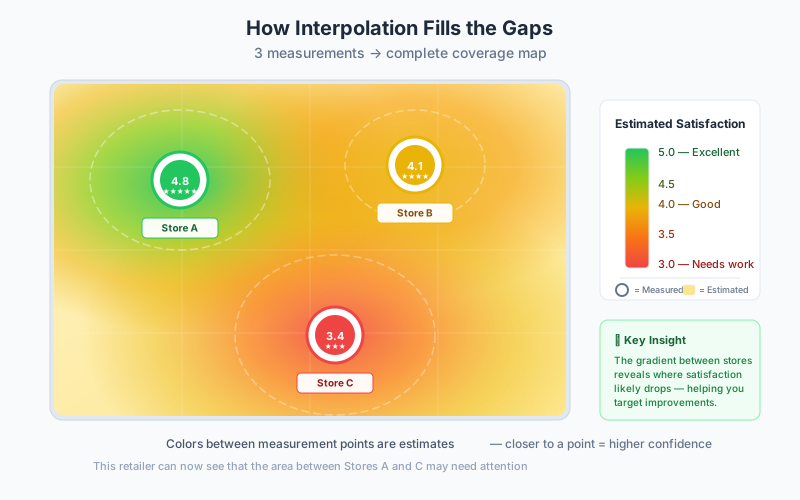
This is where spatial interpolation comes in. It’s about filling in the gaps on your map using the data points you do have, so you can see the complete picture across your entire service area.
What It Is (In Plain English)
Imagine you’re checking the temperature in your city. You have thermometers at 5 locations showing 72°, 75°, 68°, 71°, and 74°. But what’s the temperature everywhere in between? You’d estimate it based on what nearby thermometers show—areas near the 75° reading are probably warmer; areas near the 68° reading are probably cooler.
That’s spatial interpolation.
In business terms: You’ve measured something at specific locations—maybe customer satisfaction at your stores, delivery times in certain ZIP codes, or sales performance at existing sites. Spatial interpolation uses those known values to estimate what’s likely happening at unmeasured locations in between.
Why this matters: You can’t measure everything everywhere—it’s too expensive and time-consuming. But you need to understand your entire market, not just the spots where you have data. Interpolation gives you the full picture by intelligently estimating the gaps.
Why Small Businesses Care
Service Coverage Optimization (15-25% Efficiency Gains)
Identify exactly where your service is strong vs. weak:
- Find neighborhoods where delivery times are unacceptably long
- Spot areas where customer satisfaction is dropping
- Discover coverage gaps before customers complain
- Prioritize infrastructure improvements (new delivery hubs, service centers)
Expansion Planning with Lower Risk
When considering new locations or markets:
- Estimate likely performance at potential sites based on surrounding areas
- Identify underserved areas with good demographics
- Avoid over-saturating already well-covered neighborhoods
- Make expansion decisions with data instead of gut feel
Resource Allocation
Deploy limited resources where they’ll have the most impact:
- Add delivery drivers in high-demand areas you’ve identified
- Schedule service technicians based on predicted need patterns
- Stock inventory at locations serving high-opportunity zones
- Focus marketing on areas showing predicted potential
Quality Improvement
Understand your performance landscape:
- See where service quality degrades as you move away from your base
- Identify the edge of your effective service radius
- Find surprising weak spots that need attention
- Track improvement over time as you make changes
When You’d Use This
Add a Second Delivery Location?
Map all your delivery times, then interpolate to create a complete "delivery time surface" across your service area. Shows exactly where performance degrades.
Focus Marketing Budget
Create a "predicted satisfaction surface" based on where current happy customers live. Identifies neighborhoods similar to your best-performing areas.
Define Your Trade Area
Estimate customer density and willingness to travel across your entire market. Shows where your new store's natural trade area ends.
Find Coverage Gaps
Compare actual appointment density with demographic indicators. Reveals whether low-performing areas have low potential or just poor awareness.
Real Small Business Example
Mobile Auto Detailing Service
The Business: Owner + 2 employees, 3 service vehicles, $280K annual revenue, 25-mile radius covering suburban and exurban areas.
The Challenge: Some days, technicians drove 80+ miles completing 4 appointments. Other days, they stayed in tight geographic areas and served 6-7 customers. Customer satisfaction varied dramatically—5-star reviews in some neighborhoods, complaints about late arrivals in others. Owner suspected certain areas were too far from their home base, but didn't know where the cutoff was.
The Specific Problem: They had data on drive time and customer satisfaction for 800+ past appointments, but couldn't visualize where service quality broke down across their entire coverage area.
What They Did
Step 1: Gathered historical service data (2 hours)
- Exported 14 months of appointment records from scheduling software
- Included: customer address, actual arrival time, scheduled arrival time, customer rating (1-5 stars)
- Calculated "on-time performance" (minutes late or ahead of schedule)
- Had 847 appointments with complete data
Step 2: Hired a GIS consultant for analysis ($1,200)
The consultant:
- Geocoded all customer addresses
- Created "interpolated surfaces" for on-time performance and customer satisfaction
- Used Inverse Distance Weighting (IDW) method
- Mapped results as heat maps showing service quality gradients
Step 3: Analyzed the patterns (consultation included in fee)
The interpolation revealed:
Service quality dropped beyond 12 miles from home base:
- Within 10 miles: Average 8 minutes ahead of schedule, 4.7-star rating
- 10-15 miles: Average 15 minutes late, 4.2-star rating
- Beyond 15 miles: Average 35+ minutes late, 3.8-star rating
Geographic barriers created "dead zones":
- River crossing (2 bridges) added 20+ minutes in certain directions
- Highway traffic patterns made some nearby areas effectively farther than distant ones
- Three neighborhoods had perfect demographics but consistently poor service—all beyond 13 miles
Unexpected opportunity zones:
- Two areas within 8 miles had minimal customers despite strong demographics
- Interpolation showed these areas should have high potential based on surrounding patterns
- Turned out they'd never marketed there—oversight, not low demand
The Result
Immediate Actions Taken:
1. Redefined service area (Week 1):
- Stopped accepting appointments beyond 15 miles
- Exceptions for repeat 5-star customers
- Turned away ~12% of inquiries, but these were the problematic appointments
2. Adjusted pricing by zone (Week 2):
- Within 8 miles: Standard pricing
- 8-12 miles: +$20 travel surcharge
- 12-15 miles: +$40 travel surcharge
- Beyond 15 miles: Referred to competitor (built goodwill)
3. Focused marketing (Month 2):
- Launched direct mail campaign in the two under-served areas within optimal zone
- Added those ZIP codes to Google Ads targeting
- Posted yard signs after jobs in those neighborhoods
Outcomes (6 months later):
| Metric | Before | After | Change |
|---|---|---|---|
| Average daily drive distance | 73 miles | 53 miles | -28% |
| Average appointments/day | 4.8 | 6.5 | +35% |
| Fuel costs | — | -$850/month | Savings |
| On-time performance | 15 min late | 7 min ahead | +22 min |
| Star rating | 4.2 | 4.8 | +0.6 |
| Complaints about late arrivals | — | — | -78% |
| Repeat booking rate | — | — | +41% |
Revenue Impact:
- Lost revenue from turned-away distant customers: -$2,100/month
- Gained revenue from efficiency (more appointments/day): +$7,200/month
- Gained revenue from new marketing zones: +$3,400/month
- Net revenue increase: +$8,500/month (+31%)
Total investment: $1,200 (one-time consultant fee)
Payback period: 5 days of improved operations
Ongoing benefit: $102,000/year in incremental revenue + substantial satisfaction improvement
The Lesson
The owner had assumed all areas within 25 miles were serviceable—that's what they'd always told customers. The interpolation analysis revealed that geography creates natural boundaries that aren't obvious on a flat map. A neighborhood 15 miles north (across the river, through downtown) took 50 minutes to reach, while a neighborhood 18 miles west (straight highway shot) took 28 minutes.
By visualizing service quality as a continuous surface rather than individual points, they saw which areas made business sense and which didn't—even though some distant areas kept requesting service.
How It Works (The Simple Version)
Think about filling in a coloring book. You have a few spots where you know the exact color value—say, dark blue here, light blue there, medium blue over there. Spatial interpolation blends between those known points to color the entire page smoothly.
The process:
You have measurements at specific locations
- Store #1: Customer satisfaction = 4.8 stars
- Store #2: Customer satisfaction = 4.1 stars
- Store #3: Customer satisfaction = 4.6 stars
You want to know values everywhere else
- What’s customer satisfaction 3 miles from Store #1?
- What about the area halfway between Store #1 and Store #2?
- What’s it like at the edge of your service area?
The software calculates estimates
- Locations near high values get estimated as high
- Locations near low values get estimated as low
- Locations equidistant from different values get a weighted average
- The farther from measured points, the less certain the estimate
You get a complete “surface” showing predicted values everywhere
- Visualized as a heat map (red = high, blue = low)
- Or as contour lines (like elevation on a topographic map)
- Shows gradients and transitions smoothly
Common Interpolation Methods
Inverse Distance Weighting (IDW): Simpler method—nearby points have more influence than distant points. Good for most small business needs.
Kriging: More sophisticated method that considers spatial patterns and provides confidence intervals. Better for complex analysis, but requires more expertise.
Spline: Creates smoothest possible surface. Good for visualizations, less accurate for predictions.
Conceptual Workflow
Define What You're Trying to Estimate
Identify your metric: customer satisfaction scores, delivery times, sales per square foot, service quality ratings. Must be numeric (not yes/no categories), vary by location, and reasonable to assume nearby locations are similar.
Good: "Average delivery time in minutes" • "Customer satisfaction (1-5 scale)"
Bad: "Do customers like us?" (not numeric) • "Product SKU" (not a measurable quantity)
Gather Your Measurement Points
Collect data from your systems: location (address, coordinates, or ZIP code), value (the metric you're interpolating), date/time period (use recent data, 6-24 months).
Minimum requirements: At least 20-30 measurement points, spread across your service area (not all clustered), values that actually vary.
Load Data and Visualize Points
Import into chosen tool and create initial point map. Color-code or size by value: high values (dark green/large), medium values (yellow/medium), low values (red/small).
Visual check: Are points spread across your area? Do you see obvious patterns or clusters?
Run Interpolation Analysis
Choose method (IDW for most small businesses, kriging for advanced). Set parameters: power (2 is standard), search radius (1-3 miles urban, 5-10 miles rural), cell size (100-500 meters).
Result: A "raster surface" where every point in your service area now has a predicted value based on weighted average of nearby measurements.
Visualize Results as Heat Map
Apply color gradient (red → yellow → green), adjust transparency to 50-70%, add original measurement points as dots on top, include service area boundary and legend.
Create multiple views: smooth gradient (shows transitions), classified (Poor/Fair/Good/Excellent), contour lines.
Analyze and Interpret Patterns
Identify: WHERE are your problem areas? HOW BIG are the gaps? WHY might values be low there? WHERE are your strengths? WHERE are the boundaries?
Quantify findings: "32% of our service area has predicted satisfaction <4.0" • "Service quality drops below acceptable at ~12 miles from base"
Cross-Reference with Business Context
Overlay business data (your locations, competitors, territory boundaries), demographic data (income levels, population density), and infrastructure (major roads, geographic barriers).
Ask: Are weak areas fixable with more resources? Should we exit certain zones entirely? Where are high-potential areas we're not serving well?
Make Business Decisions
Weak zones: Improve service there, adjust pricing, or exit those markets.
Strong zones: Maintain current levels, consider for expansion, replicate success elsewhere.
Opportunity gaps: Target for marketing or expansion.
DIY First Time: 10-16 hours (including learning software) | DIY Ongoing: 3-5 hours per analysis
Cost Range: $0 (free tools + your time) to $800-2,500 (consultant)
Common Mistakes Small Businesses Make
Trying to interpolate across a large area with only 5-10 data points produces unreliable estimates. You need at least 20-30 points spread across your area.
Estimating values in areas far from any measurement points produces pure guesses. Only trust interpolated values within your measured area.
Interpolation assumes smooth transitions, but rivers, highways, or mountains create real discontinuities. A river crossing can change everything.
Beautiful smooth heat maps look authoritative, but they're statistical predictions with uncertainty. Focus on general patterns, not precise values at specific locations.
Running interpolation once and assuming patterns never change. Re-run analysis every 12-18 months, or whenever you make major operational changes.
Blindly trusting the interpolated surface without checking if it makes sense. Hold back 10-20% of data points and compare predictions to actual values. If the map surprises everyone who knows the business, investigate before acting.
Questions This Raises
Minimum: 20-30 points (basic patterns). Better: 50-100 points (reliable patterns). Ideal: 100+ points (fine-grained detail). It depends on area size, how much your metric varies, and how precise decisions need to be.
Investigate first—is it a data error, one-time issue, or real problem? Create interpolation WITH outliers, then without, and compare. This shows how much outliers influence the overall pattern.
Yes, with caveats. You need 20+ ZIP codes, and results show neighborhood-level patterns, not street level. Better alternative: geocode individual customer addresses if you have them.
Use IDW for: first-time analysis, quick results, visualizations, 80% of small business cases. Use kriging for: quantifying uncertainty, high-stakes decisions, complex spatial patterns.
This is valuable! Options: Redefine service area to exclude weak zones, invest strategically to fix important areas, price for reality (surcharges for hard-to-serve areas), or exit gracefully and refer to competitors.
Absolutely! Common workflow: Point pattern analysis ("Where are our customers?") → Spatial interpolation ("How satisfied are they?") → Spatial autocorrelation ("Do satisfaction patterns cluster?") → Demographic overlay ("What explains these patterns?")
Next Steps
Ready to put this into practice? See the Tools tab for implementation options.
Spatial Regression
Predict business success at new locations using data-driven insights from similar areas—take the guesswork out of choosing where to grow.
If I open at this location, what can I realistically expect in terms of revenue, foot traffic, or success based on the characteristics of the area?
What It Is (In Plain English)
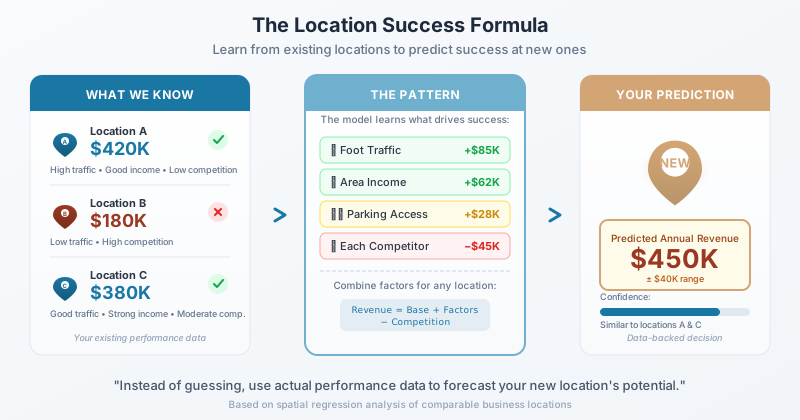
Spatial regression is like having a crystal ball that’s actually backed by data. It looks at successful (and unsuccessful) business locations, figures out what geographic factors made them work—things like population density, median income, competitor distance, or proximity to complementary businesses—then uses those patterns to predict how a new location might perform.
Think of it as the location equivalent of looking at comparable home sales when buying a house. You’re not just guessing—you’re using actual performance data from similar situations to make an informed prediction. The “spatial” part means it accounts for the fact that geography matters: a coffee shop’s success isn’t just about its own block, but also what’s happening in neighboring areas.
Why Small Businesses Care
Risk Reduction: Instead of betting $50,000+ on gut feeling, you’re making data-backed location decisions Investor Confidence: Banks and investors love seeing projected performance based on actual analysis
Negotiation Power: Armed with revenue predictions, you can negotiate better lease terms
Expansion Strategy: Know which of your potential second locations has the highest success probability
Competitive Advantage: Most small businesses still pick locations based on “feels right”—you’ll have actual data
When You’d Use This
You've narrowed down to 3 possible storefronts. Spatial regression tells you Location A should generate $380K annually, Location B $290K, and Location C $420K—suddenly that higher rent at Location C makes sense.
The landlord wants $4,500/month. Your spatial regression shows similar businesses in this area average $45K monthly revenue. Now you know if the math works.
You're ready to expand from one successful location to three. Spatial regression helps you identify which neighborhoods have the same "success factors" as your current profitable location.
You're applying for an SBA loan. Including spatial regression analysis showing projected $500K first-year revenue based on 15 comparable locations strengthens your application considerably.
Real Small Business–Scale Example
Business: NYC Department of Finance (Property Modeling Group)
Size: Local government agency, modeling 1–3 family homes in Brooklyn
Challenge: Improve fairness in residential property valuations for tax purposes
What They Did:
- Mapped Market Data: Analyzed recent sales of thousands of residential homes across Brooklyn.
- Identified a Pattern: Found that sale prices were highly influenced by nearby homes — if one street’s prices went up, the surrounding blocks tended to rise too.
- Built the Model: Used a spatial lag regression model to predict a home’s value based not only on its size, lot, and age—but also the average price of homes nearby.
- Tested for Bias: Checked the model’s accuracy using equity metrics (Coefficient of Dispersion and Price-Related Differential) to ensure high- and low-value homes were assessed fairly.
The Result:
- Assessment fairness improved citywide — models no longer systematically over- or under-valued homes in specific neighborhoods
- Location-based bias dropped significantly — neighborhoods that were being unfairly penalized or under-valued were corrected
- Regulatory benchmarks met — final model passed all professional standards for equity in taxation
- Tax decisions became defensible — property owners saw fewer disputes and appeals
The Lesson:
Location affects value — but traditional models often miss how strong that effect is. By incorporating spatial autocorrelation into regression, NYC built a smarter model that worked for real neighborhoods, not just spreadsheets. This same principle can help small businesses: If location influences your pricing, sales, or demand—model it in.
How It Works (The Simple Version)
Imagine you're trying to predict how tall a child will be based on their parents' heights. You'd look at lots of families, find the pattern, then use it to make predictions. Spatial regression does the same thing, but instead of parent heights, it uses location characteristics.
The magic is that it considers "spatial spillover"—how neighboring areas influence each other. A Starbucks doesn't just benefit from its own corner's foot traffic; it benefits from being near that popular yoga studio next door. Traditional analysis misses these geographic relationships. Spatial regression catches them.
Common Mistakes Small Businesses Make
"This neighborhood has high income!" doesn't matter if there are 5 established competitors in a 2-block radius.
Your model says the location is bad, but it doesn't account for the new Amazon facility opening next door next year.
The model loves a location, but visiting reveals it's in a dead mall with 60% vacancy.
Using only your 3 current locations to predict a 4th—you need at least 10-15 data points for reliable patterns.
That ice cream shop's December numbers aren't representative of annual performance.
Questions This Raises
"Where do I find performance data for comparable businesses?"
Start with industry associations, franchise disclosure documents (even if you're not a franchise), and commercial real estate brokers who often have this data. Sometimes you need to estimate based on traffic and typical conversion rates.
"What if my business model is unique with no direct comparables?"
Look for adjacent businesses—if you're opening a cat café, study both coffee shops AND pet stores. Or use customer-based metrics: where do your target customers live, work, and currently shop?
"How accurate are these predictions really?"
Good spatial regression models typically predict within 15-20% of actual performance. That's far better than gut feeling, which studies show is about 40-50% accurate for location decisions.
"Can this help with online businesses choosing warehouse locations?"
Absolutely! Instead of predicting revenue, you'd predict delivery efficiency. Factors would include customer density, distance to shipping hubs, and labor availability.
"What's the minimum number of locations I need to analyze?"
For a reliable model, you need 15-20 comparison points. With fewer than 10, consider simpler analysis methods or focus on one key factor (like demographics) rather than complex regression.
Next Steps
Spatial Clustering
Grouping customers and locations into logical territories that make operational sense
How do I divide my customers into logical groups so my team can serve them efficiently — without anyone driving across town while a colleague handles the house next door?
What It Is (In Plain English)
Spatial clustering takes a messy scatter of customer locations and organizes them into sensible groups based on geography. Instead of randomly assigning customers to drivers, sales reps, or service territories, clustering finds natural groupings where customers are near each other.
Think of it like sorting a jar of mixed buttons. You could divide them randomly into piles — but it’s far more useful to group the red ones together, the blue ones together, and so on. Spatial clustering does the same thing with geography: customers in the north get grouped together, the downtown cluster becomes its own territory, the suburban spread gets divided logically.
The result? Routes that make sense. Territories that are fair. And a lot less wasted windshield time.
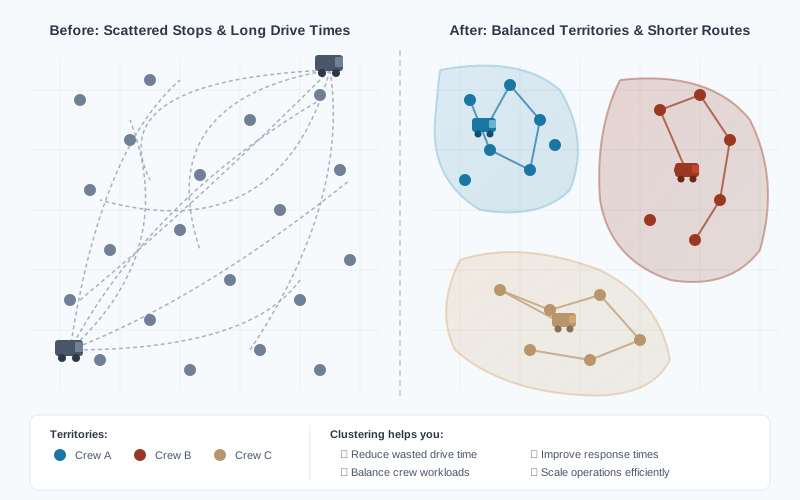
Before and after clustering: Grouping customer stops into clear territories creates shorter, more efficient routes and balanced workloads for each crew.
Why Small Businesses Care
For businesses with people on the road — whether that’s technicians, delivery drivers, sales reps, or mobile service providers — geography is money. Every unnecessary mile costs you in fuel, time, and wear on vehicles. Every inefficient territory means one person is slammed while another has gaps in their schedule.
Spatial clustering matters because it directly impacts your bottom line:
Cut fuel and travel costs. When customers are grouped logically, your team spends less time driving between appointments. A home services company with 5 technicians might save 50-100 miles per day across the team — that adds up to thousands in annual fuel savings.
Balance workloads fairly. Nothing burns out employees faster than feeling like they got the “bad” territory. Clustering helps you create territories with roughly equal customer counts and drive times, which keeps your team happier and turnover lower.
Serve customers faster. When a technician is already in a neighborhood, they can handle urgent calls nearby instead of dispatching someone from across town. Customers notice when you show up in 30 minutes instead of 3 hours.
Scale without chaos. Adding your sixth driver? Opening a second service area? Clustering gives you a framework for dividing territory logically rather than just “figuring it out” every time your business grows.
When You’d Use This
Spatial clustering shines whenever you need to divide geography among people or resources. If you’ve ever drawn territories on a napkin or argued about who “owns” which part of town, clustering can replace guesswork with data.
Home Services & Field Technicians
HVAC companies, plumbers, electricians, and appliance repair businesses use clustering for service territory planning — assigning technicians to zones that minimize drive time between jobs.
Delivery & Last-Mile Logistics
Food delivery services, courier companies, and e-commerce businesses optimize delivery zones by grouping nearby addresses into efficient routes for each driver.
Field Sales Territory Mapping
Outside sales teams divide prospects and accounts into balanced sales territories — ensuring each rep has fair opportunity without overlapping coverage.
Mobile & On-Site Services
Mobile pet groomers, house cleaners, lawn care companies, and mobile auto detailing businesses create service areas that keep providers working in tight geographic clusters.
Home Healthcare & Visiting Services
Home health agencies, visiting nurses, and in-home therapy providers assign caregivers to patient clusters — reducing travel and increasing face-time with patients.
Franchise Territory Planning
Franchise businesses define non-overlapping territories for new locations or franchisees, ensuring each unit has adequate market coverage without cannibalizing neighbors.
Real Business Example
Real Example: GreenLine Lawn & Landscape
The Business: Residential lawn care company, 4 crews, ~280 weekly accounts across a mid-sized metro area. Annual revenue around $620K.
The Challenge: Territories had evolved organically over 6 years — whoever signed a new customer "owned" that account. The result? Crews crisscrossed the city daily. One crew drove 45+ miles between jobs while another had accounts clustered tightly but fewer total customers. Fuel costs were climbing, crews were frustrated by uneven workloads, and the owner couldn't figure out how to add a fifth crew without making the chaos worse.
What They Did: Exported all 280 customer addresses from their scheduling software into a spreadsheet. Used a free clustering tool to group addresses into 4 balanced zones based on geographic proximity. Each zone was designed to have roughly equal account counts (68-72 per crew) and minimize total driving distance within the zone. They phased in the new territories over 6 weeks, reassigning accounts gradually to avoid disrupting customers.
The Result: Average daily drive time per crew dropped from 2.1 hours to 1.3 hours — a 38% reduction. Monthly fuel costs fell by $1,400 across the team. Crews completed an average of 1.5 more jobs per day with the time saved. When they added a fifth crew the following spring, they simply re-ran the clustering analysis to create 5 balanced zones in under an hour.
How It Works (The Simple Version)
At its core, spatial clustering answers one question: Which customers are closest to each other? The software groups nearby addresses together, then draws boundaries around each group to create territories.
Here’s the basic process:
Step 1: Plot all your locations on a map. Every customer address becomes a dot. You now have a visual scatter of everywhere you serve.
Step 2: Tell the software how many groups you want. Have 4 technicians? You probably want 4 clusters. Have 6 delivery drivers? Ask for 6 clusters. The number of groups typically matches the number of people or resources you’re dividing work among.
Step 3: The software finds natural groupings. It looks for addresses that are near each other and assigns them to the same cluster. The goal is to minimize the total distance within each group — so customers in the same territory are geographically close, not scattered.
Step 4: Review and adjust. No algorithm is perfect. You might need to tweak boundaries for practical reasons — maybe one cluster crosses a river with no bridge, or a key account needs to stay with a specific rep. Good tools let you manually reassign points after the initial grouping.
Common Approaches
Different clustering methods work better for different situations:
Balanced clustering divides customers into groups of roughly equal size. Use this when you need fair workloads — each sales rep gets about the same number of accounts, each driver gets a similar stop count.
Distance-based clustering groups customers purely by proximity, regardless of how many end up in each group. Use this when minimizing travel time matters more than balancing counts — common for emergency services or time-sensitive deliveries.
Density-based clustering finds natural “clumps” of customers without you specifying how many groups to create. The software identifies areas where customers are packed together and treats sparse areas as boundaries. Use this when you’re exploring your data and don’t yet know how many territories make sense.
What “Good” Clustering Looks Like
You’ll know your clustering worked when:
- Territories are compact, not sprawling or oddly shaped
- Travel stays within zones — your team rarely needs to cross into another territory
- Workloads feel fair — no one is slammed while others have light days
- The map makes intuitive sense — when you look at it, you think “yeah, that’s how I’d divide this”
DIY Workflow: Create Your First Clusters
This workflow applies whether you’re managing technicians, delivery drivers, sales reps, or any team serving customers across a geographic area.
Export Your Customer Data
Pull a list of customer addresses from your CRM, scheduling software, POS system, or even a spreadsheet. You need at minimum: street address, city, state, and ZIP. Include any extra fields that matter for balancing — like visit frequency, account value, or service type.
Clean Up the Data
Remove duplicates, fix obvious typos, and standardize formatting. "123 Main St" and "123 Main Street" should match. Most clustering tools struggle with messy addresses, so 15 minutes of cleanup now saves headaches later.
Geocode Your Addresses
Convert street addresses into latitude/longitude coordinates. Free services like geocod.io (2,500 free per day) or the US Census Geocoder handle this automatically. Upload your spreadsheet, download the results with coordinates added.
Import Into a Clustering Tool
Load your geocoded data into a tool that supports clustering. Free options include Kepler.gl (browser-based, no install) or QGIS (desktop software). Paid options like Maptive or eSpatial offer simpler interfaces if you prefer guided setup.
Set Your Parameters and Run
Tell the tool how many clusters you need — usually one per team member or service vehicle. Run the clustering algorithm. Most tools produce results in seconds, even with thousands of addresses.
Review the Results
Look at the map. Do territories make geographic sense? Check cluster sizes — are they reasonably balanced? Identify any obvious problems: clusters that cross rivers or highways, key accounts separated from their current rep, or zones that look oddly shaped.
Adjust and Reassign
Manually move points between clusters to fix issues. Most tools let you drag-and-drop or reassign individual addresses. This is where local knowledge matters — you know your territory better than any algorithm.
Export and Implement
Download your final cluster assignments as a spreadsheet. Update your scheduling software, CRM, or route planning tool with the new territory assignments. Consider phasing in changes over 2-4 weeks rather than switching everything overnight.
Expected Time: 4-6 hours for your first attempt; 1-2 hours once you've done it before
Cost: Free (using Kepler.gl + Census Geocoder) to ~$50-150/month (paid tools with simpler interfaces)
Best For: Businesses with 100-1,000 customer locations and 3-10 team members to assign
When a Generic Workflow Isn’t Enough
The steps above work well for straightforward territory balancing. But your situation might be more complex:
- You need to balance by revenue or hours, not just customer count — a handful of large accounts shouldn’t land in the same territory
- Existing relationships matter — some customers can’t be reassigned without risking churn
- Geographic obstacles complicate things — rivers, toll roads, or traffic patterns mean proximity on a map doesn’t equal proximity in practice
- You’re merging or restructuring teams — adding headcount, consolidating routes, or expanding into new areas adds layers of complexity
Common Mistakes (And How to Avoid Them)
Clustering is straightforward in concept but easy to get wrong in practice. Here’s what trips up most small businesses on their first attempt.
Reassigning 200 customers to new territories on a Monday morning guarantees chaos — confused customers, frustrated employees, and scheduling nightmares. Big-bang rollouts rarely go smoothly.
That account your senior tech has handled for 5 years? Moving them to a new person because the algorithm said so might save 10 minutes of drive time — and cost you a loyal customer.
You ran the analysis, implemented new territories, and filed it away. Two years later, you've added 80 customers and a new crew member — but everyone's still using the old zones.
Trying to create 5 balanced territories from 40 customers doesn't give the algorithm enough to work with. You'll get results, but they won't be meaningful — you could divide that list faster by hand.
Questions to Consider
Before diving into spatial clustering, take a few minutes to think through your specific situation. Your answers will help you decide whether clustering makes sense now — and what approach fits best.
Next Steps
Learn More
Ready to pick a tool? Head to the Tools tab for a breakdown of free and paid options — including what each costs, who it’s best for, and how to choose based on your budget and technical comfort.
Related methodologies in this guide:
- Point Pattern Analysis — Discover where customers cluster before you divide territories
- Spatial Autocorrelation — Understand whether customer behavior spreads between neighbors
Mapping & Analysis Tools
Finding the right tool for your budget, timeline, and comfort level
I'm ready to try this spatial analysis thing—but which tool should I actually use? Do I need expensive software, or can I start with something free?
The Honest Truth About Tools
Here’s what I tell every small business owner: you don’t need expensive software to start. Most businesses can get meaningful insights from free tools—if they know which ones to use and when it makes sense to upgrade.
The real question isn’t “what’s the best tool?” It’s “what’s the best tool for where I am right now?” A coffee shop owner mapping 500 customer addresses has very different needs than a delivery company optimizing 50 routes per day.
This section organizes tools by what you’ll actually pay, from completely free to professional-grade. I’ve included honest assessments of learning curves, because your time has value too. A “free” tool that takes 40 hours to learn isn’t free—it costs you $2,000+ in time.
My general recommendation? Start with Google My Maps or Kepler.gl for your first project. Graduate to QGIS or a paid tool only after you’ve proven spatial analysis helps your specific business.
How to Choose (The Quick Version)
Just Getting Started
Use Google My Maps—free, and you'll have your first map in 30 minutes.
Ready for Real Analysis
Learn QGIS—free and powerful, but budget 10-15 hours to get comfortable.
Need Results This Month
Try BatchGeo or Maptive—paid but minimal learning curve.
Field Sales or Delivery
Use Badger Maps—built specifically for people on the road.
Tool Categories & Recommendations
Free & Open Source
These tools cost nothing to use. The trade-off is usually learning curve or limited features—but for many small businesses, they’re all you’ll ever need.
QGIS
FreeProfessional-grade open-source GIS with capabilities rivaling $1,000+/year commercial software. Handles everything from simple customer mapping to advanced spatial statistics. Huge community means lots of tutorials and help available.
Learning curve: 10-15 hours to basic competency. Comparable to learning intermediate Excel.
Best when: You'll run analysis quarterly or more, and someone on your team can invest the learning time. The payoff is enormous flexibility at zero cost.
Skip if: You need results this week, or your entire team breaks out in hives at the thought of new software.
Google My Maps
FreeThe gentlest possible introduction to mapping. Upload a spreadsheet of addresses, get a map. No installation, no learning curve to speak of. Limited analysis capabilities, but perfect for "I just want to see where my customers are."
Learning curve: 15-30 minutes. If you can use Google Docs, you can use this.
Best when: You're brand new to mapping and want to visualize customer locations, store competitors, or plan a simple route.
Skip if: You need heat maps, clustering analysis, or to work with more than a few hundred points.
Kepler.gl
FreeBeautiful web-based visualization for larger datasets. Creates stunning heat maps, arc diagrams, and time-based animations. Developed by Uber for their own logistics—now free for everyone.
Learning curve: 1-2 hours. Drag-and-drop interface is surprisingly intuitive.
Best when: You have hundreds or thousands of data points and want impressive visualizations. Great for delivery patterns, customer density, or presenting to stakeholders.
Skip if: You need actual statistical analysis (it's visualization-focused) or want to save/edit maps over time.
Pay-As-You-Go Platforms
These are developer-focused APIs—you pay based on usage. They’re powerful but require some technical comfort. Often used when building spatial features into your own website or app.
Google Maps Platform
~$0–$5 per 1,000 callsThe 800-pound gorilla of mapping APIs. Geocoding (turning addresses into coordinates), directions, distance calculations, and embeddable maps. Google gives you $200/month free—enough for most small business needs.
Learning curve: Requires basic coding knowledge or a developer's help.
Best when: You're building location features into your website, need to geocode large address lists, or want driving directions integrated into your systems.
Skip if: You just want to make maps manually—this is for automation and integration.
Mapbox
First 50,000 map loads freeKnown for gorgeous, customizable map styles. If you want maps that match your brand instead of looking like generic Google Maps, Mapbox is the answer. Also offers geocoding, directions, and spatial analysis APIs.
Learning curve: Similar to Google Maps Platform—developer-oriented.
Best when: Design matters and you want maps that look distinctly *yours*. Popular with restaurants, real estate, and lifestyle brands.
Skip if: You don't have development resources or don't care about visual customization.
HERE Location Services
250,000 free calls/monthOriginally built for automotive navigation (think in-car GPS systems). Exceptionally strong at routing, traffic, and logistics optimization. The free tier is generous—most small businesses never exceed it.
Learning curve: Developer-focused, but well-documented.
Best when: You're serious about delivery routing, fleet management, or logistics optimization and have technical resources.
Skip if: You're doing customer mapping or market analysis—these are logistics-focused tools.
Affordable Subscriptions (Under $100/month)
These tools trade learning curve for money. You pay for simplicity, support, and “it just works” reliability. For businesses where time matters more than budget, these often make sense.
BatchGeo Pro
$99/monthThe "easy button" for spreadsheet-to-map conversion. Copy-paste addresses from Excel, get a shareable map with clustering, heat maps, and basic territory drawing. No installation, minimal learning curve.
Learning curve: 30 minutes to an hour. Genuinely beginner-friendly.
Best when: You need professional-looking maps quickly and regularly. Sales teams, marketers, and operations managers love it.
Skip if: You only need maps once or twice a year—$99/month adds up. Use free tools for occasional needs.
Badger Maps
$49/month per userPurpose-built for field sales reps. Visualize customers and prospects on a map, optimize daily routes, sync with your CRM (Salesforce, HubSpot, etc.), and log visits from your phone. It's a sales tool that happens to use maps, not a mapping tool for salespeople.
Learning curve: 1-2 hours. Designed for non-technical sales reps.
Best when: You have outside sales reps or service techs visiting multiple locations daily. ROI is usually obvious within the first month.
Skip if: You don't have field staff. This is specifically for people on the road.
Maptitude
$695/year (one-time purchase also available)Desktop business mapping software with rich built-in demographic data. Strong at market analysis, territory design, and site selection. Think of it as "GIS for business analysts"—more accessible than QGIS but with serious analytical power.
Learning curve: 5-10 hours. More intuitive than QGIS, but still real software to learn.
Best when: You need ongoing market analysis with demographic data included. The built-in Census data alone can be worth the price.
Skip if: You're Mac-only (Windows required) or prefer web-based tools.
MapBusinessOnline
$500/year (Standard tier)Cloud-based mapping for sales territories, route planning, and customer visualization. Good balance of features and usability. Exports look professional enough for presentations and reports.
Learning curve: 2-4 hours to core features.
Best when: You need territory management and customer mapping without installing desktop software. Popular with franchises and multi-location businesses.
Skip if: You need advanced spatial statistics—it's focused on business visualization, not deep analysis.
Professional Tools ($100–$200/month)
These are serious platforms for businesses making significant decisions based on location data. The higher price gets you deeper analysis, better data, and often team collaboration features.
Maptive
$110/monthCloud-based platform with demographic overlays, route optimization, territory management, and team collaboration. No software to install, works from any browser. Strong customer support and regular feature updates.
Learning curve: 2-3 hours to get productive.
Best when: Multiple people need to create and share maps, or you need demographic data layered onto your customer analysis. Good for growing teams.
Skip if: You're a solo operator—the collaboration features won't benefit you, and cheaper tools may suffice.
ArcGIS Business Analyst Web App
~$125/monthThe business-focused sibling of ArcGIS, the industry-standard professional GIS. Exceptional demographic data, trade area analysis, and site selection tools. Used by major retailers, restaurants, and franchises for location decisions.
Learning curve: 5-10 hours. More complex than other web tools, but incredibly capable.
Best when: You're making high-stakes location decisions—opening stores, evaluating franchise territories, or analyzing retail trade areas. The data depth justifies the cost.
Skip if: You're doing basic customer mapping or don't need deep demographic analysis. This is overkill for simple visualization.
When to Hire a Consultant Instead
Sometimes the right tool is a person, not software.
Consider Hiring Help When...
One-time high-stakes decision: If you're choosing a location for a $150,000 buildout, spending $2,500-5,000 on expert analysis is insurance, not expense.
No time to learn: You need answers in 2 weeks, not 2 months. A consultant delivers results while you run your business.
Complex analysis: You need spatial regression, interpolation, or statistical validation—not just maps. These techniques require experience to do correctly.
Interpretation matters: You don't just need data—you need someone to tell you what it means and what to do about it.
Typical consultant costs:
- Simple customer mapping and insights: $500-1,500
- Location analysis with recommendations: $2,000-4,000
- Comprehensive market study: $5,000-10,000
The ROI question: What’s the cost of getting the decision wrong?
Questions to Ask Yourself
Next Steps
Quick Reference: Tool Comparison Table
| Tool | Platform | Best For | Cost | Learning Time |
|---|---|---|---|---|
| QGIS | Desktop | Full-featured analysis | Free | 10-15 hours |
| Google My Maps | Web | First-time mapping | Free | 30 minutes |
| Kepler.gl | Web | Large dataset visualization | Free | 1-2 hours |
| Google Maps Platform | API | Geocoding & integration | $0–$5/1,000 calls | Developer |
| Mapbox | API | Custom-styled maps | 50K loads free | Developer |
| HERE | API | Logistics & routing | 250K calls free | Developer |
| BatchGeo Pro | Web | Easy spreadsheet mapping | $99/month | 30-60 min |
| Badger Maps | Web + Mobile | Field sales routing | $49/user/month | 1-2 hours |
| Maptitude | Desktop | Market analysis | $695/year | 5-10 hours |
| MapBusinessOnline | Web | Territory management | $500/year | 2-4 hours |
| Maptive | Web | Team mapping & demographics | $110/month | 2-3 hours |
| ArcGIS Business Analyst | Web | Retail/site selection | ~$125/month | 5-10 hours |
Connect & Share This Guide
If you're navigating software selection, system integration, or complex operational workflows, I’d welcome a conversation. My work focuses on designing thoughtful, defensible solutions that align technology with how your organization actually operates.